GL.iNet Spitz Plus (GL-X2000) review
The GL.iNet Spitz Plus is a 4G LTE router with Wi-Fi 6 that runs off mains or a 9–36V supply: a fixed mobile connection as your main or backup internet, with built-in VPN, kill switch and DNS filtering. This review rests on GL.iNet's specs and firmware; we didn't test the device or measure its speed.

GL.iNet Spitz Plus (GL-X2000) review
The GL.iNet Spitz Plus is a 4G LTE router with Wi-Fi 6 that runs off mains or a 9–36V supply: a fixed mobile connection as your main or backup internet, with built-in VPN, kill switch and DNS filtering. This review rests on GL.iNet’s specs and firmware; we didn’t test the device or measure its speed.
Who is this for? People who want a fixed 4G LTE connection as a primary or backup WAN link, with built-in VPN management, a kill switch, and network-wide DNS filtering, without a separate router or per-device VPN client.
The Spitz Plus has no battery: it needs a power source and weighs 443 grams. GL.iNet pitches it for homes and RVs, with a wall-mount kit in the box. That makes it suitable as a fixed LTE line where there is no DSL or cable, or as a backup WAN alongside a wired connection.
List price: $175.99 in the US, €184.03 in the EU. The US store sells the North American modem and the EU store the EMEA one, so buy the one for your region.
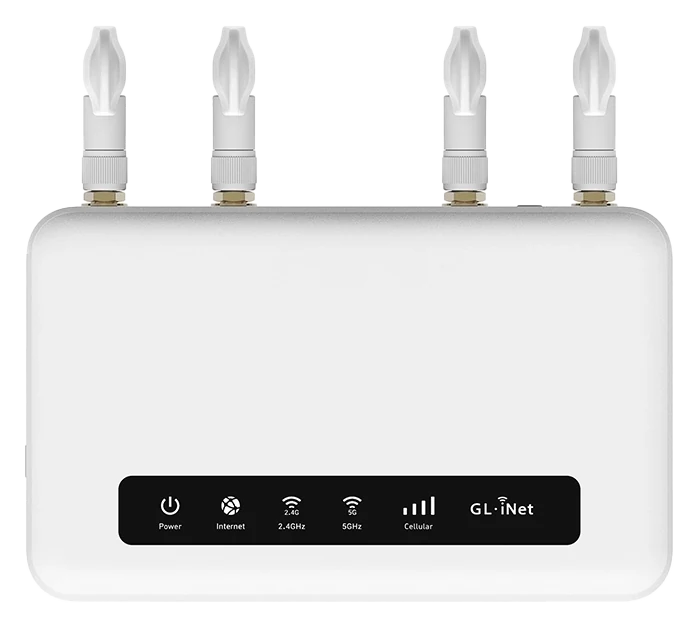
The Spitz Plus from above. The status bar shows power, internet, both Wi-Fi bands and cellular signal at a glance. Image: GL.iNet.
Specifications
| Spec | Value |
|---|---|
| CPU | Qualcomm dual-core @1 GHz |
| RAM | 512 MB DDR3L |
| Storage | 128 MB NAND Flash |
| Wi-Fi | Wi-Fi 6 dual-band: 574 Mbps (2.4 GHz) + 2,402 Mbps (5 GHz) |
| 4G | LTE CAT12, Quectel EG120K-EA (EMEA) or EG120K-NA (North America) |
| Bands (EMEA) | FDD B1/3/5/7/8/20/28/32; TDD B38/40/41 |
| SIM | 2× nano-SIM (dual SIM, single modem) |
| Antennas | 2× cellular (SMA), 2× Wi-Fi (RP-SMA), replaceable |
| Ethernet | 2× Gigabit (1 WAN + 1 LAN) |
| USB | 1× USB 2.0 |
| OS | GL.iNet firmware 4.7 based on OpenWrt 19.07 |
| Power | 12V/2.5A default; 9V–36V range |
| Consumption | <14 W |
| Dimensions | 141 × 86 × 36 mm, 443 g |
| List price | $175.99 / €184.03 |
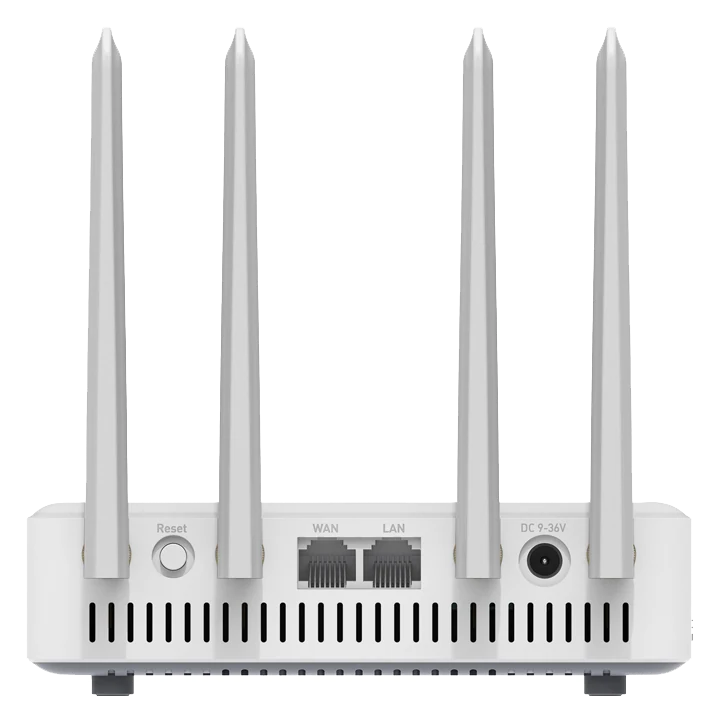
The back: reset, one WAN and one LAN port, and the DC power jack (9–36V). Image: GL.iNet.
WireGuard performance
GL.iNet specifies WireGuard at up to 190 Mbps and OpenVPN at up to 30 Mbps, in client mode on a local network; real speeds may be lower. The modem’s peak, according to Quectel, is 600 Mbps down and 150 Mbps up, and what you get depends on your operator and mast. On a strong connection the VPN can be the limit; on a weak one the mobile link is.
Spitz Plus vs Brume 3
| Brume 3 (GL-MT5000) | Spitz Plus (GL-X2000) | |
|---|---|---|
| WAN type | Ethernet (LAN1 can become a second WAN) | Ethernet, 4G LTE SIM, Wi-Fi repeater, USB tethering |
| WireGuard | up to 1,100 Mbps | up to 190 Mbps |
| Wi-Fi | None (gateway only) | Wi-Fi 6 dual-band |
| SIM | No | 2× nano-SIM |
| Ethernet | 3× 2.5G (configurable WAN/LAN) | 2× Gigabit (1 WAN + 1 LAN) |
| DPI | Yes | No |
| List price | $129.99 / €136.25 | $175.99 / €184.03 |
The Brume 3 is the stronger choice if you already have a wired internet connection and want maximum VPN throughput, but it has no Wi-Fi of its own and no modem. The Spitz Plus is the choice when 4G LTE is a requirement, as a primary connection or as failover.
Multi-WAN and failover
The Spitz Plus can stay connected through four sources at once: wired WAN port, 4G LTE SIM, Wi-Fi repeater and USB tethering. You choose one of two modes:
- Failover (the default): if the active link fails, it moves to the next available one, in the priority order you set. Useful as a backup when the DSL goes down, with LTE taking over.
- Load balance: uses several links at once by a ratio you set. Connections to the same site usually stay on one link.
On a metered SIM, Low Data Mode only checks the link when there is a network error.
Dual SIM
The Spitz Plus has two nano-SIM slots but one modem: only one SIM is active at a time, and the other is a backup. Switch by hand in the admin panel, or turn on Auto Switch with a preferred SIM, so it changes SIM when the connection fails.
This differs from the dual-standby approach of the Mudi 7. Use dual SIM here for different providers or a roaming backup, not for two active SIM cards. Physical eSIM cards work too, from firmware 4.7; a built-in eSIM chip is for bulk orders only.
OpenWrt and web interface
The Spitz Plus uses the same admin panel as other GL.iNet models, at its own firmware version:
- WireGuard and OpenVPN client (built-in WireGuard providers such as Mullvad and NordVPN, others via a configuration file)
- DNS-over-TLS and DNS-over-HTTPS under Network → DNS. Allow Custom DNS to Override VPN DNS starts on there: VPN traffic then uses your custom DNS instead of your provider’s, so turn it off to keep your provider’s
- AdGuard Home as a built-in DNS ad-blocker (off by default)
- Multi-WAN: failover, load balancing and interface priority
- USB tethering as an additional WAN source
- Per-device VPN policy (by MAC address) and kill switch (Block Non-VPN Traffic, off by default)
- GoodCloud remote management (optional)
Caveats
Older OpenWrt base: the newest stable firmware, 4.7.13 from June 2025, builds on OpenWrt 19.07.8, a line OpenWrt lists as End of Life since April 2022. GL.iNet says older bases are down to its chipset maker’s SDK and that it patches security holes in them; we didn’t check which fixes it carries over, so keep the firmware updated. Betas, the newest being 4.10 from September 2026, are in testing, and GL.iNet says they’ve had only basic testing.
The VPN doesn’t hide your SIM: your operator still sees the SIM, the modem’s IMEI and the masts it connects to (our reasoning; the VPN only covers your traffic). More on that in the Mudi V2 review.
No 5G: The Spitz Plus uses LTE CAT12, not 5G NR. At locations with 5G coverage, a 5G gateway or mobile hotspot may give higher speeds.
512 MB RAM: Less than newer GL.iNet models (Brume 3: 1 GB, Mudi 7: 2 GB), so less room for add-ons. We didn’t measure how it copes under load.
Lower WireGuard throughput: up to 190 Mbps, well below the Brume 3 (up to 1,100 Mbps) and travel routers like the Beryl 7 or Slate 7 Pro.
Dual SIM, single modem: Both SIM cards can be present, but only one can be active at a time.
No display: The Spitz Plus has five status LEDs and no screen. Everything else goes through the admin panel, the GL.iNet app or GoodCloud.
Pros and cons
Pros
- Fixed 4G LTE gateway with built-in VPN management and kill switch
- Multi-WAN failover: LTE and wired WAN available at the same time
- AdGuard Home and DNS-over-TLS built in
- Dual SIM with Auto Switch for a backup operator
- Wide LTE band support for the EMEA region
- Replaceable antennas, 9–36V input
Cons
- No 5G
- 512 MB RAM, less than newer GL.iNet models
- WireGuard throughput (up to 190 Mbps) far below the Brume 3 (up to 1,100 Mbps) and Wi-Fi 7 travel routers
- Dual SIM but single modem: no two SIMs active at once
- Firmware on OpenWrt 19.07, End of Life upstream; newest stable from June 2025
- No screen, only LEDs
Getting started
These steps assume a new or reset Spitz Plus on firmware 4.7, the newest stable version. Already set up? Start at step 3. Using a 4.9 or 4.10 beta? Its VPN and Cellular screens differ.
1. SIM and power
With the router off, insert your activated nano-SIM into slot 1: the modem doesn’t support hot-swapping. Plug in the 12V/2.5A adapter. Connect your wired internet to the WAN port if you have it; LTE works without it.
2. First login
Connect a device to the LAN port or to the Wi-Fi network printed on the router. Open 192.168.8.1, choose your language, set an admin password and set up Wi-Fi.
3. Mobile connection
On the Internet page, the Cellular section should connect by itself and show your operator with a green dot. If it doesn’t, ask your operator for the APN and enter it under Manual Setup.
4. WireGuard and kill switch
Go to VPN → WireGuard Client, pick your provider if it’s listed, or click Add Manually and upload the .conf file from your provider. Before you connect, go to VPN → VPN Dashboard → Global Options and turn on Block Non-VPN Traffic, GL.iNet’s kill switch, which is off by default. Back under WireGuard Client, start the connection from the three-dot icon, then check an IP lookup on a connected device.
5. Failover order (optional)
Go to Network → Multi-WAN and set the order under Interface Priority. Failover is already the default mode.
6. AdGuard Home (optional)
Go to Applications → AdGuard Home, switch it on and click Apply. Once it is on, your settings under Network → DNS no longer apply. Its default upstream servers (8.8.8.8, 9.9.9.9) are unencrypted; step 5 of the setup guide fixes that. Its own interface has no separate login: only a browser logged in to the router gets in (our reading of GL.iNet firmware 4.7.4 and 4.11 and AdGuard Home’s source). GL.iNet’s 4.10 beta notes list a fix for the VPN not connecting with both the kill switch and AdGuard Home on. We didn’t test this on 4.7, so if the VPN won’t connect, check that first.
Conclusion
The Spitz Plus solves a specific problem: a fixed LTE gateway with built-in VPN management, failover and network-wide DNS filtering at a location without cable internet, or as a backup WAN. For those who already have a wired connection and want maximum VPN throughput, the Brume 3 is the better choice on paper. For mobile networking with a battery, look at the Mudi 7. Weigh the old OpenWrt base, and remember that we go by GL.iNet’s figures here, not our own test.
Next step
Chosen the Spitz Plus?
- Set up a GL.iNet travel router — step by step: WireGuard, DNS-over-TLS, and AdGuard Home
Similar options
- GL.iNet Brume 3 review — higher WireGuard throughput, no 4G LTE
- GL.iNet Mudi 7 review — 5G NR with battery for mobile use
- GL.iNet Beryl 7 review — Wi-Fi 7 travel router, no SIM
Want to go further?
- Which network setup fits your profile? — how much router do you actually need?