VPN protocols explained: WireGuard, OpenVPN, IKEv2 and what to pick
A VPN protocol is the set of rules your device and the VPN server use to set up and protect the tunnel. For most people the answer is "keep your app's default", which in many apps is WireGuard or something built on it. The rest of this page tells you when that answer changes.

VPN protocols explained: WireGuard, OpenVPN, IKEv2 and what to pick
A VPN protocol is the set of rules your device and the VPN server use to set up and protect the tunnel. For most people the answer is “keep your app’s default”, which in many apps is WireGuard or something built on it. The rest of this page tells you when that answer changes.
Who this guide is for
Anyone who opens a VPN app, sees a protocol menu (WireGuard, OpenVPN, IKEv2, Stealth, QUIC, Shadowsocks) and wants to know whether the choice matters. It also helps if you use a VPN on a network that blocks it, or set one up on a router.
What this guide does not solve
- It does not choose a provider. The VPN comparison does that. A protocol says how the tunnel is built, not what the provider logs or where it is based.
- It does not make a VPN anonymous. See VPN: what it does and doesn’t do.
- It is not a cryptography course. It names the parts so you can read a provider’s feature list, nothing more.
What a protocol actually does
Every VPN protocol does three jobs: it authenticates the two ends, it agrees keys for encryption, and it carries your traffic in packets over the normal internet. They differ in how they do each job, how much code that takes, and what the traffic looks like to a network that is watching.
The protocol affects speed, battery use, how well the tunnel survives switching between Wi-Fi and mobile data, and whether a restrictive network can spot and block it. It does not change what the provider can see once your traffic arrives.
The three you will meet
| WireGuard | OpenVPN | IKEv2/IPsec | |
|---|---|---|---|
| Transport | UDP only | UDP or TCP | UDP ports 500 and 4500 (data in IPsec ESP) |
| Key exchange and ciphers | Fixed modern set (Curve25519, ChaCha20-Poly1305, BLAKE2s) | TLS, with negotiable ciphers | Negotiated between the two sides |
| Where you meet it | The default in many current VPN apps; also routers and Linux | Older apps, routers, networks that block UDP | A built-in client in your operating system; some provider apps |
| Main weakness | Does not hide that it is WireGuard | Recognisable too; heavier and slower in its classic form | Fixed ports, so easy to block; some providers are dropping it |
WireGuard
WireGuard uses one fixed set of modern cryptographic building blocks: Curve25519 for the key exchange, ChaCha20 with Poly1305 for encryption, BLAKE2s for hashing, and a handshake based on the Noise framework. There is no cipher menu to misconfigure. It has been part of the Linux kernel since version 5.6, released on 29 March 2020, and runs on Windows, macOS, iOS, Android and BSD.
It is also quiet by design: a WireGuard server does not reply at all to a packet from a client it does not know. The project says it aims to be considerably faster than OpenVPN. That is its own claim; real speed depends on the provider’s servers and your connection.
The project’s own “known limitations” page lists what it does not do:
- It does not try to hide. “WireGuard does not focus on obfuscation.” A network that looks for WireGuard traffic can recognise it.
- It does not run over TCP. The project says tunneling TCP over TCP performs badly. Anything that needs TCP has to be added on top by the provider or by you.
- It is not post-quantum secure by default. The project documents an optional pre-shared key as a way to add protection.
OpenVPN
OpenVPN uses TLS to authenticate and set up keys, and runs over either UDP or TCP. That flexibility is why it is still around: on a network that blocks UDP, or only lets web traffic through, OpenVPN over TCP on port 443 can get out where plain WireGuard cannot. It does not hide, though: in a 2022 study with a million-user ISP, researchers identified over 85% of OpenVPN flows and 34 of 41 “obfuscated” VPN setups. The cost is a larger, older code base and, in its classic form, more overhead. OpenVPN 2.6 added a “data channel offload” option that moves the encryption work into the kernel, which reduces that overhead; it needs kernel support (in Linux itself since 6.16, a separate module on older kernels) and is not something you will see in every app.
IKEv2/IPsec
IKEv2 is the negotiation half of IPsec (RFC 7296): it authenticates both sides, sets up shared keys and agrees which algorithms to use, then IPsec carries the data. The negotiation runs on UDP ports 500 and 4500. Its main selling point is that current Windows, macOS, iOS and Android include an IKEv2 client, so no extra app is needed. Its MOBIKE extension (RFC 4555) lets a tunnel survive a change of network. The downside: Proton calls IPsec complex enough to invite poor implementations, and because the ports are fixed it is easy to block.
Providers are dropping the old ones
Protocol lists on provider sites change, and some of what older guides say is out of date:
- Mullvad removed OpenVPN. The 2025.14 desktop app (December 2025) dropped it, and Mullvad said the last OpenVPN servers would go by 15 January 2026. Its stated reason: WireGuard now offers the same level of obfuscation with better security and performance. A router or app still configured for Mullvad over OpenVPN was due to stop working by that date and needs a WireGuard configuration.
- Proton VPN removed OpenVPN from its Apple apps and IKEv2 from iPhone and iPad; on the Mac, IKEv2 is being phased out. Its support page cites security concerns about Apple’s native IKEv2 implementations and names WireGuard and its own Stealth protocol as the replacements. The Android app no longer offers OpenVPN either. Proton’s protocol page now lists OpenVPN for the Linux app only, although that support page and the public source of the Windows app still include Windows.
So if a review or an old tutorial of yours lists “WireGuard, OpenVPN, IKEv2” for a provider, check the provider’s current page before relying on it.
When the network blocks VPNs: obfuscation
Because plain WireGuard does not hide itself, providers add a disguise on top. They do not make you more private to the provider; they only change what a network between you and the provider sees. You need one only if your VPN will not connect on a hotel, school, office or national network.
- Mullvad offers four options for WireGuard: UDP-over-TCP, Shadowsocks, QUIC and Lightweight WireGuard Obfuscation (LWO). QUIC tunnels the traffic through an HTTP proxy using the MASQUE protocol so it looks like web traffic; Mullvad notes that state-level censors rarely block HTTP, but China has blocked QUIC connections to listed domains since April 2024. LWO scrambles the header of each WireGuard packet, which is cheap in speed and battery; by our reading it is also the lighter disguise. With the default Automatic setting the app tries these itself after failed connection attempts. Shadowsocks has the best-documented record of being caught: researchers have shown that China’s Great Firewall detects Shadowsocks servers by the size and randomness of the first packet and by probing them, and a 2023 study found it has also detected fully encrypted traffic passively since November 2021, using rules of thumb on part of the traffic to popular data centres. That research is about China; we have no comparable data for other networks, so do not rely on it where censorship is heavy.
- Proton VPN has Stealth, a WireGuard-based protocol that runs inside an obfuscated TLS tunnel over TCP, and a “WireGuard TCP” mode that can use port 443. Its default Smart setting can switch between protocols by itself when one is blocked.
The trade-off is speed and battery: wrapping a tunnel in another layer costs throughput. Turn it on when you need it, not as a default. A disguise lowers the odds of being spotted, it does not rule them out: if using a VPN is itself dangerous where you are, do not count on one of these alone.
Post-quantum protection
The key exchange in standard WireGuard could in principle be broken by a large enough quantum computer, which matters if someone records your encrypted traffic now to decrypt it later. WireGuard’s own answer is to let you mix in a pre-shared key. Mullvad does this automatically: its app exchanges a pre-shared key using key-encapsulation algorithms designed to resist quantum attacks (ML-KEM and HQC; HQC replaced Classic McEliece in 2025) and has had it on by default on all desktop platforms since 2025, and according to its changelogs on the mobile apps too. If “harvest now, decrypt later” is part of your threat model, this is the feature to look for when comparing providers. For most readers it is a bonus, not a deciding factor.
Branded protocol names
NordVPN’s “NordLynx” and Proton’s “Proton protocols” are WireGuard underneath with the provider’s own additions. NordVPN says it adds a custom double NAT system for privacy. Proton says its framework is a new WireGuard client implementation in Rust, in beta on several platforms as of August 2026. A name can also mean a different protocol: ExpressVPN’s default, Lightway, is its own protocol built on the wolfSSL library, not WireGuard. So check what a name stands for, and treat the marketing claims the way you would treat “audited” (see security audits explained): ask what exactly is covered.
What to pick
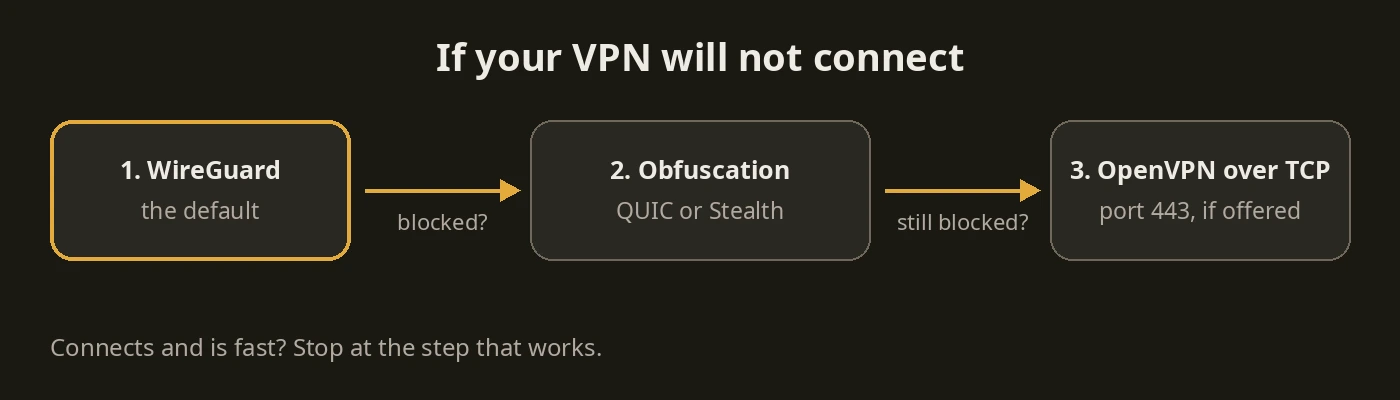
- Default: your app’s own choice, often WireGuard. If the app offers “automatic” or “smart” protocol selection, leaving it on is fine.
- Connection blocked or flaky on a restrictive network: try the provider’s obfuscation option (Mullvad QUIC or UDP-over-TCP on port 443, Proton Stealth), or OpenVPN over TCP on port 443 if the provider still offers it.
- Router or older device: use whatever the firmware supports. WireGuard if available; otherwise OpenVPN. See the GL.iNet travel router setup for a WireGuard example.
- Built-in system VPN with no extra app: IKEv2 is the realistic option, for example a work VPN.
- Worried about recorded traffic being decrypted later: choose a provider with post-quantum key exchange switched on.
When this is overkill
If your VPN connects and is fast, stop. You do not need to compare ciphers, and switching protocols for its own sake adds no privacy. The provider’s logging, jurisdiction and track record matter far more than which protocol carries the tunnel.
Stopping point
You are done when you know which protocol your VPN app is using, that the default is fine unless you have a reason otherwise, and what you would change first if the connection were blocked.
Next step
Choose or check your VPN
- VPN comparison: providers side by side
- VPN: what it does and doesn’t do
- Mullvad VPN review
- Private DNS guide: DNS-over-HTTPS and DNS-over-TLS, which are a separate thing from a VPN protocol
Logo panel: Mullvad VPN (GPLv3), Proton VPN, NordVPN, WireGuard and OpenVPN marks via Wikimedia Commons; the logos are trademarks of their owners and their appearance here does not imply endorsement. Diagrams: PrivacyGear.
Sources: GFW Report papers on Shadowsocks (ACM IMC 2020), fully encrypted traffic (USENIX Security 2023) and QUIC (USENIX Security 2025); Xue et al., “OpenVPN is Open to VPN Fingerprinting” (USENIX Security 2022); WireGuard protocol, known-limitations, install and home pages and whitepaper (wireguard.com); Linux 5.6 and 6.16 release notes (kernelnewbies.org); OpenVPN repository (README.dco.md, Changes.rst, man page) and downloads page; RFC 7296 and RFC 4555 (IETF); Microsoft, Apple and Android (AOSP Settings) documentation of built-in IKEv2 clients; Mullvad help and blog pages and app changelogs and source; Proton VPN support and blog pages and Windows app source; NordVPN support articles; ExpressVPN protocol pages. Checked 2026-11-11.