ProtonVPN review — Swiss VPN with free tier and Secure Core
ProtonVPN comes from the team behind Proton Mail: open-source, independently audited, and one of the few serious VPNs with a completely free plan, plus Secure Core routing.

ProtonVPN review
ProtonVPN comes from the team behind Proton Mail: open-source, independently audited, and one of the few serious VPNs with a completely free plan, plus Secure Core routing.
Who is this for? Anyone who wants a reliable VPN with a free tier, or who is comparing Mullvad with ProtonVPN. New to VPN? Read VPN: what it does and doesn’t do first.
ProtonVPN comes from the same team as Proton Mail. Based in Switzerland, open-source, independently audited and one of the few serious VPNs with a completely free tier. Explained: who ProtonVPN is the right choice for — and when Mullvad fits better.
What sets ProtonVPN apart
Free tier without data limits: Proton Free is still one of the few free VPN plans worth taking seriously. No data limits, no ads and no logs, Proton says. It is limited to one device at a time, medium speed (Proton’s own wording) and servers in 10 countries that the app chooses for you.
Secure Core: Paid subscribers can route traffic through an extra server in Iceland, Switzerland or Sweden before it reaches the regular VPN server. Proton says that if the endpoint server is watched or compromised, an attacker can only follow the traffic back to the Secure Core server — not to your IP. Comparable to multi-hop at Mullvad and IVPN.
Tor-over-VPN (paid): Connecting to a Tor server routes traffic through the Tor network after the VPN hop, so you can open .onion sites in your normal browser. Your normal browser does not get Tor Browser’s fingerprinting protection, so for anonymity Tor Browser remains the better tool; Tor-over-VPN is handy for occasional .onion visits.
NetShield (paid): DNS blocking of ads, trackers and malware domains through Proton’s own DNS servers. It covers every app on the device where the Proton VPN app runs (on a router setup, every device behind it). It does not work together with Tor-over-VPN or with your own custom DNS.
Specifications
| Property | Value |
|---|---|
| Jurisdiction | Switzerland |
| Protocol | Smart (automatic, the default), WireGuard (UDP/TCP) and Stealth (iPhone: Proton Stealth) in the Windows, Mac, Android and iPhone apps; OpenVPN on Linux (Proton’s pages disagree about Windows: its protocol page lists Linux only, the Windows app source still has it); IKEv2 only still on Mac (being phased out); the Linux app offers WireGuard and OpenVPN, plus Smart and Stealth behind its beta Use Proton protocols option |
| Open-source client | Yes — all platforms |
| Audits | Regular independent audits (apps and no-logs policy); fifth consecutive annual no-logs audit by Securitum in 2026 |
| Free tier | Yes — unlimited data, 10 countries, 1 device |
| Proton VPN Plus | €9.99 a month billed monthly; the 1-year plan renews at €83.88 a year. Longer plans usually start with a discounted first term, and Proton changes those discounts often. US: the same figures in dollars (pricing page, 11 November 2026) |
| Servers | 20,000+ in 140+ countries (Proton’s figures, November 2026) |
| Secure Core | Yes (paid) |
| Tor-over-VPN | Yes (paid) |
| Anonymous payment | Bitcoin (after creating a free account; goes through a third-party processor), cash by post |
Speed
We have no dated speed test of our own. Proton says every server has at least 1 Gbps of bandwidth; what you get depends on your own line, the distance to the server and the protocol. The default Smart setting picks the protocol for you, usually WireGuard.
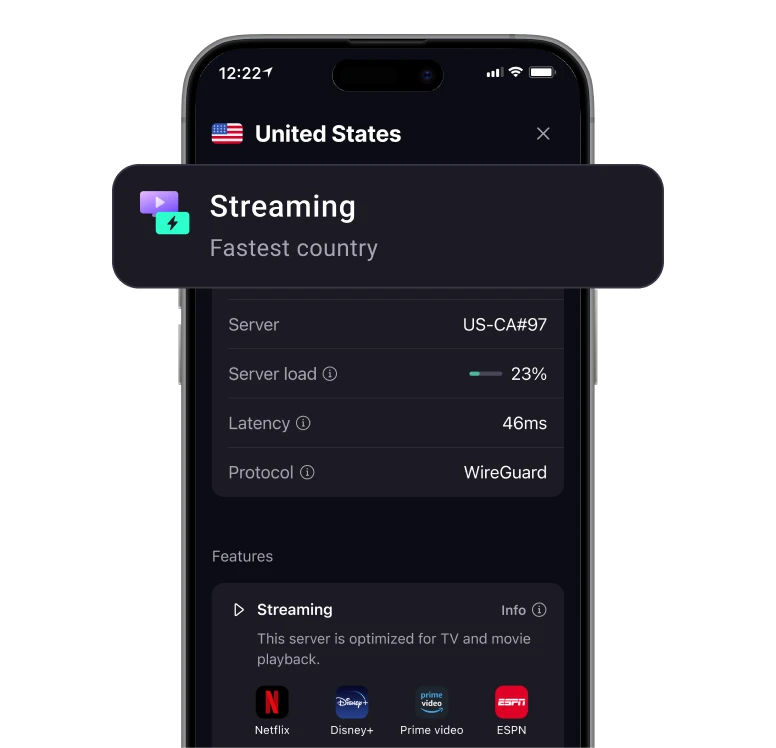
The server details screen shows load, latency and the protocol in use. Proton’s own promotional image, with its “Streaming” overlay card. Image: Proton AG.
Secure Core adds an extra hop, so expect lower speeds; Proton’s own app warns that “Secure Core may reduce VPN speed”.
ProtonVPN vs Mullvad
| ProtonVPN | Mullvad | |
|---|---|---|
| Free tier | Yes (strong) | No |
| Account system | Proton account (sign-up may ask to verify an email address or phone) | Account number, no email |
| Anonymous payment | Bitcoin (via account and a processor), cash | Cash, Monero, Bitcoin (own nodes) |
| Secure Core / multi-hop | Yes | Yes |
| Tor-over-VPN | Yes | No |
| NetShield / DNS blocking | Yes | Yes (DNS content blockers) |
| Paid price | €9.99/month billed monthly ($9.99 in the US), less on longer plans | €5/month (fixed, priced in euros; ~$5.50) |
| Organisational structure | Commercial (non-profit holding) | Simpler |
Choose ProtonVPN if:
- You also use Proton Mail (one account, combined subscriptions)
- You want to test for free before paying
- You want Tor-over-VPN or Secure Core
Choose Mullvad if:
- Maximum anonymity is the priority (no email address when signing up)
- You want to pay with cash or Monero on an account without an email address
- You want a simple, fixed price without different tiers
Caveats
Proton account required: ProtonVPN needs a Proton account, and at sign-up Proton may ask you to verify an email address or phone number to keep out bots (it says it stores only a hash). Less anonymous than Mullvad’s account number system, which asks for neither.
More complex organisational structure: Proton AG is more commercial than Mullvad — sales tactics with discount banners are visible. Has not damaged trust, but is different in character.
Proton Mail case in 2021: In 2021 Proton Mail had to provide account metadata in a Swiss legal case. That did not concern Proton VPN traffic logs. For Proton VPN, the more relevant point is that its no-logs claims have since been audited multiple times.
Swiss jurisdiction is under review: In 2025 Switzerland consulted on expanding its surveillance ordinance (the VÜPF revision). Proton calls the proposals mass surveillance and in July 2025 said it is moving most of its physical infrastructure out of Switzerland; the company itself stays Swiss. In February 2026 the Swiss government said a second consultation will follow once a final draft is ready, with no date, so the rules hadn’t changed then. For a VPN, the no-logs design matters more than the jurisdiction: data that isn’t kept can’t be handed over. More detail in the Proton Mail review.
A concrete test of that no-logs claim: Proton’s transparency report lists 59 legal orders for Proton VPN in 2025, all of which it could not answer: every request tried to identify who used a given server at a given time, and Proton says it keeps no data to do that. Its no-logs policy was also audited for the fifth consecutive year in 2026 (Securitum, with days on site), which found no indication that the reviewed servers log browsing activity, DNS queries or user-identifiable connection metadata.
Pros and cons
Pros
- Very strong free tier with no data limits or ads
- Secure Core routes traffic through Iceland, Switzerland, or Sweden before the endpoint — comparable to Mullvad multi-hop
- Tor-over-VPN available for occasional .onion visits in your normal browser
- NetShield blocks ads, trackers, and malware domains for every app on the device
- Open-source clients on all major platforms and recurring independent audits
Cons
- Proton account required, and sign-up may ask for email or phone verification — less anonymous than Mullvad’s account number system
- Secure Core lowers speed because of the extra hop
- More complex pricing structure with tiers and discount banners — different character from Mullvad’s flat €5/month (~$5.50)
Getting started
The steps below match Proton VPN 5.1 (Windows), 6.5 (Mac), 4.19 (Linux), 5.20 (Android) and 8.0 (iPhone). The apps put the same feature in different places, so each step lists them per platform.
Already have a Proton account? Proton Mail, Pass and Drive use the same account: skip step 1 and sign in with it. Already using the app? Check steps 3 to 5 against your current settings.
1. Create an account
Go to protonvpn.com and create a free Proton account. Proton may ask you to pass a CAPTCHA or verify an email address or phone number. Use Tor or a VPN at sign-up if you want to shield the account IP.
2. Install the app and leave the protocol on Smart
Download the app from protonvpn.com/download (Windows, Mac, Linux) or your phone’s app store, and sign in. The protocol is set to Smart by default, which Proton recommends: the app picks the protocol for you. Only if a network blocks VPNs, choose Stealth (iPhone: Proton Stealth) under Settings → Protocol (Mac: Preferences → Connection → Protocol). On Linux, Smart and Stealth only appear after you tick Use Proton protocols (beta) under Protocol, an option Proton switches on for the app itself; otherwise Linux offers WireGuard (the default on paid plans) and OpenVPN. There, the protocol can only be changed while disconnected.
3. Enable the kill switch
The kill switch blocks your internet when the VPN connection drops, so your real IP doesn’t leak. The standard kill switch only steps in when the connection drops by accident: after you disconnect yourself, your internet works without the VPN.
- Windows: Settings → Kill switch, turn the switch on; Standard is selected (Advanced also blocks internet while the app is not connected, even after a restart). Click Apply. Before choosing Advanced: Proton warns it can stop you signing in to Windows with a Microsoft account (for example after a major update), and advises creating a local Windows account as a backup.
- Mac: in the quick settings above the country list, click the Kill switch button (switch icon) and choose Kill switch On. Proton notes that your real IP may show briefly while switching servers.
- Linux: disconnect first (the kill switch can only be changed while disconnected), then Menu → Settings → Features → Kill switch, turn it on and keep Standard or choose Advanced.
- Android: Settings → Kill switch shows Proton’s instructions. Tap Settings, tap the gear icon next to Proton VPN, and turn on Always-on VPN and Block connections without VPN. This works like an advanced kill switch: no internet without the VPN.
- iPhone: Settings, under Security Options tap Kill switch and choose Standard (Advanced also blocks internet while the VPN is off, even after a restart), then Enable. It takes effect the next time you connect. Just below, Allow LAN connections (paid plans, on by default) lets you reach devices on your local network with the kill switch on.
On Mac, Proton notes two more limits with the kill switch on: you can’t reach devices on your local network (printer, Chromecast), and some DNS requests from Apple services can bypass the VPN. For iPhone it notes the same DNS limit; its support page still says local devices are unreachable there too, but app 8.0 added Allow LAN connections for that (checked 11 November 2026). Except on Windows, the kill switch doesn’t work together with split tunneling: turn split tunneling off first.
4. NetShield (paid)
- Windows: Settings → NetShield, turn it on, choose Block ads, trackers, and malware and click Apply.
- Mac: click the NetShield button in the quick settings and choose Block malware, ads, & trackers.
- Linux: Menu → Settings → Features → NetShield, choose Block ads, trackers and malware.
- Android: Settings → NetShield, turn the switch on (Android has one level: ads, trackers and malware). If you set Android’s Private DNS (for example via our DNS guide), NetShield shows Unavailable: choose one of the two.
- iPhone: Settings → NetShield, choose Block malware, ads, & trackers.
NetShield filters through Proton’s DNS for every app on the device. Some websites may not load properly; Proton suggests switching NetShield off for those.
5. Secure Core (paid, optional)
Secure Core is not a setting: you choose it when you connect.
- Windows, Android: Countries, then the Secure Core filter; pick a country.
- Mac: click the Secure Core button in the quick settings, choose Secure Core On, then pick a country and click Connect.
- iPhone: Countries, turn on the Secure Core switch at the top, then pick a country.
- Linux: there is no switch; Secure Core servers appear under each supported country (Via Secure Core, names like CH-LU#1).
The app routes you through Iceland, Switzerland or Sweden; on most apps you can also pick the entry country yourself. Expect lower speeds.
Conclusion
ProtonVPN is the best choice if you already use or want to explore the Proton suite, and if you want a free option for testing. Tor-over-VPN, Secure Core and a free tier are things Mullvad doesn’t offer. Those wanting maximum anonymity at sign-up choose Mullvad.
Next step
Chosen ProtonVPN?
- Setting up a GL.iNet travel router — set up ProtonVPN WireGuard at router level so all devices go through VPN automatically
Similar options
- Mullvad VPN review — no email address required, flat price, DAITA
- IVPN review — Monero payment, multi-hop on every plan
Want to go further?
- Which VPN should you choose? — full VPN comparison overview
- VPN: what it does and doesn’t do — which threats a VPN does and does not address