Obtainium review — apps directly from the developer
Obtainium is a free, open-source Android app that installs and updates apps straight from the developer's own releases on GitHub, GitLab or their website.
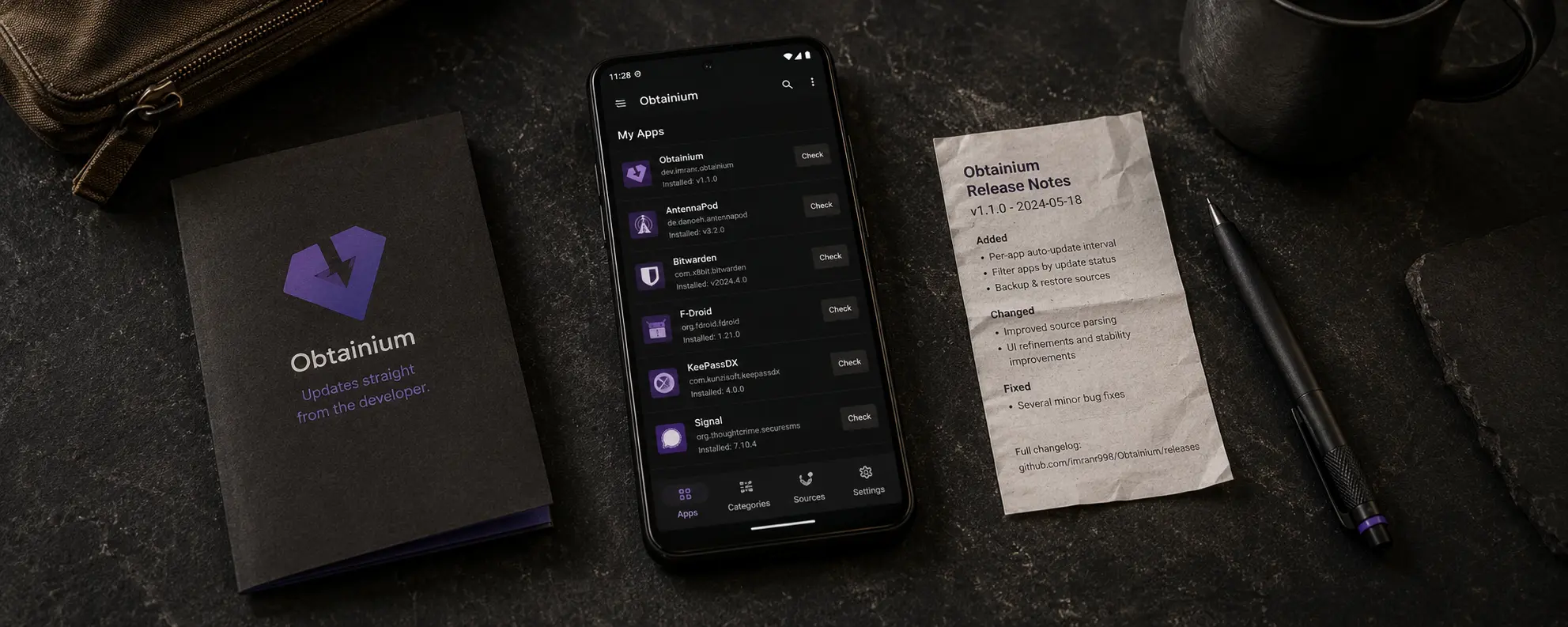
Obtainium review
Obtainium is a free, open-source Android app that installs and updates apps straight from the developer’s own releases on GitHub, GitLab or their website.
Who is this for? Android users who know which open-source apps they want and want to receive updates directly from the source — without F-Droid’s build delay and without Aurora Store’s Google dependency.
Obtainium is open-source (GPL-3.0), free, and actively maintained, mostly by a single developer (see who makes Obtainium).
What Obtainium does
Obtainium is not an app store. It is an app update manager that monitors developer release pages and notifies or installs when a new version is available. You configure which apps you want to track and where the source is.
| Obtainium | F-Droid | Aurora Store | Google Play | |
|---|---|---|---|---|
| Source | Directly from developer | F-Droid build infrastructure | Google Play (mirror) | Google Play |
| Open-source required | Optional | Yes | No | No |
| Tracker scan | No | Yes | No (shows Exodus Privacy reports) | No |
| Update speed | Fast (direct from source) | Slower | Fast | Fast |
| Central control | No | Yes (F-Droid builds) | Google + Aurora | |
| Setup complexity | Medium | Low | Low | Low |
| Google account required | No | No | No | Yes |
Who makes Obtainium (as of November 2026)
Obtainium is essentially a one-person project. Its developer, Imran R. (ImranR98 on GitHub), started it in August 2022 and wrote about 7 in 10 changes to the code in the last 12 months (698 of 1,004, up to 1 November 2026). Most other contributions are translations, plus fixes for individual download sources and a few features. Releases come often: eleven between August and 1 November 2026, the latest being 1.7.4.
The developer takes donations through GitHub Sponsors and Ko-fi, both linked from the project’s wiki. On his Sponsors page he calls the work a hobby done in his free time; it listed 14 sponsors on 9 November 2026. The GitHub repository and the website carry no donation link. The community catalogue site shows Google ads (see below).
What this means for you: development speed depends on one person. Obtainium’s own README warns that some sources are read by scraping web pages and “can easily break” when a site changes, so a source can stop working until someone fixes it.
Obtainium has signed the Keep Android Open open letter against Google’s developer-verification requirement (see caveats).
Supported sources
Obtainium works with a wide range of sources:
Open-source platforms:
- GitHub, GitLab, Forgejo (Codeberg), SourceHut
- F-Droid, IzzyOnDroid and other third-party F-Droid repos
Other sources:
- APKPure, Aptoide, Uptodown, Huawei AppGallery, Samsung Galaxy Store and more than a dozen other download sites
- APKMirror — tracking mode only (notifications, no downloads)
- HTML fallback: any URL containing APK links
Download sites like APKPure re-host APKs: that is an intermediary, not the developer. The directness argument in the security model below only holds when you point Obtainium at the developer’s own release page.
Community catalogue: apps.obtainium.imranr.dev provides pre-configured app sources you can import with a single tap. This significantly lowers the barrier to getting started. Its criteria only accept configurations that point to an app’s official source (no re-upload sites like APKPure), and no forks that keep the original app’s name. Where the platform shows them, the project also needs at least 35 stars and must be at least 4 months old. Obtainium itself labels these configurations “use at your own risk”.
As of 16 November 2026, the catalogue website loads Google AdSense ads and Plausible analytics (hosted by the developer). A content blocker stops the ads, or you can skip the site and add apps by URL (see Getting started).
The security model
Obtainium’s core promise is directness: you fetch apps from the original source, not from an intermediary infrastructure that rebuilds or re-signs the APK.
Where the model is strong:
- No central build infrastructure that could be compromised (as is theoretically possible with F-Droid).
- Updates come directly from the developer — the same releases that appear on GitHub.
- You know exactly where the APK comes from.
Where the model is weaker than F-Droid:
- A first install is only checked if you set it up. Since version 1.6.17 (September 2026), Obtainium compares an update’s signing certificate with the installed app’s before installing and warns on a mismatch (Settings → Updates → Warn about signing certificate changes, on by default). Android itself also rejects an update signed with a different key. For a first install there is nothing to compare against, unless you fill in Expected signing certificate hashes under that app’s Additional options in Obtainium (when adding it, or later via the pencil icon on the app’s page): then Obtainium blocks any APK that doesn’t match. If Verified Apps by Privacy Guides (or AppVerifier) is installed, Obtainium also hands the APK of each first install to it before installing (Settings → Updates → Share new apps with “Verified Apps” (if available), on by default), so you can check it against that app’s database of known-good certificates.
- There is no tracker scan — you cannot see which libraries are in the app unless you check the source code yourself.
- A malicious release signed with the developer’s own key is not blocked. The certificate checks catch a different signer, not a bad release from the right one: you are trusting the developer directly.
Signature compatibility:
Most apps in F-Droid’s own repository are signed with F-Droid’s key, not the developer’s. The exception is reproducible builds that F-Droid ships with the developer’s signature. Where the keys differ, you cannot upgrade an F-Droid version to an Obtainium version without uninstalling and reinstalling the app. Choose one source per app and stick with it.
Getting started
Labels below are from Obtainium 1.7.4 and stock Android (AOSP). Obtainium follows your phone’s language.
Installing
Obtainium is not available on Google Play. You install it as an APK:
- On your phone, go to github.com/ImranR98/Obtainium/releases and open the latest release.
- Under Assets, download
app-release.apk. That is the universal build; the files witharm64-v8a,armeabi-v7aorx86_64in the name are smaller builds for one processor type. Skip the files withfdroidin the name: that is the F-Droid flavour, a separate app (see below). - Open the downloaded file. Android says your phone “isn’t allowed to install unknown apps from this source”: tap Settings, switch on Allow from this source for your browser (or file manager), go back and tap Install. You can switch it off for the browser again afterwards: Settings → Apps → Special app access → Install unknown apps.
- On first start, Obtainium shows a welcome note and a note about Google’s developer verification (see caveats), and asks to send notifications. Allow them if you want update alerts. If your system blocks dynamic code loading for Obtainium (an exploit-protection setting on GrapheneOS), a note “Android certificate store unavailable” follows: Obtainium switches to its own network client and keeps working. Tap Okay.
- The first time Obtainium installs an app, it shows “Please allow Obtainium to install apps” and Android opens the same setting for Obtainium: switch on Allow from this source.
With Google’s Advanced Protection on (Android 16+), Android blocks installs from unknown sources and updates to apps installed that way, so Obtainium and the apps it installs can then be neither installed nor updated.
The GitHub build adds itself to its own app list, so Obtainium also updates itself.
Or through an F-Droid client. F-Droid’s own repository carries the F-Droid flavour (dev.imranr.obtainium.fdroid); IzzyOnDroid carries the GitHub build (dev.imranr.obtainium). The package names differ, so Android treats them as two separate apps: pick one. The F-Droid flavour does not add itself to its list; your F-Droid client updates it. On 9 November 2026, F-Droid, IzzyOnDroid and GitHub all had version 1.7.4.
Optional: verify the signature
The developer publishes the SHA-256 hash of Obtainium’s signing certificate under “Verification info” in the README and on obtainium.imranr.dev. Compare it with what AppVerifier, Verified Apps or apksigner verify --print-certs shows for your download. The F-Droid flavour is built reproducibly, so it carries the same developer signature. Each GitHub release also includes PGP-signed SHA-256 files.
Adding your first apps
Via the community catalogue (easiest start; the site shows Google ads, a content blocker stops them):
- On your phone, go to apps.obtainium.imranr.dev (in Obtainium: Add → Crowdsourced app configurations)
- Search for an app
- Tap Install. Obtainium opens and asks Import app: tap Continue. The app is now in your list, not yet installed.
- Tap the app in the list, then Install.
Adding manually:
- In Obtainium, tap Add (bottom right).
- In App source URL, enter the app’s release page, e.g.
https://github.com/beemdevelopment/Aegis - Optional, to check the first install: under Additional options for GitHub, fill in Expected signing certificate hashes with the hash the developer publishes.
- Tap the + button next to the URL field. Obtainium reads the latest release and downloads the APK; if the release has more than one APK, it asks you to Pick an APK.
- Obtainium opens the app’s page: tap Install, and confirm Android’s “Do you want to install this app?” with Install.
Updates: Obtainium checks for new versions in the background (every 6 hours by default; Settings → Updates) and sends a notification. Open the app and tap Update. Enable background silent installs (on by default) lets Obtainium install some updates on its own; Obtainium itself notes that this isn’t possible for all apps.
Already have a setup?
- App already installed from F-Droid or Play: add it in Obtainium the same way; Obtainium sees the installed app. If the developer’s APK is signed with a different key (as with most apps built by F-Droid), Obtainium warns before the update and Android refuses it anyway. Back up the app’s data, uninstall it, then install it from Obtainium.
- Switching between the GitHub build and the F-Droid flavour of Obtainium: in the old one, Settings → Import/export → Obtainium export; in the new one, Obtainium import; then uninstall the old one.
Which apps work well with Obtainium?
Obtainium works well for:
- Aegis Authenticator — 2FA app, signed APKs on GitHub releases
- KeePassDX — password manager with active GitHub releases (two APKs per release,
freeandlibre: Obtainium asks which one) - Organic Maps — offline navigation, regular releases on GitHub
Less suitable: apps without public release downloads, or apps that depend on Play Services.
Caveats
Higher user responsibility. Obtainium trusts the developer directly. You install what is on the GitHub release page, with no review layer in between (the catalogue only checks that a configuration points to the official source). Use Obtainium for apps where you know and trust the source.
No tracker scan. Unlike F-Droid, you cannot see which tracking libraries are in the app. Check exodus-privacy.eu.org if you want to verify this.
Signature conflicts. If you already have an app installed via F-Droid and it carries F-Droid’s key, you cannot upgrade to the developer’s version through Obtainium — you have to uninstall and reinstall from the new source (see Already have a setup?).
Not for non-technical users. Initial setup requires knowing where an app’s release files are hosted. The community catalogue helps, but it is not as simple as a regular app store.
Google’s developer-verification policy. Obtainium installs apps straight from individual developers’ release pages. Under Google’s policy, apps on certified Android must come from a developer registered with Google — and many GitHub-only FOSS developers will not register. The first phase (from 30 September 2026) only covers installs from Google Play and six phone makers’ app stores in Brazil, Indonesia, Singapore and Thailand, so it doesn’t touch Obtainium installs yet; Google plans to extend it to all apps on certified Android in 2027, which could then block apps from such developers. Obtainium’s own first-start note goes further: its developers won’t hand identity details to Google, so it expects Obtainium itself to stop working on certified Android devices once the requirement applies. For power users, Google offers a one-time “advanced flow” (developer mode, a restart and a one-day wait) to install apps from unverified developers; Obtainium’s in-app note still says Google hasn’t explained how it works, but Google’s own FAQ now does. It doesn’t apply on Android versions without Google certification, such as GrapheneOS.
Pros and cons
Pros
- Updates directly from the source — no build delay like F-Droid
- No central infrastructure acting as a single point of trust
- Works with GitHub, GitLab, Codeberg, and more
- Community catalogue lowers the barrier
- Open-source, free, actively maintained
- Warns about a changed signing certificate on updates by default; can block a first install that doesn’t match a certificate hash you enter
Cons
-
No tracker scan
-
A first install is only checked if you enter the expected certificate hash or use Verified Apps
-
One main developer, who works on it as a hobby
-
Higher user responsibility than F-Droid
-
Signature conflicts when switching from F-Droid to Obtainium for the same app
-
Exposed to Google’s developer-verification policy on certified Android — relies on individual developers registering with Google
-
Less suitable as a sole app source — works better as a complement
Conclusion
Obtainium complements F-Droid for users who want fast updates from apps they already trust. It eliminates F-Droid’s build delay and Aurora’s Google account requirement, but shifts verification responsibility to the user.
For most readers, the best model is: F-Droid as the base (transparent infrastructure, tracker scan), Obtainium for apps where update speed matters or that are not yet in F-Droid.
Choose Obtainium if you already know which open-source apps you want, you trust the developer source directly, and you want faster updates than F-Droid provides.
Next step
If you chose Obtainium
- F-Droid review — for open-source apps with central curation and tracker scanning
Similar options
- Aurora Store review — Play apps without a Google account
- Aegis Authenticator review — the recommended 2FA app, available via F-Droid and Obtainium
Go further
- Android privacy without a custom ROM — broader baseline settings for stock Android users
- GrapheneOS first setup — F-Droid and Obtainium on GrapheneOS