Pi-hole review — network-wide DNS adblocker
Pi-hole is a network-wide adblocker that works at the DNS level. Instead of installing an extension per browser, Pi-hole blocks ads and trackers for every device on your network — including your smart TV, your phone, and IoT devices that don’t support browser extensions.

Pi-hole review
Pi-hole is a network-wide adblocker that works at the DNS level. Instead of installing an extension per browser, Pi-hole blocks ads and trackers for every device on your network — including your smart TV, your phone, and IoT devices that don’t support browser extensions.
Who is this for? Anyone who wants DNS-level blocking for the entire network on a Raspberry Pi or server. AdGuard Home is the more modern alternative with a cleaner interface — compare both before choosing.
How Pi-hole works
When a device on your network looks up a domain name (e.g., ads.doubleclick.net), that request normally goes to a DNS server from your ISP or Google. Pi-hole intercepts that request and checks blocklists: if the domain is blocked, Pi-hole returns an empty response. The connection never gets established.
This is the same principle as uBlock Origin in a browser, but for the entire network in one place.
Pi-hole vs AdGuard Home
Both do the same thing at their core: DNS-based ad-blocking for the network. AdGuard Home is newer, has a more modern interface, and is easier to set up. Pi-hole has been around longer, has a larger community and more documentation.
| Pi-hole | AdGuard Home | |
|---|---|---|
| Interface | Functional | Modern |
| Installation | Script / Docker | Docker / binary |
| Blocklist management | Extensive | Extensive |
| DoH/DoT upstream | Via configuration | Built-in |
| Community | Large, long active | Growing |
| Open-source | Yes | Yes |
If choosing now: AdGuard Home is the recommended choice for new installations — easier to configure with DNS-over-HTTPS built in. Pi-hole is a solid choice if you’re already familiar with the ecosystem.
Installation
Pi-hole runs on any Linux machine. The name refers to the Raspberry Pi — the original target device — but it works on any x86 or ARM computer.
Installation options:
- Raspberry Pi — the classic choice: quiet and energy-efficient
- Docker — ideal on an existing NAS or homelab server
- VM — on a Proxmox or VirtualBox installation
- VPS — for access outside the home network (but then you see your own DNS traffic)
Installation via the official script (see pi-hole.net):
curl -sSL https://install.pi-hole.net | bash
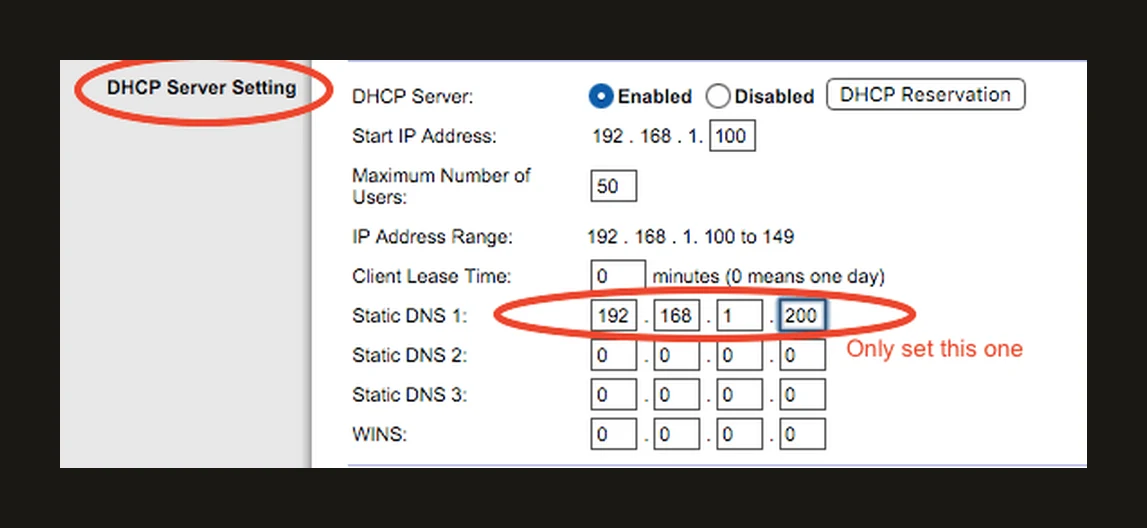
Then set Pi-hole as the DNS server on your router. All devices on the network use it automatically — usually via your router’s DHCP settings, where you set the Pi-hole’s IP address as the (only) static DNS server.
Blocklists
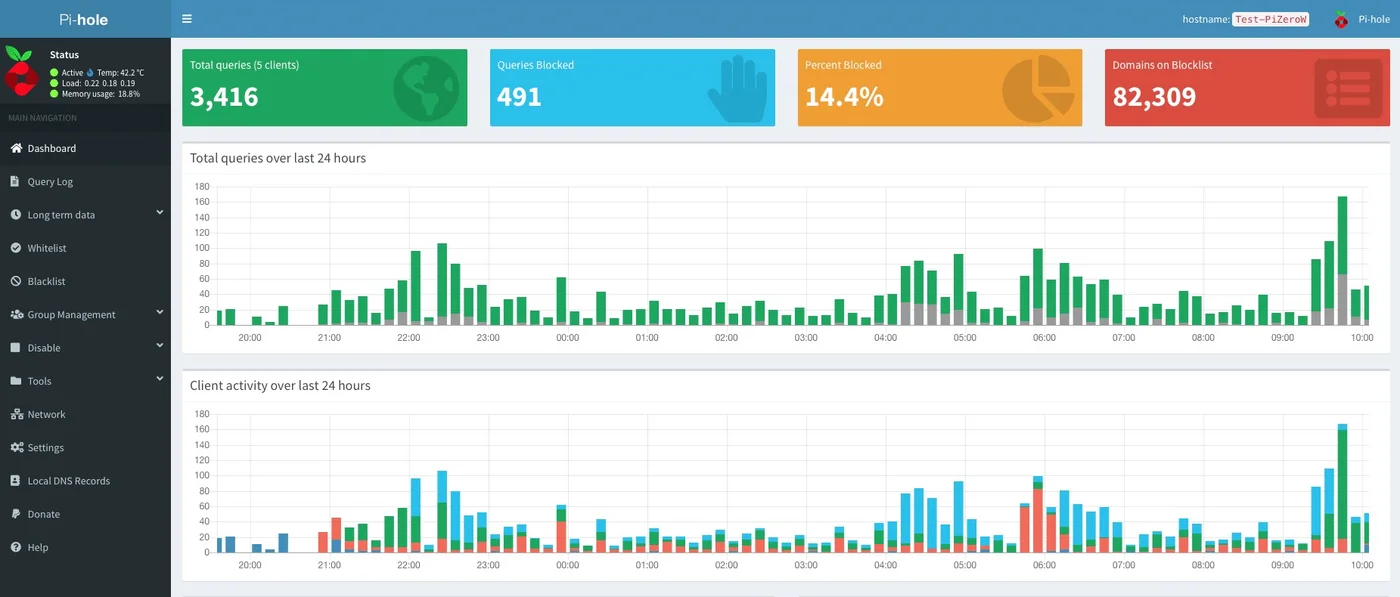
Pi-hole ships with a default blocklist. Via the dashboard you add additional lists.
Popular additions:
- Steven Black hosts — combined list from multiple sources
- Firebog — curated collection of categorized lists
- oisd.nl — well-maintained list, also good for regional ad networks
A typical installation with supplementary lists blocks 100,000–500,000 domains.
What Pi-hole doesn’t do
Pi-hole works at the DNS level. Ads served via the same domain as the content (e.g., YouTube ads on youtube.com) are not blocked — for that you need a browser extension like uBlock Origin.
Pi-hole also only protects devices on your home network. On mobile data or an external Wi-Fi network, it doesn’t work.
Caveats
Always-on hardware required: Pi-hole must be running while your network depends on it. If the host goes down or restarts, devices may temporarily lose DNS until you have recovery or failover in place.
DNS encryption: By default, Pi-hole sends DNS queries unencrypted to upstream servers. Configure DNS-over-HTTPS (DoH) or DNS-over-TLS (DoT) to Quad9 or another privacy-friendly resolver for full protection. See the privacy DNS guide.
Pros and cons
Pros
- Blocks ads and trackers at DNS level for every device on the network — including smart TVs and IoT devices that cannot run their own adblocker
- A typical installation with supplementary blocklists blocks 100,000–500,000 domains
- Runs on any Linux machine — Raspberry Pi, Docker on a NAS, VM, or VPS
- Large, long-active community with extensive documentation
- Free and open-source
- Works well if you already have a Raspberry Pi or always-on server
Cons
- Requires always-on hardware — if the host goes down, DNS can stop working until you recover or fail over
- DNS queries are sent unencrypted to upstream servers by default — DoH/DoT requires additional configuration
- YouTube ads (served via youtube.com) cannot be blocked without breaking the service
- Only protects devices on your home network — not mobile data or external Wi-Fi by itself
Conclusion
Pi-hole is a proven tool for network-wide ad-blocking. If you already have a Raspberry Pi or always-on server, the installation barrier is low and the result is immediately noticeable.
For new installations, AdGuard Home is the more modern choice with fewer configuration steps. Both are free and open-source.
Getting started
1. Install Pi-hole
Run the install script on a Raspberry Pi, VM or Docker host:
curl -sSL https://install.pi-hole.net | bash
Follow the steps in the installer. Note the admin password shown at the end.
2. Set Pi-hole as DNS on your router
Log in to your router admin interface and set your Pi-hole machine’s IP address as the primary DNS server. All network devices will use it automatically.
3. Add blocklists
Open the Pi-hole dashboard at http://pi.hole/admin. Go to Settings → Adlists and add extra lists — oisd.nl or the Firebog tick-lists are good starting points. Then click Tools → Update Gravity to load the lists.
4. Configure DNS-over-HTTPS (recommended)
Pi-hole sends DNS queries unencrypted by default. Install cloudflared or use Unbound as a local resolver for DNS-over-HTTPS or DNSSEC. See the privacy DNS guide for step-by-step instructions.
Next step
Chosen Pi-hole?
- Privacy DNS guide — set up DNS-over-HTTPS and DNS-over-TLS as upstream for Pi-hole
Similar options
- AdGuard Home review — more modern interface, DoH built in, recommended for new installations
Want to go further?
- Network segmentation: VLANs at home — Pi-hole as part of a fully segmented home network