GL.iNet Brume 2 (MT2500) review
Who is this for? Anyone who already has a good router and wants to add VPN for all devices without replacing it. No Wi-Fi needed — purely a VPN gateway. The Brume 3 is the faster successor with 1,100 Mbps WireGuard.
GL.iNet Brume 2 (MT2500) review
Who is this for? Anyone who already has a good router and wants to add VPN for all devices without replacing it. No Wi-Fi needed — purely a VPN gateway. The Brume 3 is the faster successor with 1,100 Mbps WireGuard.
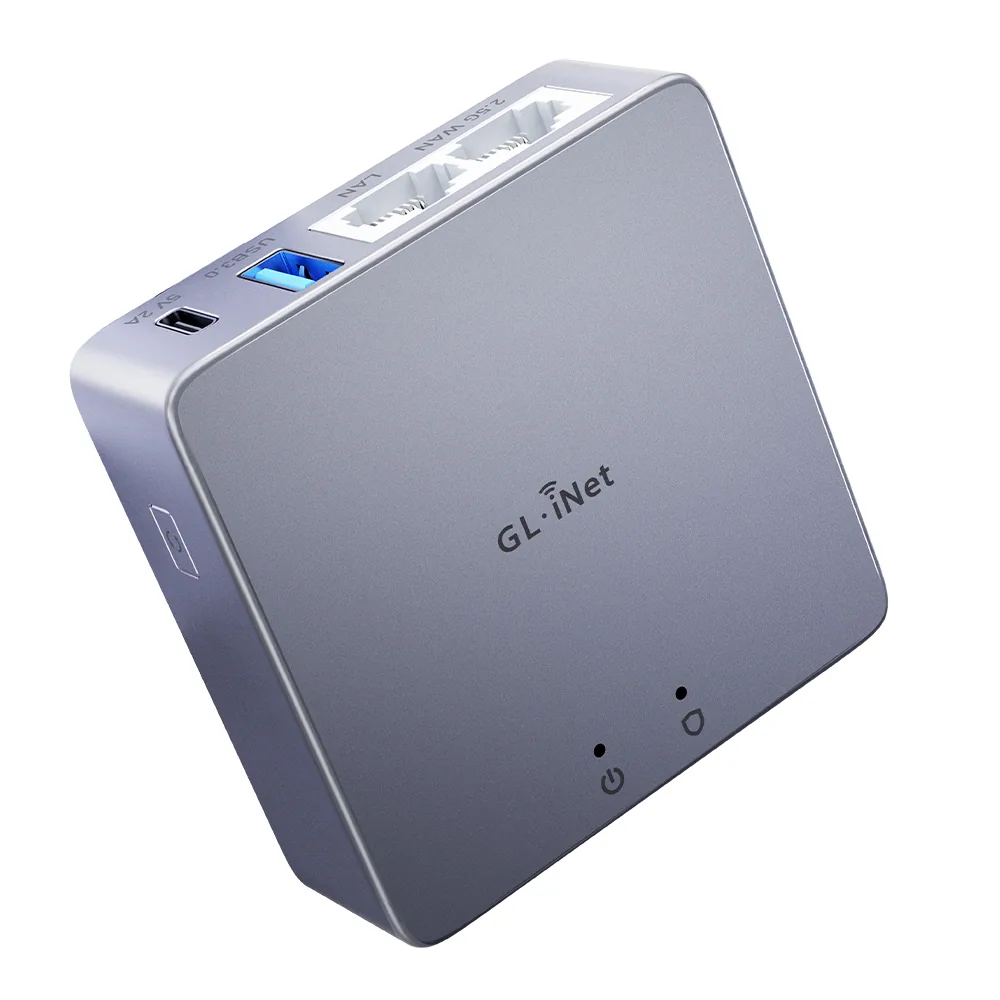
The Brume 2 is not a router in the traditional sense — it has no Wi-Fi. It is a VPN gateway: a small device you place between your existing modem and router, so all your devices automatically go through WireGuard without configuring each device separately.
Specifications
| Property | Value |
|---|---|
| Processor | MediaTek MT7981 (ARM Cortex-A53, 1.3 GHz, dual-core) |
| RAM | 1 GB DDR4 |
| Storage | 8 GB eMMC |
| Wi-Fi | None |
| Ethernet | 1x 2.5 Gbps WAN, 1x Gigabit LAN |
| USB | 1x USB 3.0 |
| Operating System | OpenWrt |
| Power | USB-C |
| Version | MT2500 (plastic) / MT2500A (aluminium) |
| Price | Paid |
How does a VPN gateway work?
Normally you configure WireGuard per device: once on your phone, once on your laptop, and so on. With a VPN gateway you do it once on the gateway, and all devices behind it automatically go through VPN — including devices that cannot run VPN themselves (smart TV, game console, smart home devices).
Setup:
Internet → Modem/ONT → Brume 2 (WireGuard) → Router → all devices
Or if your existing router already works as a modem bridge:
Internet → Modem → Brume 2 (WireGuard) → Switch/Wi-Fi AP → devices
WireGuard performance
GL.iNet rates the Brume 2 at 355 Mbps WireGuard throughput; independent tests land a little lower, around 300–350 Mbps. Either way that is more than enough for most home connections — VPN servers from providers like Mullvad, ProtonVPN and IVPN rarely deliver more than 250–350 Mbps per connection anyway.
For symmetric 1 Gbps fibre, the Brume 2 is a bottleneck. For that, look at the Brume 3 or the Flint 2.
Advantages over VPN on a router
Works with any existing router: You do not replace your router. You place the Brume 2 in front of your existing router. Your Wi-Fi settings, devices, and network name remain unchanged.
Always on, silent, low power: The Brume 2 uses less than 5W. Just leave it running — no laptop required, no VPN app to forget to activate.
1 GB RAM, 8 GB eMMC: Enough for WireGuard, OpenVPN, AdGuard Home and DNS-over-TLS simultaneously without memory pressure.
2.5 Gbps WAN port: Future-proof for faster fibre connections.
Built-in features
Via the GL.iNet web interface (or OpenWrt CLI):
- WireGuard and OpenVPN client
- DNS-over-TLS and DNS-over-HTTPS
- AdGuard Home (built-in DNS ad blocker)
- VPN policy per device: route specific devices outside the VPN
- Kill switch: block internet if VPN drops
MT2500 vs MT2500A (aluminium)
The only difference is the housing. The aluminium version (MT2500A) has better passive cooling — no fan, more durable for 24/7 use. If you plan to run the Brume 2 continuously, the aluminium version is the better investment.
Who is it for
Buy the Brume 2 if:
- You have an existing router and Wi-Fi setup you want to keep
- You want all home devices to go through WireGuard without per-device configuration
- Your internet connection is under 300 Mbps (or your VPN server is the bottleneck anyway)
- You want a simple, silent solution that just works
Choose something else if:
- You also need a new router or Wi-Fi solution → Flint 2 or Flint 3
- You want speeds above 400 Mbps through WireGuard → Brume 3
- You need a travel router → Beryl AX
Caveats
This is not a full router replacement: The Brume 2 solves one problem very well, but only if you already have the rest of your network sorted. If you still need Wi-Fi, switching, or broader network features, you may be buying only half the solution.
Throughput ceiling matters: Around 350 Mbps is fine for many homes, but it is not fine if you specifically bought fast fibre and expect your VPN setup to keep up. In that situation the Brume 2 is no longer “good enough”; it becomes the limiting factor.
Gateway placement adds complexity: Putting a second box between modem and router is manageable, but it still means one more device, one more admin panel, and one more point of failure if something in the network stops behaving.
Pros and cons
Pros
- About 350 Mbps WireGuard throughput — sufficient for most home connections
- 1 GB DDR4 RAM and 8 GB eMMC — can run WireGuard, AdGuard Home, and DNS-over-TLS simultaneously without memory pressure
- 2.5 Gbps WAN port — future-proof for faster fibre connections
- Kill switch blocks internet if VPN drops — no accidental unprotected traffic
- Under 5W power consumption — designed to run 24/7 silently
Cons
- No Wi-Fi — not a replacement for a router, only adds VPN in front of an existing network
- It becomes a bottleneck on faster fibre connections
- The aluminium version is more attractive for 24/7 use, but not mandatory for everyone
Conclusion
The Brume 2 solves a specific problem: you want all your home devices to go through VPN without replacing your existing network. Compact, silent, energy efficient, and the 2.5G WAN port gives it some future headroom. For connections up to roughly 300 Mbps, it is a strong full-time WireGuard gateway.
Getting started
1. Connect it
Connect the Brume 2 between your modem/ONT and your existing router: WAN port of the Brume 2 to the modem, LAN port to the WAN input of your router. Connect a device via Ethernet to the LAN port and open 192.168.8.1 in a browser. Set an admin password on first login.
2. Set up WireGuard
Go to VPN → WireGuard Client and import the .conf file from your VPN provider. Enable the kill switch so traffic is blocked if the VPN drops. Check an IP lookup on a connected device to confirm traffic is routing through the VPN.
3. Protect DNS
Go to Network → DNS and enable DNS-over-TLS or DNS-over-HTTPS. Link this to the active VPN connection for full DNS protection on all devices behind the gateway.
4. AdGuard Home (optional)
Go to Applications → AdGuard Home and enable. Runs as a DNS ad blocker for all devices behind the Brume 2 — no per-device installation needed.
Next step
Chosen the Brume 2?
- GL.iNet travel router setup guide — step-by-step WireGuard, DNS-over-TLS and AdGuard Home configuration
Similar options
- GL.iNet Brume 3 review — faster successor with 1,100 Mbps WireGuard for fast fibre connections
- GL.iNet Flint 2 review — home router with Wi-Fi and ~900 Mbps WireGuard if you also want to replace your router
Want to go further?
- Which network fits your profile? — how much router do you actually need?