GL.iNet Beryl AX (MT3000) review
The GL.iNet Beryl AX is a compact Wi-Fi 6 travel router with GL.iNet's OpenWrt-based firmware and WireGuard VPN built in: small enough for a travel bag, capable enough for daily use at home.

GL.iNet Beryl AX (MT3000) review
The GL.iNet Beryl AX is a compact Wi-Fi 6 travel router with GL.iNet’s OpenWrt-based firmware and WireGuard VPN built in: small enough for a travel bag, capable enough for daily use at home.
Who is this for? Travellers who want a VPN router for hotels and public networks, or home users looking for an affordable privacy-friendly router. Its successor is now the Beryl 7, which GL.iNet calls “a fully upgraded version of our Beryl AX” (Wi-Fi 7, WireGuard up to 1,100 Mbps per GL.iNet, both ports 2.5G). If you are buying new today, start there. The Beryl AX remains a lower-cost option for anyone who doesn’t need Wi-Fi 7, and is worth considering second-hand.
Specifications
| Property | Value |
|---|---|
| Processor | MediaTek MT7981B (dual-core ARM Cortex-A53, 1.3 GHz) |
| RAM | 512 MB DDR4 |
| Storage | 256 MB NAND |
| WiFi | Wi-Fi 6 (AX3000: 574 Mbps on 2.4 GHz + 2,402 Mbps on 5 GHz), dual-band, two retractable antennas |
| Ethernet | 1× 2.5G WAN, 1× Gigabit LAN |
| Operating system | GL.iNet firmware 4.11 (OpenWrt-based); vanilla OpenWrt also supported |
| USB | 1× USB 3.0 |
| Power | USB-C (5V/3A), under 8 W |
| Dimensions / weight | 120 × 83 × 34 mm, 196 g |
| Price | USD 98.99 / EUR 103.71 (list price in GL.iNet’s US and EU stores, 1 Nov 2026) |
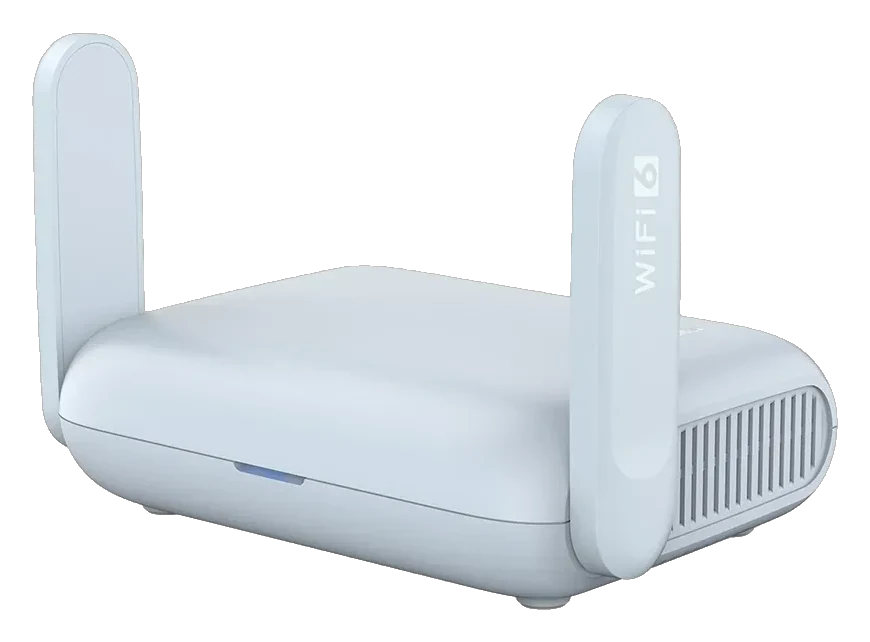
The Beryl AX with both antennas raised. GL.iNet lists them as retractable, so they fold away for travel. Image: GL.iNet.
VPN performance
GL.iNet rates the Beryl AX at up to 300 Mbps over WireGuard and up to 150 Mbps over OpenVPN. Those are GL.iNet’s own figures, measured on a local network with the router as VPN client; real-world speeds depend on your connection and VPN server.
If the hotel or holiday-rental connection is slower than that, the router’s VPN speed is not what limits you. If you need WireGuard on a faster home connection, look at the Flint 2 (up to 900 Mbps per GL.iNet).
USB-C power: the travel difference
The Beryl AX takes its power over USB-C at 5 V/3 A, so a charger you already carry for your laptop or phone can power it, as long as it supplies 5 V/3 A. No separate adapter needed: one plug in the wall socket, Beryl AX on the charger, phone and laptop too.
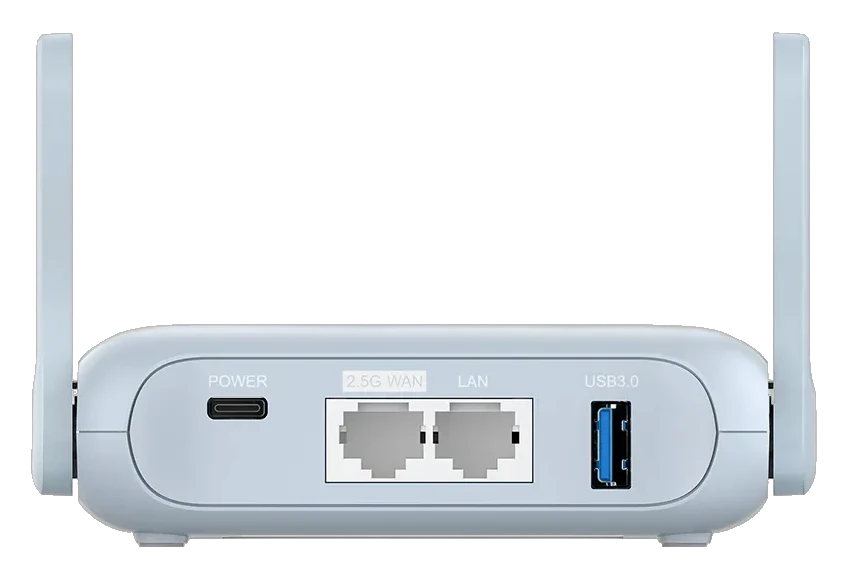
The back panel: USB-C power on the left, then 2.5G WAN, LAN and USB 3.0. Image: GL.iNet.
OpenWrt and web interface
The Beryl AX runs the same GL.iNet firmware as the Flint 2 (both on 4.11.0 in November 2026). What you can configure:
- WireGuard and OpenVPN client directly via the web interface
- DNS-over-TLS and DNS-over-HTTPS for the entire network
- AdGuard Home as built-in DNS ad blocker (included, off by default)
- Guest network, isolated from the main network by default
- Repeater mode: connect to hotel Wi-Fi, share the secured connection with all your devices
The web interface is more accessible than standard OpenWrt. Those who want to can log in over SSH for the OpenWrt command line, and official OpenWrt releases (25.12.6) support the Beryl AX if you want to replace GL.iNet’s firmware altogether.
Older OpenWrt base: the 4.11 firmware we read for the Beryl AX builds on OpenWrt 21.02, which OpenWrt itself lists as End of Life since May 2023. GL.iNet maintains its own firmware and publishes security advisories; we didn’t check which fixes it carries over, so keep the firmware up to date.
Use cases
Travelling: Connect the Beryl AX to hotel Wi-Fi (or an Ethernet port), set up WireGuard with your VPN provider, and all your devices — laptop, phone, tablet — automatically go through VPN. Configure once, not per device.
Captive portals: Hotels and airports use a login page for Wi-Fi access. The Beryl AX has a Login Mode for Public Hotspots: it pauses the VPN while you log in from one device and leaves the mode by itself after a successful login. No logging in on every device separately.
As home router: The Beryl AX works fine as a small home router for apartments or smaller households. Its single LAN port is the main limitation compared to the Flint 2.
Caveats
One LAN port: For a wired home network with multiple devices, you need a switch. As a travel router, one LAN port is rarely a problem.
512 MB RAM: Enough to run AdGuard Home and WireGuard, both of which GL.iNet ships on this model. Less than the Flint 2 (1 GB) for those wanting to run multiple heavy services simultaneously.
LAN port limited to Gigabit: The WAN port is 2.5G, but the single LAN port tops out at Gigabit. The Flint 2 has two 2.5G ports plus four Gigabit LAN ports.
Comparison with other GL.iNet models
| Model | List price (GL.iNet store, 1 Nov 2026) | WireGuard (GL.iNet’s figure) | Use case |
|---|---|---|---|
| GL-SFT1200 Opal | $39.99 / €41.68 | up to 65 Mbps | Travel router, simple (Wi-Fi 5) |
| GL-MT3000 Beryl AX | $98.99 / €103.71 | up to 300 Mbps | Travel router, powerful (Wi-Fi 6) |
| GL-MT3600BE Beryl 7 | $129.99 / €136.25 | up to 1,100 Mbps | Travel router, Wi-Fi 7 — the successor |
| GL-MT6000 Flint 2 | $169.99 / €166.75 | up to 900 Mbps | Home router, recommended |
| GL-BE9300 Flint 3 | $209.99 / €213.52 | up to 680 Mbps | Home router, Wi-Fi 7 |
Pros and cons
Pros
- WireGuard up to 300 Mbps per GL.iNet — the router is not the limit on slower hotel and holiday rental connections
- USB-C powered (5 V/3 A) — a laptop or phone charger that supplies that is enough, no separate adapter needed
- Login Mode for Public Hotspots handles hotel Wi-Fi login pages without per-device logins
- AdGuard Home, DNS-over-TLS/HTTPS and an isolated guest network available in the web interface
- Compact (120 × 83 × 34 mm, 196 g) — fits in a travel bag
Cons
- Only one LAN port — a switch is needed for wired home networks with multiple devices
- 512 MB RAM — enough for standard use, but less than the Flint 2 (1 GB)
- LAN port limited to Gigabit — only the WAN port is 2.5G
- Superseded by the Beryl 7 (Wi-Fi 7, roughly four times GL.iNet’s WireGuard figure, both ports 2.5G) — buy the Beryl AX new only if the lower price ($31 / €33 less at list price) matters more than Wi-Fi 7
Conclusion
The Beryl AX is still a solid compact router to take everywhere that also works well at home: Wi-Fi 6, WireGuard up to 300 Mbps per GL.iNet, USB-C power and a usable web interface. But its successor, the Beryl 7, offers Wi-Fi 7 and roughly four times the WireGuard throughput (GL.iNet’s figures) for $31 / €33 more at list price, so buy the Beryl AX new only if the saving outweighs Wi-Fi 7, or buy it second-hand. Firmware 4.11 also brings VLANs to the admin panel for anyone who wants to separate work, private and IoT devices — see the network segmentation guide.
Those looking for a fixed home router and wanting higher WireGuard speeds should choose the Flint 2.
Getting started
These steps assume a fresh Beryl AX on firmware 4.11 (the current release in November 2026; check under System → Upgrade, Current Firmware). Already set it up, or on older firmware? Update first, or see the GL.iNet travel router setup guide for the menus of older versions.
1. Connect it
Connect the Beryl AX to an Ethernet port (hotel or modem) via the WAN port, or use repeater mode (Internet → Repeater) to connect to an existing Wi-Fi network. Open 192.168.8.1 in a browser on a connected device. Set an admin password on first login.
2. Set up WireGuard
Go to VPN → VPN Client Profile, choose WireGuard and upload the .conf file from your VPN provider, then start a tunnel with it under VPN → VPN Dashboard. Its Kill Switch is on by default for a new tunnel; leave it on. Verify on a connected device via an IP lookup that traffic is routing through the VPN.
3. Captive portals
Hotels and airports use a login page for Wi-Fi access. On the Internet page, under Repeater, use Login Mode for Public Hotspots: the router pauses the VPN so you can log in from one of your devices, and leaves the mode once you are logged in. Until it has, your traffic is not going through the VPN. This way you log in once for all your devices.
4. DNS and AdGuard Home (optional)
Go to DNS (its own menu since firmware 4.11; Network → DNS before) for DNS-over-TLS. Go to Applications → AdGuard Home to enable a network-level ad blocker. Both are optional but useful if you also use the Beryl AX as a home router.
Next step
Chosen the Beryl AX?
- GL.iNet travel router setup guide — step-by-step WireGuard, DNS-over-TLS and AdGuard Home configuration
Similar options
- GL.iNet Beryl 7 review — the Wi-Fi 7 successor, WireGuard up to 1,100 Mbps per GL.iNet
- GL.iNet Slate 7 review — Wi-Fi 7 travel router with a touchscreen
- GL.iNet Flint 2 review — fixed home router with more ports and higher WireGuard throughput
Want to go further?
- Which network fits your profile? — how much router do you actually need?