Cake Wallet review — open-source Monero wallet without your own server
Cake Wallet is an open-source, non-custodial Monero wallet for Android and iPhone, with desktop builds for Mac and Linux: your keys are created and stored on your device, not with Cake, and you don't need to run your own server.
Cake Wallet review
Cake Wallet is an open-source, non-custodial Monero wallet for Android and iPhone, with desktop builds for Mac and Linux: your keys are created and stored on your device, not with Cake, and you don’t need to run your own server.
Who is this for? Readers following the Monero guide who need a mobile wallet. Cake Wallet is a Monero wallet for Android and iOS with built-in swap functionality — no separate exchange app needed to move from Bitcoin to Monero.
Cake Wallet is open-source and non-custodial: the source code is public on GitHub under an MIT license, and Cake never holds your keys. They only leave the device in a backup you make yourself (see below). Cake Wallet was founded in 2018 by Vikrant Sharma and is developed by Cake Labs LLC, which also makes Cupcake and the Monero-only Monero.com app; Cake says it is “trusted by 2M+ users” (its own figure, cakewallet.com, October 2026).
Monero’s planned FCMP++ upgrade — which would replace 16-member ring signatures with a full-chain anonymity set — is a protocol-level change that has not activated yet (on 15 November 2026 the newest Monero release was 0.18.5.4, and Monero’s roadmap still lists Full-Chain Membership Proofs under “Future”). When it ships, it will apply to transactions from any updated wallet, Cake Wallet included, with nothing to configure. The Monero guide covers what it would change.
Non-custodial: what that actually means
Non-custodial means Cake Wallet itself never has access to your funds. Your wallet is created locally with a seed phrase (for Monero: 16 words in the Polyseed format by default, or 25 words “Legacy” or 12 words BIP39 if you pick those; 12 or 24 words for Bitcoin and similar coins). If you lose that seed phrase, there is no “forgot password” button — nobody, not even Cake Labs, can recover your wallet without it.
That’s the opposite of a custodial service (like an exchange account at Kraken or Coinbase), where the platform holds the keys and therefore also has access to your balance. For financial privacy, non-custodial is the right choice, but it shifts full backup responsibility onto you.
Write the seed phrase down and keep it offline, separate from your phone. Cake’s backup FAQ suggests paper and advises against screenshots, cloud notes and photos. Without the seed phrase, a lost or wiped device means permanently lost access.
Where your keys can end up. The app also makes a backup file of all wallets (Settings → App settings → “Backup”), encrypted with a password it shows you; you choose where it goes, for example a USB stick or a cloud drive (Cake’s backup docs). Anyone with that file and its password has your wallets, so treat the password like a seed phrase. On Android the app opts out of Android’s own backup. On iPhone, the app (version 6.5.3) says an iCloud backup doesn’t carry the passwords that unlock your wallets to a new phone, so after such a restore you add the wallets again from their seed phrases.
Supported coins and built-in swap
Alongside Monero (XMR), Cake Wallet supports Bitcoin, Litecoin, Ethereum, Tether (as a token), and a range of other coins — but that doesn’t mean you get one big multi-coin wallet. Each coin has its own separate wallet with its own seed phrase by default. If you only want Monero, you simply create a Monero wallet and never touch the rest of the app; in daily use that works like a Monero-only wallet such as Monerujo.
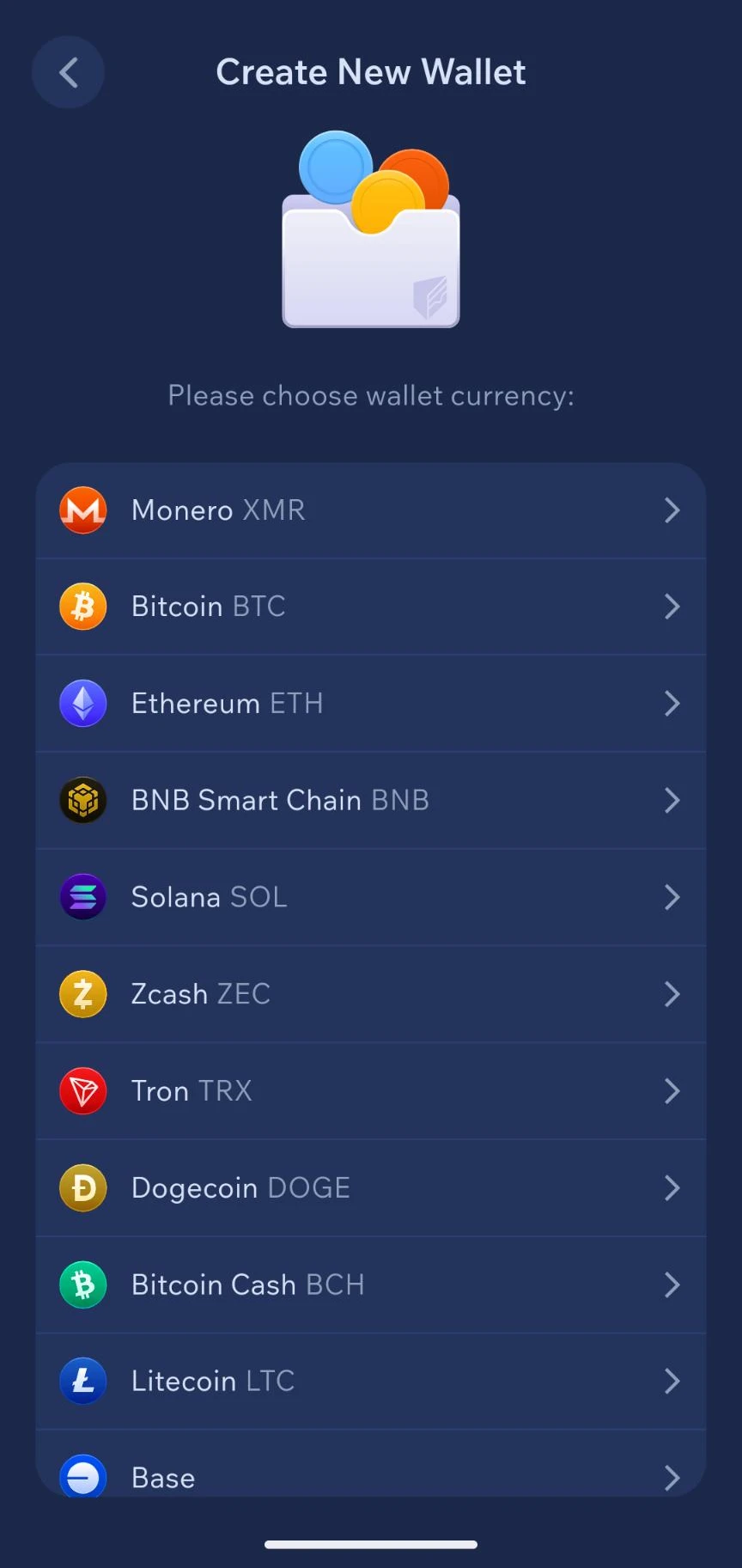
Screenshot: Cake Wallet, July 2026.
There is also an optional “Wallet Group”: one shared BIP39 seed backs one wallet per coin. Only BIP39 wallets can join, so a Monero wallet only fits in a group if you create it with the BIP39 seed type (12 words) instead of the default Polyseed, according to Cake’s wallet groups docs. The option appears when you add a wallet later (Wallets tab → ”+ Create New Wallet” → pick the coin → “Choose Wallet Group”), not on first launch. It’s a convenience layer on top of the separate wallets, not a replacement: readers who prefer to keep one coin strictly separate can ignore it.
The app also has a built-in swap feature for exchanging between coins directly, through external providers. In version 6.5.0 the app’s code switches on ChangeNOW, Trocador (an aggregator that routes your trade to other exchanges), SwapTrade, XOSwap and Swaps.xyz, plus the decentralised Chainflip, NEAR Intents and Jupiter; Exolix and SideShift are switched off. The list changes between versions. This is the same route the Monero guide describes for converting Bitcoin to Monero without a separate KYC Monero purchase: buy Bitcoin through a regular exchange, then swap to Monero inside Cake Wallet.
Caveat: the swap itself happens through third parties, not Cake Wallet directly. Cake Wallet is the interface; the exchange provider processes the actual swap and may apply its own limits, rates, or (limited) identification requirements, depending on the provider chosen. That also means “without an exchange” isn’t quite precise: there’s always a third-party swap service in between, even when that service itself doesn’t ask for an account or KYC — you’re skipping a traditional exchange with its own account, not every intermediary. Your coins go to that provider during the swap: Cake’s swap FAQ says Cake can’t reverse or refund a swap itself, and a failed swap is refunded by the provider. Save the Trade ID until the coins have arrived.
Donation links via AnonPay: no longer in the app
Earlier versions let you create a payment or donation link from the Receive screen using Trocador AnonPay: a payment page where the payer could pay with almost any coin Trocador supports, converted into the coin of your own wallet. In version 6.5.3 that option is gone. The screen that created these links is gone from the app’s source since version 6.4.6 (only the details of links made earlier can still be opened), and Cake’s documentation no longer has an AnonPay page, although the project’s README still lists donation links. If you need a reusable public address, see Silent Payments below (Bitcoin) or MWEB (Litecoin).
Silent Payments: protecting the receiver on Bitcoin
Cake Wallet supports Silent Payments (BIP 352), a Bitcoin protocol that specifically protects the receiver’s privacy. Normally you share one static Bitcoin address, and every payment to it is visibly linkable to that address by anyone looking at the blockchain. With Silent Payments you instead share a static “sp1” address, but the sender automatically generates a new, unique Taproot address on-chain for every transaction — only the receiver can recognize that a given transaction is theirs. From the outside, the transactions aren’t linkable to each other or to one public address.
To receive, tap Receive, tap the address type under the QR code and choose “Silent Payments”. Because payments to you are hidden on-chain, your wallet has to look for them itself: turn on Settings → “Bitcoin Settings” → “Silent Payments” → “Set Silent Payments always scanning”. The matching happens on your device, so no server learns which payments are yours, but the wallet downloads the data it scans from an Electrum server. If your selected node can’t serve that data, Cake’s Silent Payments docs say the scan runs against Cake’s own server (electrs.cakewallet.com) without changing your node setting. Scanning costs sync time, battery and data; you can leave it off and turn it on when you expect a payment.
Caveat: Silent Payments only protects against linking future payments to your address — it doesn’t hide amounts (the way Monero does), and it doesn’t help if you’ve already linked the sp1 address itself to your identity by sharing it publicly under your own name.
Built-in Tor and “Tor only”
Cake Wallet has Tor built in: Settings → App settings → “Connections” → “Enable built-in Tor”. Cake marks it as experimental: the app itself says not every connection supports Tor routing and some may use the regular internet, and suggests Tor in VPN mode (an app like Orbot) to cover all app traffic. On the same screen, “Fiat API” (price data) and “Swap” can each be set to “Tor only”; Cake’s built-in Tor docs say these then fail closed instead of leaking your IP, and its privacy settings docs that with Swap on “Tor only” swaps are limited to Trocador through its onion service. This connects to a caveat in the Monero guide: Monero hides the transaction itself, but not your IP address toward the node you connect through.
Cupcake: turning an old phone into an air-gapped signer
Cake Labs also ships a separate companion app called Cupcake, available for both Android and iOS, that turns a spare phone into an air-gapped hardware-wallet-style signer for Monero, Bitcoin, and Litecoin including MWEB (per Cake’s Cupcake docs). The private key lives only on the Cupcake device; Cake Wallet on your main phone holds only the view key, so it can display balance and history and prepare transactions, but cannot sign them alone.
The transfer between the two devices happens entirely through QR codes, not a wireless connection: Cake Wallet prepares a transaction and shows it as a QR code, Cupcake scans it and signs offline, then shows the signed transaction back as a QR code for Cake Wallet to scan and broadcast. Because there’s no Bluetooth or network link between the two devices at any point, the signing device has no radio attack surface to defend — it only ever needs a camera and a screen.
Cupcake is open source (GPL-3.0), with its own GitHub repository separate from the main Cake Wallet app; Cake lists it on the App Store, Google Play and GitHub. To pair the two, open the menu in Cupcake and choose “Link to Cake Wallet”; in Cake Wallet tap “Wallets” → “Restore Wallet” → “Cupcake App”, scan the QR code, name the wallet and tap “Restore”.
Simple to start, dozens of settings underneath
First setup asks little of you: a PIN, a coin, a name and the seed phrase. Underneath sits a large layer of expert settings. In version 6.5.3, Settings has per-wallet screens (Privacy: automatic new addresses, saving recipient addresses, Payjoin for Bitcoin; the coin’s own settings: nodes, Silent Payments, MWEB for Litecoin; Recovery & Keys), Connections (built-in Tor, “Tor only” for prices and swaps, name lookups like ENS and Unstoppable Domains), Security (a 4- or 6-digit PIN, “Require PIN after”, biometrics, blocking screenshots, duress PIN, Cake 2FA with TOTP codes), Display (theme, currency, language) and Other (fee priority). Added together, that’s dozens of individual settings spread across multiple screens — not the handful of options a Monero-only wallet needs. One of them is worth knowing before you need it: Cake’s duress PIN is a second PIN that, per Cake’s docs, deletes every wallet in the app when entered. It’s a wipe, not a decoy wallet, so only set it once all your seed phrases are backed up.
That’s exactly the difference from Feather and Monerujo: those apps don’t need a comparable settings layer, simply because they have only one coin and one job. Cake Wallet has that breadth (multiple coins, swap, fiat integration), and the dozens of settings are a direct consequence of that — not a goal in itself. For most readers just starting out, the defaults are fine; the deeper layer exists for anyone who wants to fine-tune something specific (running a custom node, disabling Payjoin), not something you have to work through to use the app.
Comparison with Feather and Monerujo
| Cake Wallet | Feather Wallet | Monerujo | |
|---|---|---|---|
| Platform | Android, iOS, macOS, Linux | Windows, macOS, Linux | Android |
| Coins in the app | Monero, Bitcoin, Litecoin, Ethereum etc. (separate, each its own wallet) | Monero only | Monero only |
| Monero-only use possible | Yes — just create a Monero wallet | Yes, only option | Yes, only option |
| Built-in swap | Yes | No | Yes (via Exolix, no registration; Exolix may ask for ID under its AML/KYC policy) |
| Old-phone signer companion | Cupcake (QR-code air-gapped, Android + iOS) | No | Sidekick (Bluetooth-paired, Android only) |
| Open-source | Yes (MIT) | Yes | Yes |
| F-Droid | Yes, via its own repository | N/A (desktop) | Yes, via its own repository |
| Independent audit of the app | None found (one 2022 review of THORChain’s Monero multisig, commissioned by Cake) | Not known | Not known |
Feather remains the recommended choice for desktop, and Cake Wallet is our Android recommendation now that Monerujo has had no release since June 2025 (see its review). Monerujo is the most minimal Android option for pure Monero, with no other coins ever in the picture, but it does still offer its own built-in swap and its own old-phone companion signer (Sidekick) — so “minimal” describes its coin scope, not its feature set. Cake Wallet can also be used as a pure Monero wallet — you just don’t create wallets for the other coins — but it’s mainly the most practical choice if you want to start with Monero on mobile and handle the Bitcoin-to-Monero swap in the same app, or if you specifically want the QR-based, radio-free Cupcake signing model over Monerujo’s Bluetooth-based Sidekick.
Getting started
Android: five install routes (Cake’s Android install docs, checked 15 November 2026):
- Google Play: the simplest route, but runs through Google’s infrastructure. Cake says the official listing’s address ends in
id=com.cakewallet.cake_wallet. - F-Droid: Cake Wallet is not in the default F-Droid index. Add its own repository from fdroid.cakelabs.com in the F-Droid app. That repository serves the same APK files as the GitHub releases.
- Obtainium: add the Cake Wallet GitHub repository as an app source; Obtainium then installs and updates from the GitHub releases.
- Direct APK: download from GitHub releases.
- Accrescent: alternative Android app store. Cake’s docs say moving to Accrescent from another route means backing up all seeds, uninstalling and reinstalling.
Cake says the APKs from GitHub, Accrescent, and F-Droid are signed with the same key, and publishes its SHA-256 signing certificate hash in the project README: C5:40:53:AB:0F:10:D9:54:17:62:A3:DA:76:65:AE:3D:BA:5E:7C:74:3A:B4:F1:08:A5:34:9D:62:AC:10:6E:F5. An app such as AppVerifier shows an installed app’s certificate so you can compare it with that hash. On 13 November 2026 Cake’s F-Droid repository listed this same certificate for version 6.5.3.
iPhone and iPad: via the App Store (iOS 15 or later). Cake says the developer on the listing should be Cake Technologies, LLC.
Desktop: on a Mac, the same App Store listing (macOS 13 or later), or the Cake_Wallet_vX.X.X.dmg file from GitHub releases (not Monero_com_…, which is Cake’s separate Monero-only app). On Linux, the Flatpak (Cake’s recommendation) or the tar.xz archive from GitHub releases. Not every release includes Linux files (on 15 November 2026 the newest was still 6.4.4); Cake’s Linux install page has the steps. Cake says its desktop apps are being redesigned, with a refreshed release planned for late 2026, and recommends the mobile apps until then; Windows builds are paused.
Minimum Android version: 8.0 (SDK 26).
Creating a wallet (phone, version 6.5.3):
- On the “Welcome” screen, tap “Set a PIN” and enter a PIN twice. It’s 4 digits unless you first tap “Switch to 6-digit PIN”. (On Linux there is no PIN: the button reads “Set up a Wallet” and you set a wallet password instead.)
- Tap “Create New Wallet”.
- Choose the coin (“Please choose wallet currency:”), for example Monero.
- Enter a “Wallet name”. For Monero, the default recovery phrase type is Polyseed (16 words); “Advanced Settings” has the other types and an optional passphrase. A passphrase creates a different wallet and can’t be recovered if you lose it, so leave it empty unless you know you want one. Tap “Next”.
- On “Your Secret Recovery Phrase”, tick the three statements, tap “Show me my Recovery Phrase”, and write the words down in order, stored separately from your phone. (“Skip this step” also exists; if you use it, back up later via Settings → Wallet settings → Recovery & Keys.)
- Tap “Verify Phrase”, answer the two questions about your words, then tap “Open Wallet”.
Fingerprint or face unlock is a separate switch afterwards: Settings → “Security” → “Allow biometrical authentication”.

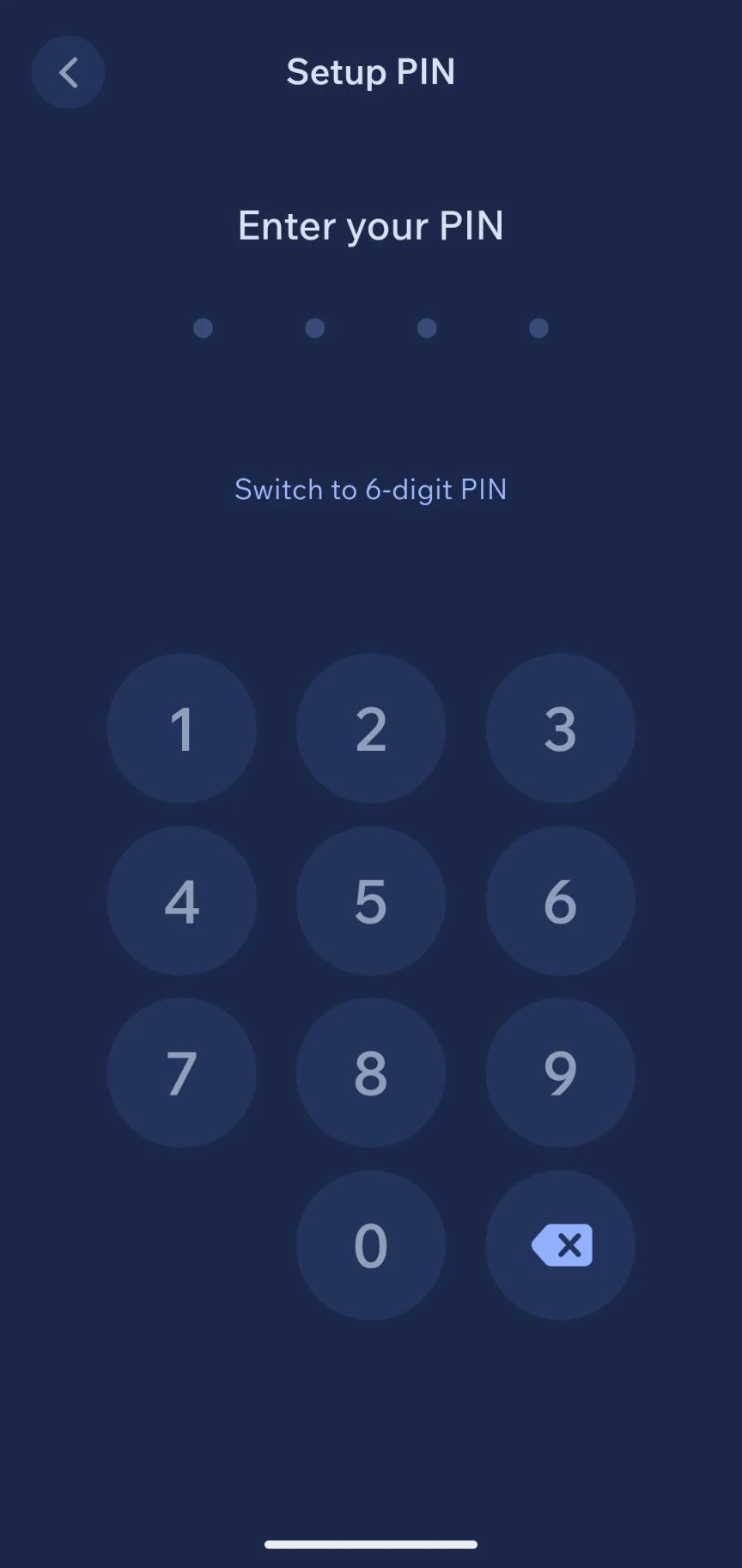
Restoring an existing wallet: after setting your PIN, tap “Restore Existing Wallet” → “Recovery Phrase or Keys”, choose the coin, name the wallet and enter the seed phrase. For Monero, pick the recovery phrase type that matches your words (Polyseed, Legacy or BIP39), and enter the block height or tap “Restore from date” so the wallet doesn’t scan the whole chain, then tap “Restore”. It works regardless of which install route you used. Moving a whole Cake Wallet setup to a new phone? The same screen offers “Backup file”, which restores all wallets from a Cake backup at once (only on a fresh install, per Cake’s docs).
Caveats
No published audit of the app. We found no independent security audit of Cake Wallet itself. The one review we found that Cake commissioned, by Inference AG (published March 2022), covered THORChain’s implementation of Monero multisig, not Cake Wallet’s code. The source code is open and inspectable, but that is not the same as a published audit report. For a wallet with real financial risk, that’s a genuine gap, even without any concrete indication of a problem.
Seed phrase loss is unrecoverable. As with any non-custodial wallet: no seed phrase, no access. There is no customer support that can restore your balance.
Swap privacy is not guaranteed. The swap providers are third parties with their own policies. Some may still request identification for larger amounts. “Tor only” for swaps hides your IP address from the provider (and limits swaps to Trocador), but not what the provider itself logs.
The app itself has a larger attack surface, even if your wallet doesn’t. Even if you only create a Monero wallet and never touch the rest of the app, the same installed app is still running on your phone with code for every supported coin and every swap integration. That’s a different kind of risk than Feather or Monerujo, which as standalone applications simply contain no code for other coins at all. It’s not a proven weakness — there’s no concrete indication this has ever been exploited — but it is a real design difference between “my wallet is simple” and “the app running my wallet is simple.” If you want Cake’s app without the other coins, Cake Labs also makes Monero.com, a Monero-only app built from the same code (we haven’t reviewed it separately).
Pros and cons
Pros
- Open-source (MIT), source code publicly inspectable
- Non-custodial — seed-phrase-based recovery, no account required
- Built-in swap between Monero, Bitcoin, and other coins, no separate app
- Built-in Tor, plus “Tor only” modes for swaps and price data
- Available on Android, iOS, macOS, and Linux
- Same signing key on GitHub, Accrescent, and F-Droid (per Cake), with a published certificate hash to check against
Cons
- No published independent security audit of the app
- Not in the default F-Droid index — requires adding its own repository
- Swap providers are third parties with their own privacy policies and possible ID requirements
- The installed app always contains code for every coin and swap integration, even if your own wallet is Monero-only
Conclusion
Cake Wallet is a practical, open-source entry point for starting with Monero on mobile and handling the Bitcoin-to-Monero swap in the same app. The non-custodial design and open source code are solid foundations.
The main caveat is the lack of a published independent audit of the app — the code is inspectable, but that’s not the same as a published audit report. Feather (desktop) and Monerujo (Android) have no published audit either; what they offer instead is a smaller, Monero-only codebase. If you only want Monero but would rather stay inside Cake Wallet: that works too — just create a Monero wallet and leave the other coins alone.
Next step
Coming from the Monero guide?
- Monero guide — how Monero works, how to buy it, and where Cake Wallet fits in that process
Similar options
- Feather Wallet — desktop-only, Monero-only, no built-in swap, Ledger and Trezor support, offline signing
- Monerujo — Android, Monero-only, Sidekick Bluetooth signer, offset seeds
Want to go further?
- Choosing a password manager — for the backup password; keep the seed phrase itself offline
- Privacy DNS guide — network privacy alongside financial privacy