Feather Wallet review — the desktop reference for Monero
Who is this for? Readers following the Monero guide who want a desktop wallet on Linux, macOS, or Windows, and who prefer a Monero-only tool over a multi-coin app like Cake Wallet.

Feather Wallet review
Who is this for? Readers following the Monero guide who want a desktop wallet on Linux, macOS, or Windows, and who prefer a Monero-only tool over a multi-coin app like Cake Wallet.
Feather is free, open-source (BSD-3-Clause), and Monero-only — no other coins, no built-in swap, no exchange integration. It runs on Linux, Tails, macOS, and Windows, and is built specifically to double as the reference wallet for Tails and Whonix users, alongside being a general-purpose desktop wallet.
Monero’s FCMP++ hard fork (9 August 2026), which replaced 16-member ring signatures with a full-chain anonymity set, is a protocol-level change — keep Feather updated and it applies to your transactions automatically. The Monero guide explains what changed.
Monero-only, on purpose
Feather does exactly one job: Monero. There’s no “create a Bitcoin wallet too” option, no swap tab, no fiat on-ramp. That’s a deliberate scope choice, not a missing feature — the project’s own framing is a small, fast, beginner-friendly wallet that still has “a feature set that is on par with the official CLI” for advanced users. If you want Monero plus a built-in way to swap from Bitcoin in the same app, that’s what Cake Wallet is for; if you specifically want a Monero-only wallet with nothing else installed alongside it, Feather is built around that constraint from the ground up.
Node connection: local, remote, or Tor
Feather gives you three ways to reach the Monero network, and the choice matters for privacy:
- Local node — you run your own
monerodand point Feather at it (Settings → Network → Node, default port 18081 on mainnet). This is the strongest privacy option: nobody but you ever sees which addresses you’re checking. Feather does not route local-node traffic over Tor, since there’s no third party to hide from in the first place. - Remote node — you connect to someone else’s public Monero node. Convenient, no sync wait, but that node operator can see your IP address and which transactions you’re asking about (though not your wallet’s contents or private keys — Monero’s design means a remote node can’t spend your funds or read your balance history without your view key).
- Tor — Feather ships with its own bundled Tor binary and does not require a separate Tor install. If no local Tor daemon is found, it launches its own on port 19450.
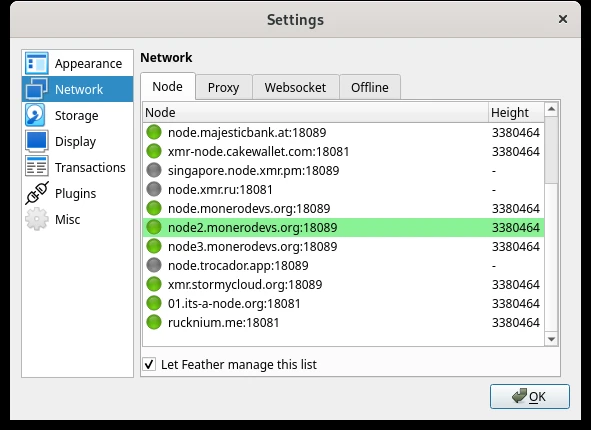
Caveat: the default Tor mode excludes wallet sync. Feather’s default setting routes “all network traffic over Tor, except for wallet synchronization.” The stated reason is that sync involves a lot of data and is very slow over Tor — the developers judge this an acceptable privacy/convenience tradeoff, since a remote node doesn’t learn much just from the sync process itself. Readers who want everything over Tor, including sync, can change this in Settings — it will just be slower. One notable exception: on Tails or Whonix, Feather routes all traffic through Tor regardless of this setting, since those platforms enforce it at the OS level.
View-only wallets and multisig
Feather supports view-only wallets — a wallet loaded with only the view key, not the spend key, so it can display incoming transactions and balance without being able to sign outgoing transactions. This is useful for auditing purposes (checking a wallet’s activity on a machine you don’t fully trust, or handing bookkeeping access to someone else) without exposing spending capability.
Feather also supports multisig wallets, where more than one party must approve a transaction before it goes through — useful for shared funds or higher-security setups where a single compromised key shouldn’t be enough to move money. Multisig in Monero generally has more edge cases and rougher tooling than Bitcoin multisig; treat it as an advanced feature for readers who specifically need it, not a default recommendation.
Feather also supports Ledger and Trezor hardware wallets for holding the private key on separate hardware rather than the same machine running the wallet software.
The April 2024 denial-of-service incident
Worth naming directly: on 28 April 2024, a bug affecting every available Feather version made it briefly impossible to send funds. The root cause was a years-old hardcoded sanity-check limit (100 million RingCT outputs) in a 2021 patch meant to guard against a specific spam attack; the Monero network’s real output count grew past that hardcoded limit on that date, tripping the check. Feather shipped an emergency fix within hours — its first emergency release ever, reserved specifically for bugs that risk fund loss or block core wallet functionality.
What this means for the review: funds were never at risk — the bug blocked sending, it didn’t expose or lose anyone’s coins — but it’s a concrete example of what “no formal audit” can look like in practice: a plausible, if narrow, class of bug that a broader security review might have caught earlier. Feather’s public incident report and fast, transparent fix are themselves a reasonable trust signal, even though they don’t substitute for an audit.
Security practices without a formal audit
Feather has no published third-party security audit as of this writing. What it does have:
- A running bug bounty program, paying out USD 150–3,000 (in XMR) for reproducible vulnerabilities that could cause fund loss in the latest signed release — with at least one real payout on record (2.5 XMR for a confirmed issue).
- Signed releases: GPG-signed hashes for every release, plus free code-signing for Windows builds via SignPath.io.
- Reproducible builds: documented Guix-based build instructions, so anyone can verify that the published binary matches the public source code.
This is a meaningfully more concrete security posture than “trust us” — but a bug bounty and reproducible builds are not the same thing as an independent audit combing through the codebase proactively. Both matter; neither replaces the other.
Comparison with Cake Wallet and Monerujo
| Feather Wallet | Cake Wallet | Monerujo | |
|---|---|---|---|
| Platform | Linux, Tails, macOS, Windows | Android, iOS, macOS, Linux | Android |
| Coins | Monero only | Monero, Bitcoin, Litecoin, Ethereum etc. | Monero only |
| Built-in swap | No | Yes | Yes (via Exolix) |
| Old-phone signer companion | No | Cupcake (QR-code, air-gapped) | Sidekick (Bluetooth-paired) |
| Local node support | Yes | Limited (per-coin custom node) | Yes |
| Built-in Tor | Yes, bundled binary | Tor Only Mode for exchange/fiat traffic | No |
| View-only wallets | Yes | Not a core feature | Yes |
| Multisig | Yes | No | No |
| Hardware wallet support | Ledger, Trezor | Ledger, Trezor, BitBox, Coldcard | Ledger |
| Open-source | Yes (BSD-3-Clause) | Yes (MIT) | Yes |
| Independent audit | Not known (bug bounty program instead) | One multisig review (2021) | Not known |
Feather is the more capable option for readers who specifically want multisig (Cake Wallet doesn’t offer that, even though it now supports multiple hardware wallets), and its local-node-first, Monero-only design keeps things simple. But “minimal” doesn’t apply across the board to its mobile counterparts: Cake Wallet and Monerujo both bundle a built-in swap and their own old-phone signer companion (Cupcake and Sidekick respectively), and Monerujo also supports Ledger and view-only wallets — Feather is the one without a built-in swap or an old-phone companion option of the three.
Getting started
Download: featherwallet.org (also reachable via Tor onion address and I2P). Verify the GPG signature against the published signing key before running any binary — the project publishes signed hashes for every release.
Linux options: standalone executable, AppImage (x64, ARM32, ARM64, RISC-V 64-bit), Flatpak, or a dedicated Tails/Whonix AppImage.
Windows: installer (Windows 10+) or a standalone .zip.
macOS: separate builds for Intel and Apple Silicon.
Creating a wallet:
- Launch Feather and choose “Create new wallet”
- Pick a node connection mode (Tor by default, or configure a local/remote node in Settings)
- Write down the seed phrase immediately and store it separate from the machine running Feather
- Optionally set up view-only access or multisig if your use case calls for it
Restoring an existing wallet: choose “Restore wallet” and enter your seed phrase — Feather supports both the 25-word legacy Monero seed and the newer Polyseed format, and can recover a damaged Polyseed under specific conditions (see the project’s own recovery guide for exact steps).
Caveats
No independent third-party audit. The bug bounty program and reproducible builds are real, verifiable security practices, but neither is a substitute for a dedicated audit combing the codebase for vulnerabilities before they’re found in the wild. The 2024 incident is a concrete (if narrow, fund-safe) example of the kind of bug a proactive audit might catch sooner.
Default Tor mode does not cover wallet sync. If your threat model requires every byte of network traffic to go over Tor, you need to change the default setting yourself — the out-of-the-box default is a deliberate speed/privacy tradeoff, not full Tor coverage.
Desktop-only. Feather has no mobile app. Readers who need Monero on a phone should look at Cake Wallet or Monerujo instead.
Multisig is an advanced feature with real complexity. Monero multisig has more rough edges than single-signer wallets. Don’t reach for it unless you have a concrete reason (shared funds, an explicit higher-security setup) — for most readers a normal single-key wallet with a well-stored seed phrase is enough.
Pros and cons
Pros
- Free, open-source (BSD-3-Clause)
- Monero-only — smaller attack surface than a multi-coin wallet, nothing else installed alongside it
- Built-in Tor with no separate installation required
- Local node support with no forced Tor routing when using it
- View-only wallets, multisig, and hardware wallet support (Ledger, Trezor)
- Signed releases and reproducible builds
- Active bug bounty program with real payouts on record
Cons
- No independent third-party security audit
- Default Tor setting excludes wallet sync (configurable, but not the out-of-the-box behavior)
- Desktop only — no mobile app
- Multisig tooling has more edge cases than Bitcoin equivalents
Conclusion
Feather is the practical desktop reference for Monero: Monero-only by design, built-in Tor, real local-node support, and features (view-only wallets, multisig, hardware wallet support) aimed at readers who want more control than a simple send/receive app. The lack of a formal audit is a real gap, though the bug bounty program and reproducible builds are a meaningfully more concrete trust signal than nothing.
For most desktop readers coming from the Monero guide, Feather is the safe default. Readers who also want a built-in Bitcoin-to-Monero swap, or who need Monero on a phone, should look at Cake Wallet instead.
Next step
Coming from the Monero guide?
- Monero guide — how Monero works, how to buy it, and where a desktop wallet fits in
Similar options
- Cake Wallet — mobile-first, multi-coin, built-in swap
- Monerujo — Android, Monero-only, Sidekick Bluetooth signer, offset passphrases
Want to go further?
- Choosing a password manager — store your seed phrase here, not loose on your machine
- Privacy DNS guide — network privacy alongside financial privacy