YouTube without Google: NewPipe, FreeTube and the simple route
You can watch YouTube without a Google account, without ads and without Google building a viewing profile from cookies: with an app that fetches the videos for you, or simply by watching logged out in a privacy browser.
YouTube without Google: NewPipe, FreeTube and the simple route
You can watch YouTube without a Google account, without ads and without Google building a viewing profile from cookies: with an app that fetches the videos for you, or simply by watching logged out in a privacy browser.
Who this guide is for
For anyone who watches YouTube regularly but doesn’t want every video tied to their Google account: parents, people who watch sensitive topics (health, politics, religion), and anyone tired of ads and autoplay. You don’t need to be technical for the simple route; the apps take ten minutes to set up.
What this guide doesn’t solve: YouTube still sees your IP address with every route below. If you need to hide that, see what a VPN does and doesn’t do and the Tor Browser review. And none of these routes lets you comment, upload or use YouTube Premium without logging in.
The short answer
- On an Android phone: use NewPipe, from F-Droid. No account, no ads, background play and downloads.
- On your computer: use FreeTube, or watch YouTube logged out in Firefox with uBlock Origin.
- On an iPhone: watch YouTube logged out in a privacy browser. There’s no NewPipe or FreeTube for iOS.
And the valid stopping point for everyone: watching logged out, in a browser that blocks trackers, already cuts the link to your account and most of the tracking. The apps go a step further, but they break more often.
What changes, and what doesn’t
| YouTube app, logged in | Logged out in a privacy browser | NewPipe / FreeTube | |
|---|---|---|---|
| Viewing history tied to your Google account | Yes | No | No |
| Ads | Yes (unless Premium) | Blocked by uBlock Origin | None |
| Google cookies and scripts | Yes | Limited by the browser | No account cookies or page scripts; the apps can run YouTube’s anti-bot check (see below) |
| Subscriptions | In your Google account | Not saved (or via bookmarks) | Stored locally on your device |
| YouTube sees your IP address | Yes | Yes | Yes |
| Comments, uploads, Premium | Yes | Viewing comments only | Viewing comments only |
| Breaks when YouTube changes something | No | Rarely | Sometimes, until an update arrives |
The apps work by reading YouTube’s website and internal interfaces instead of Google’s official ones. That keeps Google’s account cookies and page scripts away, but not all of its code: to keep videos playing, both apps can download and run YouTube’s anti-bot script (FreeTube in a separate session, away from your data). It also means YouTube can break them with a change on its side, and an update doesn’t always fix that quickly: see the known problems under each app.
Android: NewPipe
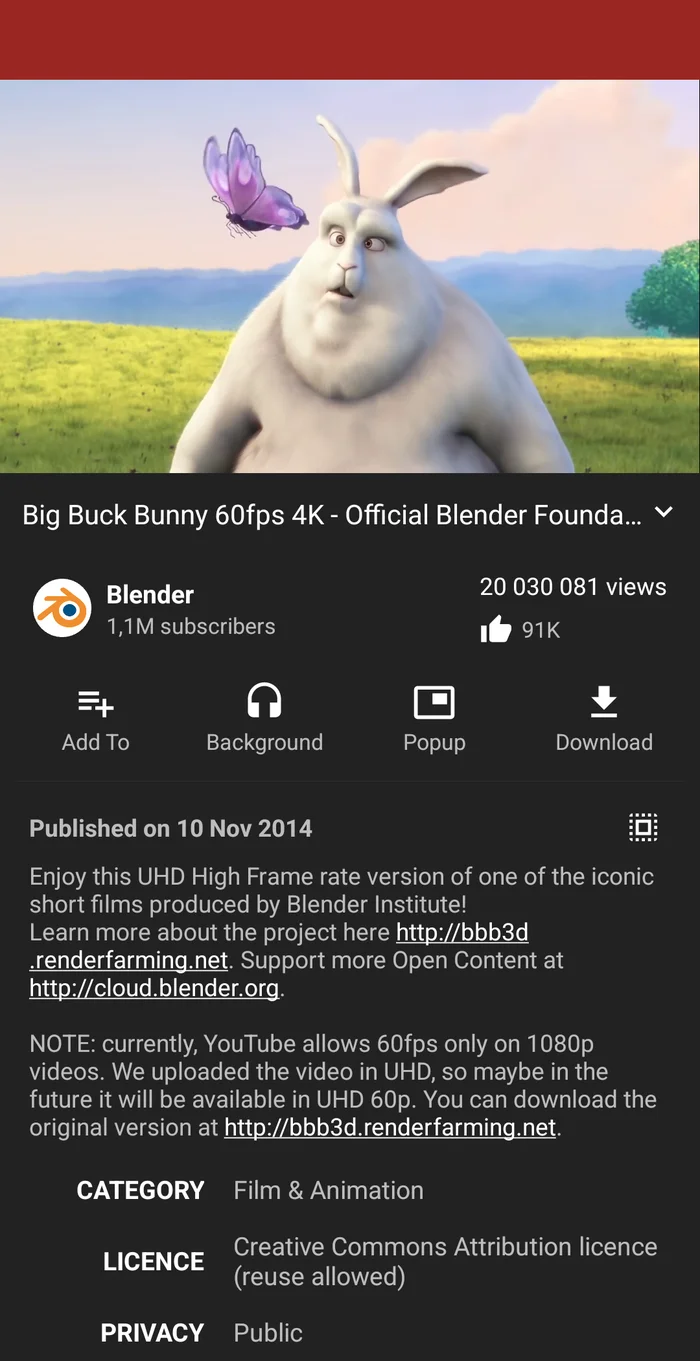
NewPipe’s player, with background play, a floating popup and downloads built in. NewPipe 0.26.1, January 2024. Screenshot: Unnerving duck, Wikimedia Commons, CC0.
NewPipe is a free, open-source app (GPL-3.0) that plays YouTube without Google Play Services and without an account. It also supports PeerTube, SoundCloud, Bandcamp and media.ccc.de.
What you get:
- Subscriptions without an account, stored in the app, with notifications for new videos and channel groups for a tidier feed
- Background audio (only the audio stream loads, saving data) and a floating popup player
- Downloads of video, audio and subtitles
- Local playlists and history that never leave your phone
Installing it: NewPipe is deliberately not on Google Play. NewPipe recommends adding its own repository to F-Droid, which gets updates fastest; the version in F-Droid’s main repository works too but updates arrive later. See the F-Droid guide. Keep it updated: when YouTube changes something, an old NewPipe is a common reason videos stop loading.
Known problem on 7 November 2026: even the current NewPipe 0.29.1 can stop playing or downloading after a while with an HTTP 403 error. NewPipe has had this bug open since 14 September and marks it urgent; the changelog of the 0.29.2 test version doesn’t list a fix. Users report that closing and reopening the app helps for a while. If that’s too much hassle, try PipePipe below, or the logged-out browser route.
Bringing your subscriptions: this needs your Google account one last time, in a browser.
- In NewPipe, open the Subscriptions tab, tap ⋮ (top right) → Import from → YouTube. NewPipe shows the steps below with a link to Google Takeout; you can open that link on your phone or type it on a computer.
- In Google Takeout, signed in, under YouTube and YouTube Music: click All data included, then Deselect all, tick only subscriptions and click OK.
- Click Next step, then Create export. Google prepares the archive; with the delivery method Send download link via email you get an email with a Download archive button. Get the .zip file onto your phone.
- Back in NewPipe’s import screen, tap Import file and pick the .zip. If that fails, unzip it and pick the
subscriptions.csvfile (in the folderYouTube and YouTube Music/subscriptions/; folder and file names follow your Google language).
NewPipe then loads each channel, which can take a while and uses data for a long list.
Want SponsorBlock or a more modern design? PipePipe is an independent fork of NewPipe with SponsorBlock (skip sponsor segments), Return YouTube Dislike and more filtering; it says NewPipe’s problems don’t necessarily occur there (we didn’t test it). LibreTube has a more polished design and SponsorBlock, and can optionally use a Piped account to sync subscriptions. Both are open source and on F-Droid and IzzyOnDroid. The former fork Tubular has been archived; if you used it, switch to one of these.
On a normal (Google-certified) Android phone: Google’s developer verification started on 30 September 2026, but only for installs from Google Play and six phone makers’ app stores (Samsung, Xiaomi, OPPO, vivo, HONOR, Transsion), and only in Brazil, Indonesia, Singapore and Thailand. F-Droid isn’t on Google’s list for this first phase. Google says it will extend the check to all apps on certified Android devices in 2027; apps from unregistered developers can then still be installed through adb or Google’s “advanced flow”. See the F-Droid review for what that means. On GrapheneOS it doesn’t apply.
Computer: FreeTube
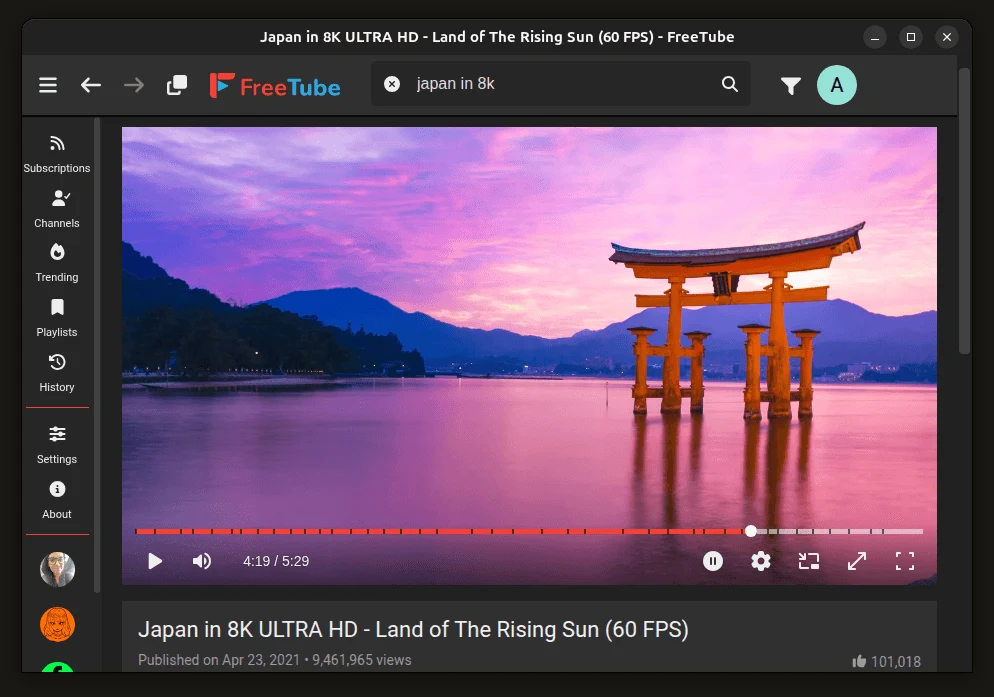
FreeTube on the desktop: subscriptions, playlists and history live on your own computer. Version not stated, on the project’s site since August 2026. Screenshot: FreeTube project (freetubeapp.io), MIT licence.
FreeTube is a free, open-source desktop app (AGPL-3.0) for Windows 10 and later, macOS 13 and later, and Linux. It fetches videos with its own built-in extractor. FreeTube says this stops Google tracking you with cookies and JavaScript, though it can run YouTube’s anti-bot script, in a separate session. Your subscriptions, playlists and history stay on your computer.
Useful extras: SponsorBlock and DeArrow (less clickbaity titles and thumbnails) built in, subscription “profiles” to split your feed by topic, a mini player, and a browser extension that opens YouTube links straight in FreeTube.
Bringing your subscriptions: in FreeTube go to Settings → Data → Import Subscriptions and pick the subscriptions.csv from a Google Takeout export (steps 2-3 in the NewPipe section; unzip the archive first, FreeTube reads the .csv, not the .zip). It also accepts a subscriptions file exported from NewPipe (Subscriptions → ⋮ → Export to → File).
FreeTube still calls itself beta: it says it should work well for most users, with bugs and missing features left. Known problem on 7 November 2026: users of 0.26.0 report videos stalling or reloading, often around the one-minute mark; the report is open, with no fix linked yet.
The even simpler desktop route: watch YouTube logged out in Firefox with uBlock Origin. That blocks ads and most tracking scripts, and you don’t install a new app. In Chrome and other browsers that use its store this route is weaker: the Chrome Web Store removed uBlock Origin on 31 August 2026, leaving only the lighter uBlock Origin Lite. If you want to stay logged in to Google elsewhere, use a separate browser or profile for YouTube (see the browser hardening guide).
iPhone and iPad
There’s no NewPipe or FreeTube for iOS. Realistically:
- Watch logged out in a privacy browser such as Firefox, DuckDuckGo or Brave, and don’t install the YouTube app. uBlock Origin lists no iPhone version, so ad blocking depends on the browser.
- Yattee is an open-source iOS app that connects to several kinds of backend, including a server you host yourself. Its current version is a TestFlight beta, and public servers are scarce (see below). Only try it if you’re comfortable troubleshooting.
Invidious and Piped: why they’re not the default
Invidious and Piped are websites that show YouTube videos without loading YouTube’s own page. They used to be an easy option: open an Invidious instance in any browser. But Invidious says its public list is short because of problems with YouTube, and it asks people to host at home if they can; a listed instance must now use anti-bot measures and rotating IP addresses. On 7 November 2026 that list showed four public instances on the regular web, plus a few Tor, I2P and Yggdrasil addresses. Piped doesn’t use YouTube’s official API either, so it’s exposed to the same blocks; we didn’t check its public servers. FreeTube can use Invidious and LibreTube can use Piped, but as a first choice neither service is dependable.
Grayjay?
Grayjay, from FUTO (also behind FUTO Keyboard), plays YouTube and many other platforms in one app, on Android and desktop. Its code is published, but under FUTO’s own Source First licence rather than a standard open-source one. It’s a reasonable choice if you follow creators across several platforms; for YouTube alone, NewPipe and FreeTube are simpler.
Already have a setup?
- NewPipe from F-Droid’s main repository, switching to NewPipe’s own repository (or the other way round): the two builds are signed with different keys (F-Droid’s and NewPipe’s), so one can’t update the other. NewPipe’s own procedure: Settings → Backup and restore → Export database, uninstall NewPipe, install it from the new source, then Import database.
- Coming from Tubular or another fork: NewPipe warns that importing a database exported from a different app can break things. Bring your subscriptions over with the Google Takeout route above instead.
When this is overkill
If you rarely watch YouTube, or mostly watch cooking and music videos, logging out and using Firefox with uBlock Origin is enough. The apps are worth it when you watch a lot, want subscriptions without an account, or want background play and downloads without paying for Premium.
If you watch YouTube with kids, logging out also removes the account-based recommendations; FreeTube adds Settings → Parental Control → Show Family Friendly Only.
Next step
- Android: install NewPipe via the F-Droid guide, import your subscriptions from Google Takeout.
- Computer: install FreeTube from freetubeapp.io, or set up Firefox with uBlock Origin.
- iPhone: remove the YouTube app and watch in a privacy browser, logged out.
- Keep the apps updated. When videos stop loading, try an update first; if you’re already on the latest version, restart the app or use the logged-out route.
Related
- Which browser should you choose? — for the logged-out route
- Privacy apps overview — alternatives per app category
- Replacing Google Maps and Replacing Google Photos — the next Google apps to replace