Mastodon and the fediverse: social media without one company in charge
Mastodon is a social network like X or Threads, but run by many independent servers instead of one company. It has no ads and no engagement algorithm. It is, however, a public network: good for posting and following, not for private conversations.
Mastodon and the fediverse: social media without one company in charge
Mastodon is a social network like X or Threads, but run by many independent servers instead of one company. It has no ads and no engagement algorithm. It is, however, a public network: good for posting and following, not for private conversations.
Who this guide is for
For people who want to leave X, Threads or Facebook for something without ads, tracking or an owner who can change the rules overnight, and who want to know what’s actually private on Mastodon before they start. You don’t need to be technical; signing up takes a few minutes.
What this guide doesn’t solve: Mastodon is not a private messenger. For conversations that need to stay private, use Signal. And it doesn’t make public posts disappear: anything you post publicly can be copied, like anywhere else online.
The short answer
- Pick a server that fits you, like choosing an email provider: from the list on joinmastodon.org, in your language or region, run by people you’re comfortable trusting.
- Treat every post as public unless you deliberately choose otherwise, and never share anything sensitive in a private mention: server admins can read those.
- Check four settings: three under Preferences → Privacy and reach, one on your own profile (below).
How the fediverse works
Mastodon is part of the fediverse: a network of independent servers that speak the same language (the ActivityPub protocol), so people on different servers can follow and reply to each other. Your address looks like an email address, for example @alice@mastodon.social.
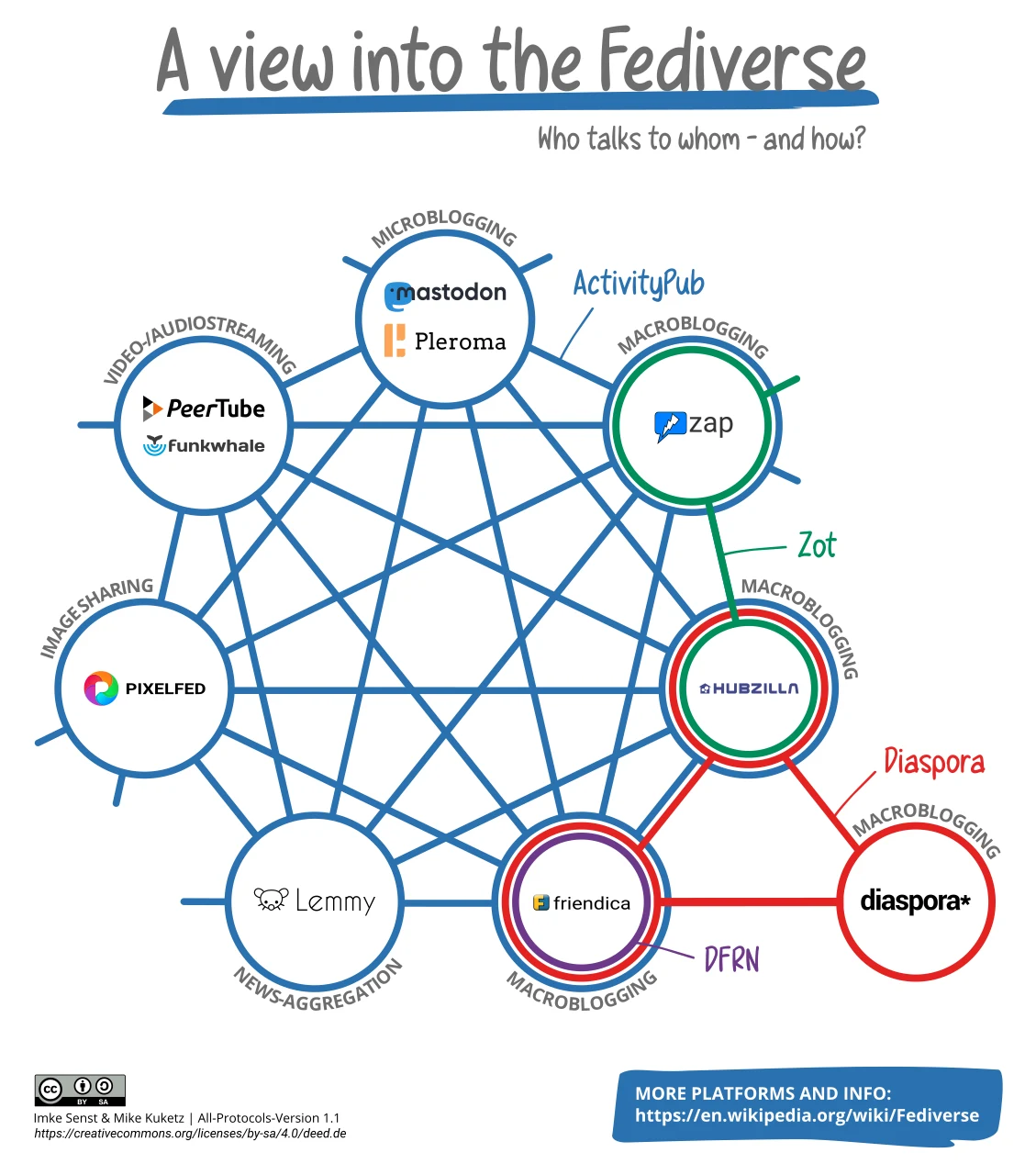
The fediverse: different platforms that can talk to each other. Diagram from 2022. Image: Imke Senst & Mike Kuketz, Wikimedia Commons, CC BY-SA 4.0.
The practical consequences:
- Your server is your provider. It stores your account, sees your email address and IP address, sets the rules and does the moderation. The Mastodon software is open source. Its developer, Mastodon GmbH in Germany, lost its non-profit status and has been moving the project to a new foundation since 2025, according to joinmastodon.org; a US non-profit, Mastodon, Inc., supports it. But each server is run by someone else: a company, an association, a volunteer.
- Your posts are copied to other servers. When someone on another server follows you, your posts are delivered to that server too. That’s how federation works, and it’s also why you can’t fully control a post once it’s out.
- No algorithm decides your feed. Your home feed shows the people you follow, newest first.
What’s private on Mastodon, and what isn’t
Mastodon sets visibility per post, not per account. The four options:
| Visibility | Who can see it | Good for |
|---|---|---|
| Public (default) | Anyone, also without an account; appears in public feeds | Normal public posting |
| Quiet public | Anyone with the link or on your profile; hidden from public feeds, hashtags, trends and search | Replies and posts you don’t want to promote |
| Followers | Only your followers and people you mention | Posting to a known audience, if you approve followers yourself |
| Private mention | Only the people you mention | Short, non-sensitive messages |
Two things to know:
- Private mentions are not encrypted. Mastodon’s own documentation warns not to share sensitive information this way: the administrators of your server and the recipient’s server can access them. Use Signal for anything private. Mastodon 5.0, in beta since 4 November 2026, renames private mentions to “Messages”, with their own composer; neither the announcement nor the beta’s release notes mention encryption.
- Followers-only only works if you approve followers. Otherwise anyone can follow you and read your earlier followers-only posts. Turn off Automatically accept new followers first (see below). Copies still sit on your followers’ servers, and Mastodon’s default privacy policy warns that other servers may not limit access as well. And you can’t make old public posts private afterwards.
Deleting posts sends a deletion request to other servers (Mastodon servers remove the post when they get it), but you can’t check that every server honours it, and screenshots and archives exist. Treat public posts as permanent.
What about Nostr?
Nostr is another decentralised alternative to X. It isn’t part of the fediverse: you post through relays with a key pair instead of an account on a server. For public posting the trade-offs are similar. Its direct messages are a different story:
- Older Nostr DMs (NIP-04) openly show who is messaging whom, and when. The protocol’s own spec calls them deprecated and says they must not be used for anything you need to keep secret.
- Newer DMs (NIP-17) hide the sender and the real time, but the message still names the recipient’s key, relays see your IP address, and there is no forward secrecy unless you turn on disappearing messages: if your key leaks, past messages can be read.
The authors of Nostr’s encryption spec say so themselves: in high-risk situations, use dedicated end-to-end encrypted messaging and limit Nostr to exchanging contacts. For anything sensitive, that means Signal, or SimpleX if you don’t want to give a phone number. Sources: Nostr specs NIP-04, NIP-17 and NIP-44.
Settings worth checking
These steps are for the web version of Mastodon 4.7 (the current release). Not every server runs the latest version; see the note at the end of this section. Servers already testing Mastodon 5.0, mastodon.social among them, have a new layout: there, Settings is in the menu under your account; the settings pages themselves are the same.
1. Privacy and reach. Click Preferences in the menu on the left, then Privacy and reach in the settings menu. (Also under More → Privacy and reach.) Click Save changes at the bottom when you’re done.
- Automatically accept new followers: on by default. Turn it off if you want to decide who follows you. Needed if you use followers-only posts, so do this before your first one.
- Include public posts in search results: off by default. Leave it off unless you want strangers to find your posts by keyword.
- Include profile page in search engines: on unless your server changed the default. Turn it off if you don’t want your profile in Google or Bing. Mastodon notes that total exclusion from all search engines can’t be guaranteed for public information.
The same page has Feature me in discovery experiences: with it on, you and your public posts can be suggested to other users and others can add you to their collections. Turn it off if you’d rather not be promoted.
2. Follows and followers. Since Mastodon 4.6 this switch is on your profile: open your profile, click Edit profile, then Customize under Profile display settings, and turn off Show ‘Followers’ and ‘Following’. It saves as soon as you flip it. Who you follow says a lot about you. Mastodon notes that these display settings may not apply for people on other servers or in third-party apps.
3. Default visibility (optional). Under Preferences → Posting defaults, set Posting visibility to Quiet public or Followers only if most of what you post isn’t meant for everyone, then Save changes. The same page has Who can quote (Anyone, Followers only, Just me) for quote posts. You can still choose per post.
Older servers: on Mastodon 4.4 and older, Privacy and reach is a tab under Public profile and posting defaults are under Preferences → Other. Up to 4.5, the follows switch is on the Privacy and reach page itself, as Show follows and followers on profile.
Already have an account? The same settings apply. Two things don’t change by themselves: posts you already published keep their visibility, and followers you already have keep seeing your followers-only posts. To remove followers, go to Preferences → Follows and followers, choose Followers, tick the accounts and click Remove selected followers.
In the apps: the official Android app’s own Privacy and reach screen only has the discovery and post-search switches; use the web version for the rest.
Choosing a server
This is the decision that matters most, because your server holds your data and can read your private mentions:
- Start from the list on joinmastodon.org. Servers there have committed to the Mastodon Server Covenant: active moderation, daily backups, more than one person with emergency access, and at least three months’ notice before shutting down.
- Look at who runs it and where. The list can be filtered by language, region (where the provider is legally based) and legal structure. A server run by an association or organisation in your own region means its rules and the law it falls under are easier to understand.
- Read the rules and the privacy policy on the server’s “About” page.
- Bigger isn’t always better. mastodon.social is run by the Mastodon organisation itself and is the easiest start, but also the most crowded. For Dutch-speaking readers, mastodon.nl is the largest Dutch-language server in the official list (run by Stichting Activityclub; new sign-ups need approval).
Moving later is possible. Mastodon can move your followers to a new account on another server (if their server software supports it), and you can take your follows, lists and blocks with you. Your old posts don’t move: you can download them as an archive, but not import them. Download that archive and anything else you need first: after the move you lose access to the old account, and you can’t move again for 30 days. So choosing well at the start saves you trouble.
Apps
The web version works in any browser. On phones:
- Official Mastodon app for Android and iOS; the Android version is also on F-Droid.
- Tusky on Android, open source (now developed on Codeberg) and on F-Droid, if you prefer a different design.
Both connect directly to your own server.
When this is overkill, and when it isn’t enough
If you mainly read news and follow a few people, you don’t need to tweak anything: sign up, keep your posts public, and don’t put anything sensitive in private mentions.
If you’re at higher risk, for example a journalist or activist, remember that your server knows your email and IP address and can be asked for them under the law that applies to it. Choose a server whose operator and jurisdiction you trust, sign up with a separate email address (see email aliases), and keep all sensitive contact on Signal.
Next step
- Pick a server on joinmastodon.org and sign up.
- Go to Preferences → Privacy and reach and set the three settings there, then turn off Show ‘Followers’ and ‘Following’ under Edit profile if you want (see above).
- Move any private conversations to Signal.
Related
- Signal setup guide — for the private conversations Mastodon can’t protect
- Email aliases — a separate address for your Mastodon account
- Metadata removal guide — strip location data from photos before you post them