Truecaller review and alternatives — scam protection versus privacy
Truecaller shows who is calling before you pick up and blocks known spam numbers, using a shared database of numbers and names. This page reviews what it collects and compares it with the alternatives, including what your phone already does.
Truecaller review and alternatives
Truecaller shows who is calling before you pick up and blocks known spam numbers, using a shared database of numbers and names. This page reviews what it collects and compares it with the alternatives, including what your phone already does.
Who is this for? Anyone who gets spam or scam calls and wonders whether Truecaller, or an app like it, is worth installing. If you just want the short answer, it’s in the first section.
Every caller-ID app has the same trade: to tell you who an unknown number is, someone has to keep a database of numbers, and that database is built from what other people’s phones report. The question is how much of your data, and other people’s, goes into it.
The short answer
- Mostly bothered by nuisance calls? Turn on the spam filter your phone already has (Google’s Phone app on most Android phones, call screening and the spam filter on iPhone). It handles the bulk of them without an extra app.
- Worried about scam calls, for yourself or someone close to you? A caller ID that shows a name is a real safety tool: if the caller says they’re from the bank and the screen shows a private person’s name or a spam label, you know to hang up. Truecaller does this best because its database is the biggest. That costs privacy, yours and that of people who never signed up, and for some readers the safety is worth that price.
- On GrapheneOS? There is no caller ID built in, so you choose between an app like Truecaller and a blocker that works on your phone, such as SpamBlocker. See GrapheneOS.
- Want spam warnings without sending anything? Should I Answer? checks numbers against a database stored on your phone. It tells you a number was reported, not whose it is.
- Not on Truecaller and don’t want to be listed? You can unlist your number, whether or not you use the app.
How caller-ID apps work
A phone number on its own tells you nothing. To show “Possible scam” or a business name, an app has to look the number up somewhere. There are two ways to do that:
- Online lookup: the number that calls you is sent to the provider’s server, which answers with a name or a spam rating. The provider learns who calls you, and when. Google’s Phone app and Truecaller on Android work this way.
- Local database: the app downloads a list of known spam numbers to your phone and checks against that list on the phone itself. Nothing about the call leaves your device. Should I Answer? works this way, and so do iPhone apps that use Apple’s Call Directory extension, which hands the phone a list of numbers to identify or block.
Apple added a third way with iOS 18: Live Caller ID Lookup, an online lookup in which the number is encrypted so the server can answer without seeing which number you asked about. Apple built it on homomorphic encryption and published the code. Truecaller uses it on iPhone from iOS 18.2.
The database itself is built from user reports: people marking a number as spam, suggesting a name, or (in Truecaller’s older model) uploading their whole address book. That’s where the privacy question sits: not only what the app knows about you, but what it knows about everyone in your contacts.
Safety or privacy: choosing the trade
This is the real decision on this page, and there’s no answer that’s right for everyone.
What a name on the screen buys you. Phone scams usually start with a story: the bank’s fraud desk, the police, a parcel service, a family member with a new number. A spam list can only say “this number was reported”. A name-based caller ID can show who the number actually belongs to, and the mismatch is the warning: the caller says “your bank”, the screen says a private name, “Spam” or a different company. That is exactly the moment a scam call can be stopped, before any money moves. A spam label only appears once enough people have reported the number; a name can show up even for a number nobody has reported yet, if the app knows whose it is.
What it costs. Name databases are built from what users report about other people’s numbers, so the protection you get is partly paid for with data about people who never chose to be in it. You also give the app your own name and number, and on Android a lot of access to your phone. Truecaller, the app with the biggest name database, is funded by ads.
Where it doesn’t help. If a scammer spoofs the bank’s real number, a name-based caller ID shows the bank’s name too. The only defence there is the habit: hang up and call the number on your card yourself.
So who should choose what?
- If phone scams are a real risk for you, or you’re setting up a phone for someone who would believe a convincing caller (an older parent, someone who was scammed before), the safety benefit can outweigh the privacy cost. Truecaller is a defensible choice there; use the ways to limit what it gets.
- If you rarely get suspicious calls and you’d recognise the “bank” story, the built-in filter or a local list is enough, and you don’t need to add an app that collects this much.
- Either way, the habit matters more than the app: a number on your screen never proves who is calling.
Comparison table
| Google Phone (Android) | iPhone built-in | Truecaller | Hiya | Should I Answer? | SpamBlocker | |
|---|---|---|---|---|---|---|
| Price | Free | Free | Free with ads; Premium subscription | Free; paid version via in-app purchases | Android: free with in-app purchases; iPhone: database subscription after a 1-month trial | Free, open source |
| Lookup | Online (unknown numbers sent to Google) | Local, plus business names from Apple or your carrier, and optional apps | Online; on iPhone via Apple’s encrypted lookup | Online | Local database on your phone | Your own rules on the phone; optional online lookup services |
| Your contacts | Not sent to Google | Stay on the phone | EU: read on the phone only; elsewhere the policy lists address-book access | Processed, may be stored | Read on the phone, not sent | Read on the phone, not sent |
| Ads / tracking | Google account ecosystem | None | Yes; App Store label: identifiers and usage data used for tracking | Ads and marketing in policy | None declared (“no data collected” on iPhone) | None; offline features collect no data |
| Who runs it | Google (US) | Apple (US) | Truecaller (Sweden; outside Europe you contract with its Indian entity) | Hiya (US, EU office in Hungary) | Mister Group (Czech Republic) | Independent open-source developer (aj3423 on GitHub) |
| Best for | Every Android user, as the baseline | Every iPhone user, as the baseline | People at real risk of phone scams who want a name on unknown numbers | Samsung owners who already have it built in | Android users who want more than the default without sending call data | GrapheneOS and other de-Googled Android phones |
Truecaller
What it does
Truecaller identifies unknown callers by name, labels and blocks spam, and lets you search a number to see who it belongs to. On Android it can replace your phone app and SMS app. The paid Premium tier removes ads and adds features such as unlimited lookups, “who viewed my profile” and, in a handful of countries (not the Netherlands or most of the EU), an AI assistant that answers calls for you. It’s the best-known app in this category: over a billion downloads on Google Play.
Premium is a subscription that costs real money, and the price varies by country. Check your own app store before subscribing.
What it collects
Truecaller’s privacy policy differs by region, and the difference matters:
- In the EU, EEA, UK and Switzerland (policy updated 3 June 2026), Truecaller says it reads your contacts on the phone only, to recognise callers you already know, and does not upload them. Truecaller’s Google Play listing now makes the same claim in general: “Truecaller does not upload your phonebook”.
- Outside Europe, the policy (updated 3 July 2026) lists “access to device address book” among the data collected, alongside location, the apps installed on your phone, your advertising ID, and call and message logs. Data may be processed in India.
- Everywhere, the free version is ad-supported according to its store listing and privacy policy. Apple’s privacy label for Truecaller says identifiers and usage data may be used to track you across other companies’ apps and websites, and that location, contact info, search history and purchases may be linked to your identity.
You also give Truecaller something to work with: your own name and number are required to create a profile, and that profile is shown to other users when you call them (you can make your name private).
Truecaller and people who never signed up
This is the part that has drawn the most criticism. Truecaller can show a name for your number even if you have never installed it, because other users report or suggest names for numbers that call them. In Europe, Truecaller says a suggested name is only shown once it has been “verified through consistent community input”, and that it deletes name suggestions and spam reports after two years.
Earlier versions of Truecaller built much of this directory from uploaded address books. In 2017 the EU’s Article 29 Working Party (now the European Data Protection Board) sent Truecaller questions about its data practices; Truecaller confirms the enquiries, and according to Privacy International they were about processing non-users’ data without consent. In 2019 Privacy International asked Truecaller to notify non-users by text message when their number is added. Truecaller’s current EU policy relies on two legal bases for non-users: a Swedish publishing certificate (utgivningsbevis) for its search database, which under Swedish constitutional press-freedom law exempts parts of the processing from the GDPR, and legitimate interest for the rest.
The question isn’t settled worldwide either. In September 2026 the Lagos State High Court in Nigeria dismissed a privacy case brought on behalf of non-users, but in its reasoning rejected the idea that a user’s consent to upload contacts counts as consent from the people in those contacts. The case failed because the court found no proven harm, not on the consent argument. (The judgment isn’t online; this follows the Nigerian newsroom The ICIR, which quotes a certified copy.)
What you can do as a non-user: unlist your number at truecaller.com/unlisting. According to Truecaller’s help pages it can take up to 24 hours, unlisting can’t be reversed, and a number marked as spam can’t be unlisted. You can’t check from outside whether your number has reappeared other than by searching for it.
On iPhone
Truecaller on iPhone is a different, more limited app: Apple doesn’t let third-party apps see your calls the way Android does. Since iOS 18.2 it uses Apple’s Live Caller ID Lookup, which means the lookup of an incoming number is encrypted and routed through Apple’s relay servers, so Truecaller’s server can answer without seeing which number you asked about. For the call lookup itself, that’s the most privacy-friendly online lookup on this page. According to Truecaller’s help pages, full caller ID on all incoming calls needs Premium, and it only works once you turn on Truecaller’s switches in Settings → Apps → Phone → Call Blocking & Identification. The rest of the app (profile, search, ads, the privacy label above) still applies.
Limiting what Truecaller gets
If you decide the safety is worth it, you can still keep its footprint smaller:
- Decline personalised ads when the app asks for consent. In Europe, Truecaller’s policy ties targeted ads to your consent choices.
- Turn off call-pattern analysis in Settings → Privacy Center: the switch “Allow Truecaller to analyze your call patterns to improve spam detection and provide additional information on incoming calls”. Truecaller says it uses anonymised incoming and outgoing calls from its network to map how numbers are connected, and that registered users can opt out.
- On GrapheneOS, use Contact Scopes (Settings → Apps → Truecaller → Permissions → Contacts and accounts → Contact Scopes → Enable Contact Scopes) to give it none or only some of your contacts. Truecaller then can’t see any contacts until you add a contact, label, number or email, and only gets read access to those; switching it on also takes away the normal Contacts permission if you’d already given it. In Europe Truecaller says it reads contacts on the phone only, but this way it doesn’t see them at all. We haven’t tested how much of Truecaller’s display of your own contacts’ names still works then.
- On iPhone, the encrypted Live Caller ID lookup keeps the number lookup itself private.
- If you stop using it, deactivate your account first (in the app: Settings → Privacy Center → Deactivate), then unlist your number at truecaller.com/unlisting, so your profile doesn’t stay behind. That is the order Truecaller’s help gives.
Verdict
Truecaller does one thing better than anything else on this page: it puts a name on numbers you don’t know, which can expose a scam call while it’s happening. It’s also an ad-funded app that wants your name, your number and, on Android, a lot of access to your phone, and its directory includes people who never agreed to be in it. For someone at real risk of phone scams, that trade can be worth it; limit what it gets with the steps above. For readers who mostly get nuisance calls, the built-in options below are enough.
The alternatives
Google Phone app — already on most Android phones
If your phone uses Google’s Phone app (Pixel and many other Android phones), caller ID and spam protection is on by default. According to Google, when a number that isn’t in your contacts calls you, or you call it, that number is sent to Google to look up a business name or a spam rating. Google says it doesn’t get the numbers in your contacts.
What to set: in the Phone app, tap More options (⋮) → Settings → Caller ID and spam and turn on Filter spam calls if you’d rather not hear them ring at all; you get no missed-call or voicemail notification for them, but filtered calls still appear in your call history. Phones with automatic Call Screen don’t have that switch: there, blocking spam is one of the Call Screen options (Settings → Spam and Call Screen or Call Screen). Call Screen, which answers unknown callers for you, works mainly on Pixel phones, and only in a list of countries that doesn’t include the Netherlands (automatic in Australia, Canada, Ireland, the UK and the US; manual in a few more, such as Germany and France). Fake call detection, which warns when a caller hides their identity or impersonates one of your contacts, needs Android 12 or later, the Phone by Google, Contacts and Google Messages apps, and RCS turned on in Google Messages.
The trade-off: Google learns which unknown numbers you call and receive calls from. If you already use Google’s apps, that adds little. If you’ve moved away from Google (on GrapheneOS, for example), this isn’t the route for you.
GrapheneOS — no caller ID built in
GrapheneOS ships its own phone app without Google, and it does no online number lookup: you can block individual numbers, but there’s no spam database and no caller-ID service. Names come only from your contacts, or from your carrier if it sends one. Nothing needs turning on; the feature simply isn’t there. Your options:
- Truecaller’s Android app can be installed on GrapheneOS; we haven’t tested it there. It gives you the name-based caller ID described above, with the same privacy trade. Use Contact Scopes to limit what it sees of your contacts.
- Google’s Phone app can be installed with sandboxed Google Play. Users on the GrapheneOS forum report that calls in secondary user profiles still go to GrapheneOS’s own phone app, so it’s most useful in the main profile. It sends unknown numbers to Google, as on any Android phone.
- A rule-based blocker such as SpamBlocker (from F-Droid) or a local spam list such as Should I Answer? sends nothing about your calls by default, but tells you only whether a number matches your rules or was reported, not whose it is.
If you moved to GrapheneOS to get away from Google and data collection, SpamBlocker fits that choice best. If you or someone you set the phone up for is a likely scam target, Truecaller with Contact Scopes is the more protective route.
iPhone — screen, silence or filter
iPhone has no community spam database of its own, but it has strong local tools. In Settings → Apps → Phone:
- Screen Unknown Callers → Ask Reason for Calling: the iPhone asks callers who aren’t in your contacts why they are calling before your phone rings. Or choose Silence to send them all straight to voicemail.
- Call Filtering → Unknown Callers moves missed calls and voicemails from unknown numbers to a separate list.
- Call Filtering → Spam silences calls your carrier identifies as potential spam or fraud, sends them to voicemail and moves them to a separate Spam list. It only catches what your carrier flags.
Add the numbers that matter (doctor, school, work) to your contacts first, so screening never catches them. Screening isn’t applied while you’re roaming, and it turns off for 24 hours after you call emergency services.
Hiya — built into many Samsung phones
Hiya is the company behind Smart Call on many Samsung phones, depending on country, and also offers its own app. Hiya is based in Seattle with an EU office in Budapest. Its privacy policy says the app processes the numbers in your contacts to recognise callers, and that it “may store this information” for data validation for you and other users. The policy also covers marketing and advertising use, and Hiya’s newer AI Phone app processes call audio in real time to detect scams. According to Hiya’s app listing, its real-time scam and AI-voice detection works only in the US and Canada.
If Smart Call is already on your Samsung phone, using it adds no new company to the picture. Installing the separate Hiya app instead of, say, Should I Answer? gives you little extra privacy-wise.
Should I Answer? — a local database, contacts stay on your phone
Should I Answer? is made by Mister Group, a Czech company, and works differently from the others: it downloads a database of reported numbers to your phone and checks incoming calls against it offline. The company says your contacts and your own number are read on the phone and never sent. Reports are checked by an administrator before they are added to the shared database; the app listing calls them anonymous, but the privacy policy says reviews you write are public and linked to your account, which is tied to your email address (the email itself isn’t shown publicly). It collects anonymous statistics about unknown numbers that call you, to spot new spam waves.
On iPhone, Apple’s privacy label says “no data collected”. The iPhone version needs a small monthly database subscription after a one-month trial; the Android version is free with optional in-app purchases. The Android app was last updated in July 2026, the iPhone app in October 2021.
The trade-off: a local database is only as good as its last update and its users in your country. It won’t name a business the way Google or Truecaller can; it tells you whether a number has been reported, and what others said about it.
SpamBlocker — open-source rules for Android
SpamBlocker is a free, open-source (MIT) call and SMS blocker for Android 10 and later, available from F-Droid and GitHub. It doesn’t replace your phone app, so it works next to GrapheneOS’s own dialer. Instead of a name database, it works with rules you choose: allow your contacts and numbers you’ve called, let repeated calls through (someone who really needs you tends to call back), block by number pattern or country, and optionally check a downloadable spam database or query online lookup services such as PhoneBlock in real time.
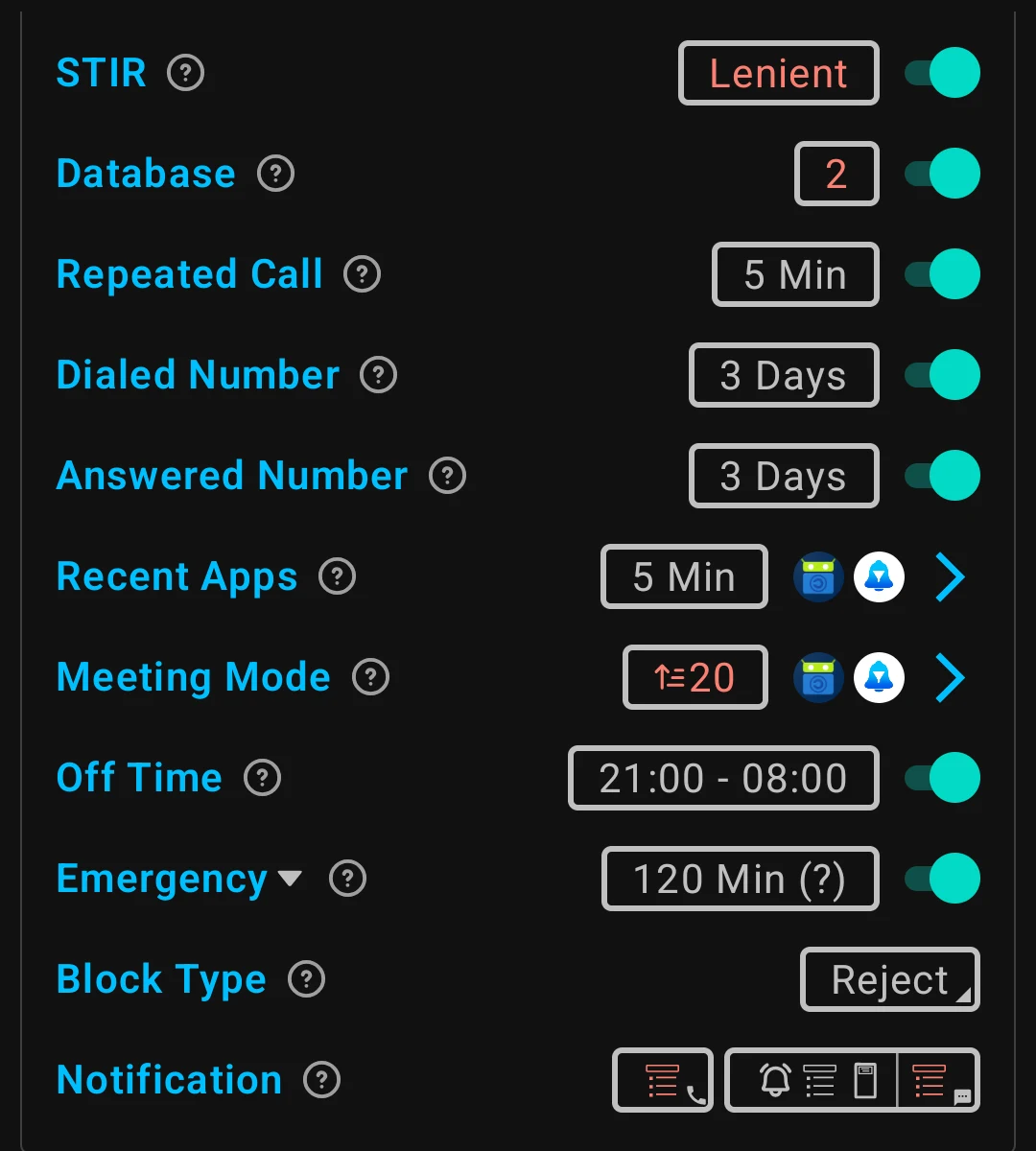
SpamBlocker’s rule settings. Screenshot: SpamBlocker project (MIT licence), GitHub.
Together with the iPhone’s built-in tools, it’s the most private option on this page: according to the developer, the offline features collect no data at all, and the online ones (instant lookup, reporting) show the lookup server only your IP address, your connection fingerprint and the number being checked. Builds on F-Droid are reproducible.
The trade-off: it takes some setting up, and like Should I Answer? it can’t tell you who a number belongs to, so it won’t expose a scammer whose number nobody has reported yet.
What your carrier and the law do (Netherlands/EU)
Apps only deal with the call once it reaches you. Much of the spam problem is spoofing: a call from abroad that shows a Dutch number, or even your bank’s number.
In the Netherlands, misusing caller ID is already prohibited, but according to the government that rule doesn’t fit new tricks or the longer chain of carriers behind spoofed calls, and networks abroad that use Dutch numbers are a relatively large source of spoofing. From 10 July to 9 October 2026 the government consulted on a draft amendment to the Telecommunications Act that would, as a general rule, ban lasting use of Dutch numbers abroad (with exceptions) and widen and tighten the caller-ID ban, so spoofed calls from abroad are harder to make. It’s a draft, not law yet, and it makes spoofing harder rather than impossible.
Until then, the most reliable rule is behavioural: a number on your screen proves nothing. If a “bank” calls, hang up and call the number on your card yourself.
Which one for whom
| Profile | Practical route |
|---|---|
| Normal user | The built-in filter. On iPhone, Ask Reason for Calling; on Android, Google’s spam filter. Stop there. |
| Privacy-conscious | Built-in filter; on GrapheneOS or Android without Google, SpamBlocker or Should I Answer?. Unlist your number from Truecaller. |
| At real risk of phone scams, or setting up a phone for someone who is | Truecaller, with your name private and its access limited, plus the hang-up-and-call-back habit. |
| Small business owner | Built-in filter, but don’t silence unknown callers if customers call you; use the spam filter instead. |
| Stalking or harassment | Avoid apps that publish a profile with your name. Unlist your number from Truecaller and block, don’t engage. |
Caveats
- None of these stops spoofed calls. A scammer showing your bank’s real number will often get through any filter, and a name-based caller ID will even show the bank’s name. The defence is calling back yourself.
- Silencing unknown callers has a cost: delivery drivers, a new doctor’s office or a callback from a company you contacted may end up in voicemail.
- Privacy policies change. The claims above are from the providers’ own policies and store listings as of November 2026; they’re the companies’ statements, not something we can verify from outside.
- Regional differences are large. Truecaller’s coverage, Hiya’s Samsung integration and Google’s caller ID all depend on country.
Conclusion
This is a safety-versus-privacy choice, and the right answer depends on who is holding the phone. If you mostly get nuisance calls, switch on the spam filter and call screening your phone already has; on GrapheneOS or without Google, add SpamBlocker or Should I Answer?. If phone scams are a real risk, for you or someone you look after, Truecaller’s name display is the strongest warning on this page, and it’s worth its privacy cost when you limit what it gets. Whatever you choose: a number on your screen never proves who’s calling, and if you don’t use Truecaller, it’s still worth unlisting your number.
Next step
Set up what you already have
- iPhone privacy settings — the other settings worth changing while you’re in there
- Android privacy without a custom ROM — what to change on a normal Android phone
- GrapheneOS first setup — the rest of a new GrapheneOS phone’s setup
Want to go further?
- The normal baseline — where call filtering fits in your overall setup
- Profile: stalking or harassment — when your number being findable is part of the problem