Ledger hardware wallets review — wide support, a partly closed OS, and one paid backup path
Ledger makes hardware wallets that keep your crypto keys on a certified chip: the Nano S Plus, Nano X and Nano Gen5, plus the Flex and Stax touchscreens. We look at what it means for privacy and trust.
Ledger hardware wallets review
Ledger makes hardware wallets that keep your crypto keys on a certified chip: the Nano S Plus, Nano X and Nano Gen5, plus the Flex and Stax touchscreens. We look at what it means for privacy and trust.
Who is this for? Anyone who holds crypto and is deciding between Ledger and Trezor. If you want the widest coin support, a polished phone app or a touchscreen, Ledger is a real option. If open firmware and no vendor backup path matter most, the Trezor Safe 3 is our first choice.
Ledger is the other big name in hardware wallets, and its five current devices share the same security design: a certified secure element chip, a secure operating system and a screen on the device where you confirm every transaction. The differences between the models are the screen, the connections and the price. The reasons for caution are not about whether the devices work; they are about what you have to trust, and about four episodes in Ledger’s history that you should know before buying. Everything below comes from Ledger’s own pages, read on 8 November 2026, unless it says otherwise. Ledger has also announced the Ledger Atom, a larger device it expects to ship in summer 2027; it is not on sale yet and not covered here.
The range at a glance
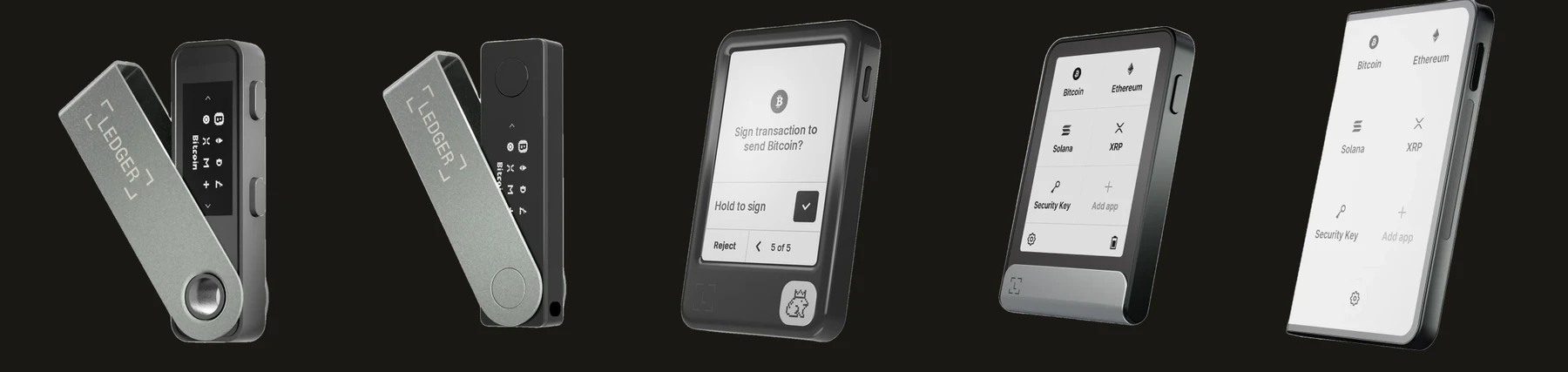
The current range, left to right: Nano S Plus, Nano X, Nano Gen5, Flex, Stax. Product images: Ledger (shop.ledger.com), cropped; used for identification, all rights with Ledger.
| Model | Screen | Connections | Secure element | Price (EU / US) |
|---|---|---|---|---|
| Nano S Plus | 1.1” OLED | USB only (no iPhone) | CC EAL6+ | €59 / $69 |
| Nano X | 1.1” OLED, no touch | USB-C and Bluetooth, battery | CC EAL5+ | €99 / $99 |
| Nano Gen5 | 2.8” E Ink touchscreen | USB-C, Bluetooth, NFC | CC EAL6+ | €179 / $179 |
| Flex | 2.8” E Ink touchscreen, Gorilla Glass | USB-C, Bluetooth, NFC | CC EAL6+ | €249 / $249 |
| Stax | 3.7” curved E Ink touchscreen | USB-C, Bluetooth, NFC, Qi charging | CC EAL6+ | €399 / $399 |
Prices are Ledger’s own shop prices for the Netherlands and the United States, and change with promotions and region; check the shop before you buy. The older Nano S has been discontinued.
Two practical points sit behind the table:
- The touchscreens add protections the classic Nanos lack. Ledger says its classic Nanos (S Plus and X) do not support newer protections such as Transaction Check and the Recovery Key. The Gen5, Flex and Stax include a Recovery Key in the box.
- The screen is part of the security. On the touchscreen models, Ledger says the screen is driven by the secure element itself, so a compromised computer or phone cannot change what you read there; Ledger calls the classic Nanos’ screens secure too. This is the same logic as on the Trezor: confirm the address and amount on the device, never in the browser.
What makes Ledger different
Wide coin support. Ledger says its devices manage more than 15,000 coins and tokens through the Ledger Wallet app and supported third-party wallets. If you hold less common coins or a lot of different tokens, this is the main reason to choose Ledger.
A real phone app, without an account. The Ledger Wallet app (formerly Ledger Live) runs on desktop, iOS and Android. Ledger says it keeps your data on your own phone or computer, so you do not sign in with an email address and password; the only login is the optional Ledger Recover one. It is not supported inside virtual machines, so use a normal computer.
Several ways to connect. The Nano S Plus is cable-only and does not work with iPhones. The Nano X and the touchscreens add Bluetooth, and the touchscreens add NFC.
On trust models
Ledger is widely sold, and we still point privacy-conscious readers to Trezor or Coldcard first. The reasons:
- Part of the OS is closed. Ledger says most of its code is open source (Ledger Wallet, the Secure SDK, the apps on the device), and that the OS command dispatcher and the entry points of Ledger Recover can be reviewed. The code that drives the secure element’s security hardware stays closed because the chip maker, STMicroelectronics, owns it. Ledger’s answer is audits by its own Donjon team plus a third-party lab under NDA. That is a defensible trade-off, but it means you trust audits you cannot read, not code you can.
- Ledger Recover exists on the device. Announced in May 2023 and paused after the backlash, it launched later as an optional subscription. Ledger describes it as a “digital spare key” created and encrypted inside the secure element, split into three pieces, stored by three independent companies in three countries, and released only after your identity is checked online by two companies. It is opt-in, and Ledger says your private keys never leave the device. But using it means a copy of your wallet access exists with third parties, tied to your identity, and the Recover backup and restore commands are part of the device’s operating system itself, so they are on the device whether or not you ever subscribe. Ledger published the Recover protocol white paper and that part of the OS code on GitHub in 2023, under a licence that allows reading it and building it for your own Ledger but not reusing it: the source is viewable, but it is not open source. That repository has not changed since October 2023, and the rest of the implementation is not public.
- Bluetooth and NFC add wireless surface. Every Ledger except the Nano S Plus can talk wirelessly. That is convenient, but a device that cannot talk wirelessly has less to attack. The Nano S Plus is the only model without it.
Four things that happened
Ledger Recover (May 2023). The announcement caused a backlash, which press reports at the time tied to a deleted Ledger Support tweet saying it had always been technically possible to write firmware that extracts keys. Ledger’s CEO apologised for how it was communicated, held back the launch until more of the OS was open sourced, and promised to open source more. The service is still sold: Ledger’s shop lists $99.99 a year (€99.99 in the Netherlands) and a free first month.
Customer data leak (2020). Ledger’s own FAQ says its e-commerce and marketing database was exploited from April to June 2020, through a misconfigured key at an email provider: about 1 million email addresses leaked, and about 272,000 customers also had their name, postal address and phone number exposed. Separately, Shopify support staff exported Ledger’s order records in the same months, which Ledger says affected about 292,000 customers (mostly the same people). Buyers after June 2020 or outside Ledger.com were not affected. This is a leak at the shop, not a flaw in the device, but it is a reason to use a separate email address when you order. Trezor had a comparable leak in November 2026, at a shipping partner (about 27,000 orders; see our Trezor Safe 3 review), so a leak of order data no longer sets the two apart.
Connect Kit attack (14 December 2023). An attacker phished a former Ledger employee’s npm account (bypassing 2FA with a session token) and published three malicious versions of Ledger Connect Kit, a library that some crypto web apps loaded at runtime. For hours, those apps could trick users into signing transactions that drained their wallets. Ledger says it deployed a fix within 40 minutes of being alerted, though the malicious file stayed reachable for a while through caching, and that the attacker never had access to Ledger’s own systems. The lesson is the one the device screen exists for: on an unfamiliar web app, read what the device asks you to sign, not what the page says.
Tampered devices from a reseller (October 2026). On 9 October 2026 reports appeared of crypto drained from Ledger wallets bought in Southeast Asia. On 10 October Ledger confirmed that one affected user’s device “contained an unauthorized hardware implant”, and on 11 October that all confirmed cases so far involve devices sold through CryptoBilis, a reseller in Southeast Asia that has stopped selling hardware wallets. CryptoBilis was on Ledger’s own list of official resellers (marked “Sales temporarily paused” when we checked on 12 October and again on 8 November), so buying from a listed reseller did not protect these buyers. According to Ledger’s security lab (13 October), the implant is a separate component inside the casing that reads the screen: when the device shows the 24-word recovery phrase during setup, the implant decodes the words and sends them out over the mobile network (LTE, using a built-in eSIM). It does not change the secure element, the operating system, transactions or signatures. Ledger calls it “a localized distribution attack”: a criminal group bought genuine devices over many months, fitted the implant and put them back on sale through resellers in Southeast Asia. Ledger has asked its resellers to stop selling in Southeast Asia and Hong Kong, and says spot purchases in stores, including in Germany, and checks of its own stock found only clean units. Resellers must now keep Ledger devices off shelves and displays and hand them over at purchase, and may never resell returned units. Ledger says its own systems were not compromised. On-chain analysts at Bitquery counted about $102 million taken from 324 wallets between 9 and 13 October (reported by heise online); Ledger has not confirmed a figure. In Europe, MediaMarkt Saturn stopped selling Ledger devices in mid-October after a customer in Germany reported tampered units bought in its stores (reported by heise online and ForkLog; we found no statement on MediaMarkt’s own site). As of 13 October Ledger had not verified a drain linked to a device bought anywhere other than CryptoBilis, and said it was reviewing reports from other locations. Ledger’s advice to CryptoBilis buyers: do not set up an unused device, and if you already did, move your funds to a new Ledger with a new 24-word phrase (not the old phrase on a new device, since the old phrase may be exposed). CryptoBilis also sold Trezor devices: Trezor says it has since found the same kind of implant in three Trezor Safe 5 devices bought there (12 November; see our Trezor Safe 3 review). Sources: Ledger Support and Ledger on X, 10, 11 and 13 October 2026; Trezor blog, 30 October and 12 November 2026; Ledger’s blog, “Ledger’s Response to the Hardware Implant Attack”, 15 October 2026; Ledger’s reseller page, read 12 October and 8 November 2026; heise online, 16 October 2026; ForkLog, 13 October 2026.
Daily use
You set up the device, write the 24-word recovery phrase on paper (or use the Recovery Key on the touchscreen models), and manage accounts in the Ledger Wallet app. Sending crypto means confirming the details on the device. The devices have a battery-limited lifespan: Ledger says the batteries in the Stax, Flex and Nano X last three to five years on average, and that the devices as a whole should be expected to last a couple of years with good care, so plan for replacement and keep your recovery phrase safe independently of the device.
Never type your 24 words into a computer, phone or website. A real Ledger device only asks for them on its own screen during recovery. A device that arrives with a pre-written phrase or a “setup” card to fill in is a scam.
Caveats
Recover is a trade, not a requirement. You do not need to subscribe, and nothing stops you from using a Ledger as a plain offline device. If you do subscribe, you give up some of the “nobody but me holds this” property in exchange for a way back if you lose your phrase.
The Recovery Key is a backup card, not a second wallet. It is PIN-protected over NFC and, according to Ledger, wipes itself after three wrong PINs, so write the PIN down somewhere safe and separate. It is compatible with the NFC-equipped touchscreen models.
Single-source prices. The prices above are Ledger’s own, read from two regional views of its shop on 8 November 2026. Resellers and promotions differ.
Pros and cons
Pros
- Wide coin and token support (Ledger says 15,000+)
- Certified secure element (EAL6+ on four of five models); on the touchscreens the chip drives the screen
- Polished desktop and phone app, with no account login
- Bluetooth and NFC models that work with iPhone and Android
- Recovery Key included on the touchscreen models
Cons
- Part of the OS is closed, so you rely on audits you cannot read
- Recover’s backup commands are part of the device’s operating system, whether or not you subscribe
- A 2020 shop leak exposed names, addresses and phone numbers of about 272,000 customers
- In 2026, tampered devices with a hardware implant were sold through one of Ledger’s official resellers
- Bluetooth and NFC add wireless surface (the Nano S Plus has neither)
- Batteries and screens wear out; plan to replace the device
Conclusion
Ledger is a capable and widely supported hardware wallet, and a sensible choice if you need its coin range or a touchscreen with a phone app. It is not our first pick for privacy-conscious readers, because you have to trust a partly closed OS, an optional service that shares the secure-element backup with third parties, and a company that has had a shop-data leak, a software supply-chain attack and, in 2026, tampered devices sold through an official reseller in its history.
If you want one default: for most people with Bitcoin and major coins, buy a Trezor Safe 3 (open firmware, no vendor backup path). Choose Ledger if you need its coin support or a touchscreen with Bluetooth and accept the trade-offs. If you do buy a Ledger, the Nano S Plus is the cheapest and the only one without wireless; the Nano Gen5 is the cheapest touchscreen with a Recovery Key.
Logo: Ledger, Wikimedia Commons, CC BY-SA 4.0. Ledger is a trademark of its owner; no endorsement is implied.
Next step
Buy from Ledger’s own shop (shop.ledger.com): after the 2026 reseller incident, Ledger says its direct sales channels were not affected, and being on Ledger’s reseller list did not protect CryptoBilis buyers. Never buy second-hand or from a marketplace seller. Set the device up yourself, and send a small test amount before moving everything.
Similar options
- Trezor Safe 3 review: open firmware, no Bluetooth, the default we recommend first
- For Bitcoin-only with air-gapped operation: Coldcard Mk5 or Q (higher price and complexity). Seeds created on a Coldcard before the July 2026 firmware fix must be moved to a new seed: see the Coldcard note in our Trezor Safe 3 review
Want to go further?
- Aegis Authenticator review: protect the exchange and email accounts around your wallet with a proper authenticator