AI browsers and browser assistants: should you use one?
An AI browser or assistant reads the page you are on and answers questions about it, summarises it, or even clicks for you. For most people the answer is: use one on demand and in a separate profile, and never let it act inside your bank, email or health logins.
AI browsers and browser assistants: should you use one?
An AI browser or assistant reads the page you are on and answers questions about it, summarises it, or even clicks for you. For most people the answer is: use one on demand and in a separate profile, and never let it act inside your bank, email or health logins.
Who this guide is for
Anyone who has seen a “summarise this page” button, a sidebar chatbot or an agent that books things for you, and wonders what it sends where. It is also for people who handle other people’s data at work. It is not a review of each product: the facts below were checked on 14 November 2026, and this market changes monthly.
Two kinds of product, and why it matters
- Assistants inside the browser you already use: Gemini in Chrome, Copilot in Edge, and the many chatbot extensions in the Chrome Web Store. They add a sidebar to a browser that otherwise stays the same.
- Standalone AI browsers: Perplexity’s Comet is one. OpenAI’s ChatGPT Atlas was another, until OpenAI retired it. Others exist (Dia, Opera Neon, Fellou); we did not read their data pages.
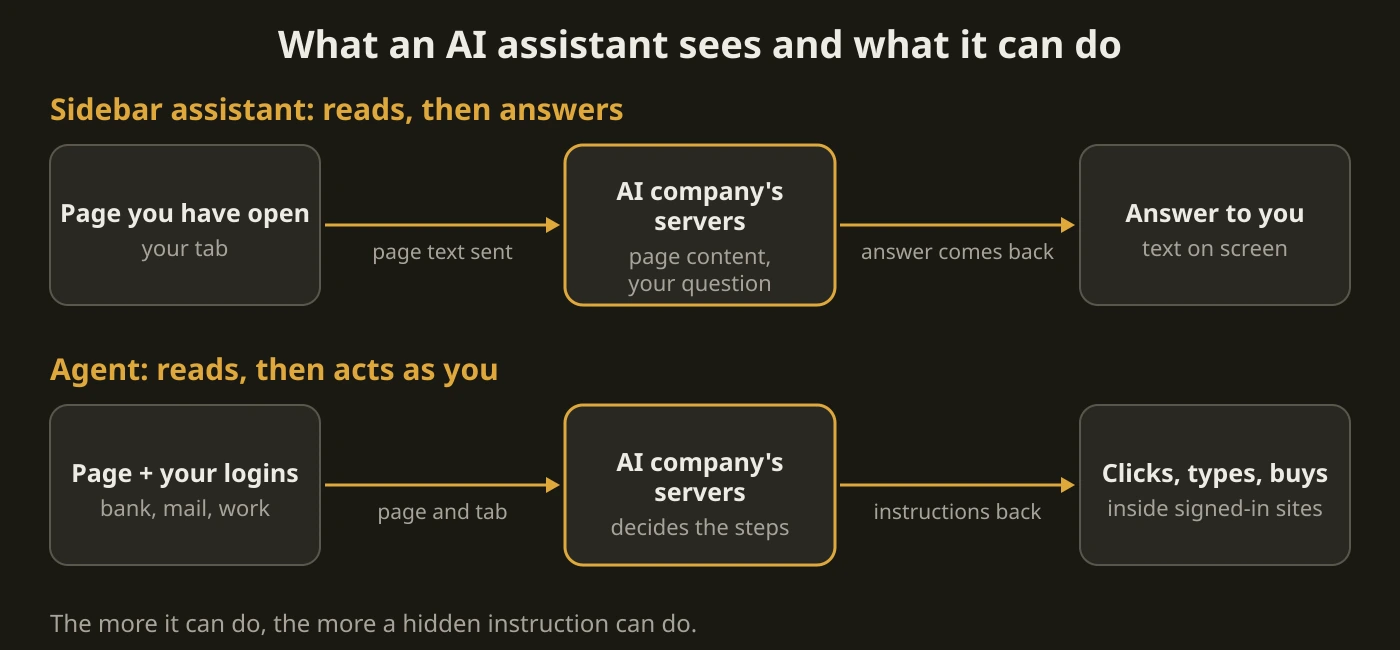
Both kinds usually work by sending what is on your screen, or a summary of it, to a company’s servers. The difference is how much they can see and do: a sidebar mostly reads the page you open it on, an “agent” can click, type and sign in as you.
What the research found
The best independent study we know of is “Big Help or Big Brother?” by researchers at UC Davis, UCL, UC3M and Mediterranea University of Reggio Calabria (arXiv 2503.16586, June 2025). They did not test AI browsers: they tested nine popular Chrome extensions that add an AI assistant (Merlin, Sider, Monica, Harpa, TinaMind, Perplexity, Copilot, ChatGPT for Google and Max AI), in 180 experiments across 20 websites, half of them public and half behind a login. What they found:
- All but one extension generated its answers on the company’s servers, not on your device.
- On pages behind a login, collection ranged from part of the page to a full copy of the page’s HTML.
- Merlin took what people typed into forms. The researchers saw it send medical records from a university health portal, academic records and a Social Security number entered on the IRS website to its servers.
- Sider and Merlin shared chat and user identifiers with Google Analytics, and TinaMind with analytics.google.com. Merlin also shared the raw questions.
- Monica and Sider built a profile of the user (location, age, gender, income, interests) and used it to personalise answers, including in unrelated contexts. Perplexity and TinaMind showed no strong sign of profiling.
- Most privacy policies did not match what was observed; Perplexity’s was the exception that disclosed everything the researchers saw. All of them said or hinted that they collect no personal or sensitive information, and none addressed what happens to page content from private pages.
Limits. This was a 2025 test of Chrome extensions, and extensions change. It does not describe Comet, Gemini in Chrome or Edge, and we have not seen an equivalent independent audit of those. Read it as proof that “an AI sidebar reads everything on the page” is not a hypothetical, not as a ranking.
What the vendors say about their own products
All of this is from each vendor’s own help pages. All four were re-read on 14 November 2026.
- Perplexity Comet: Perplexity says that by default the assistant does not access or upload your browsing history, the full list of your open tabs, cookies, passwords, autofill data or local files, nor what you type on websites unless you send it in a request. When a request needs page content, history items or other tabs, that context is stored for up to 30 days and marked as a “Temporary Session” in your Perplexity library, where you can delete it or remove the expiry (it is then kept). You can switch the assistant off or block it on specific sites.
- Google Gemini in Chrome: when you open it, the page content of your current tab is shared with Gemini by default, and you can stop sharing a tab. It is not available in Incognito, and Google’s list of supported regions includes no EU country, so in the Netherlands you will not see it yet (14 November 2026). The agent feature (“auto browse”) needs a personal account, is limited to adults in the US with a paid Google AI plan, and Google states you are responsible for what Gemini does during a task, including purchases.
- Microsoft Edge, Browse with Copilot: for consumers it is rolling out to Microsoft 365 Premium subscribers in the US, with more markets to follow (14 November 2026). Microsoft says Copilot takes screenshots of the pages it works on and keeps them up to 30 days (not used for training), and can use cookies, so on sites where you are signed in it is signed in too. Microsoft’s own advice is to avoid financial activity, personal identifiers such as ID numbers, and medical records, and it calls the feature experimental.
- OpenAI’s ChatGPT Atlas has been retired and gets no more updates. OpenAI’s help page says bookmarks, open tabs and history do not transfer automatically, and that deleting your ChatGPT chats or uninstalling Atlas does not delete its browser memories, cookies or other Atlas data; for that it points to its Privacy Portal or support. The lesson is practical: a young product can vanish, and what you handed it should be deletable.
The real risk: pages that give the AI orders
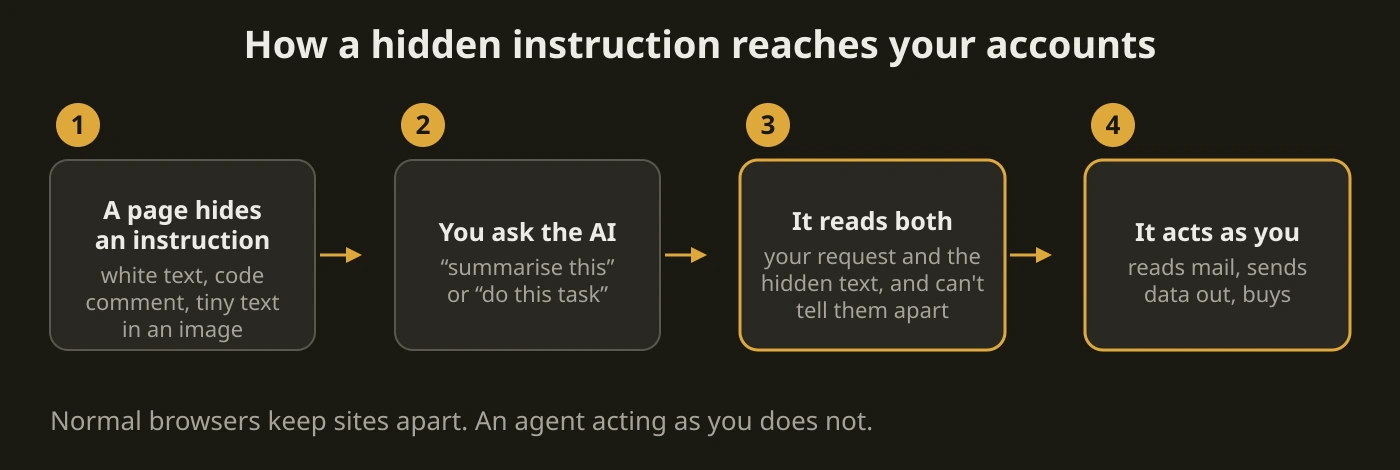
Everything above is about where your data goes. The bigger risk in 2026 is prompt injection. The AI cannot reliably tell the difference between your instruction and text on a web page, so a page (or a comment, or an email) can contain hidden instructions: white text on white, a comment in the code, text hidden in an image. If the assistant can act, it may follow them.
- Brave’s security team showed this on Comet in August 2025: asking it to summarise a web page could be turned into reading data from another tab. Perplexity fixed part of it, and Brave reported on 20 August 2025 that the attack was not fully mitigated. In October 2025 Brave added a version using near-invisible text in screenshots, and attacks on other AI browsers, including Fellou and Opera Neon (published after Opera’s fix was verified). We have not re-tested any of these, so we cannot say what is fixed today. Note that Brave builds its own AI assistant (Leo) with agent features, so it has a stake in the topic, though the write-ups include the disclosure timelines.
- The vendors say the same thing about themselves. OpenAI wrote in December 2025 that prompt injection, like scams and social engineering on the web, is unlikely ever to go away entirely. Google’s help page lists examples of what an injected instruction could do, such as taking your private information from emails and posting it publicly, and Microsoft’s page says Copilot can be affected by malicious hidden instructions on web pages and recommends watching its activity closely.
- Why logged-in sessions are the danger. The browser’s normal protections stop one site from reading another. An agent acts with your logins, so those protections do not apply to what it is told to do: a hostile comment on a forum can become an instruction aimed at your email or bank tab.
What we recommend
- Default for most readers: do not make an AI browser your main browser. Keep a normal browser for banking, email, health and work. If you want AI help, use it on demand, and on pages you would be happy to paste into a chat.
- If you try one, give it its own profile or browser. No saved passwords, no logged-in banking, email or work accounts, and nothing you would not want a company to hold for up to 30 days. Brave’s researchers likewise say agentic browsing should be kept apart from regular browsing.
- Keep the agent off by default. Summarising an article is a read-only job. Letting an agent click, buy or fill forms is the part with the risk. If you do use it, watch what it does and take over for sign-ins and payments.
- Check the controls once. Turn off page sharing you do not need, block the assistant on sensitive sites, and know where its history, memories and screenshots are stored and how to delete them.
- Skip chatbot extensions you cannot verify. The study’s findings come from exactly this group. If an extension asks to read every site you visit, it can do so.
- If you handle other people’s data (clients, patients, pupils), do not use these on that work unless your organisation has approved it and signed the right agreement. Page content leaves for the vendor’s servers. Our reading is that this is a data-protection issue; see what a data processing agreement is and ask your privacy officer.
When this is overkill
If you only use an AI assistant on a public article now and then, in a profile with no logins, you do not need any of this. The rules above are for agents, for anyone who keeps real accounts open in the same browser, and for work with other people’s data.
Stopping point
You are done when you know which of the two kinds you use, that nothing with a login for money, mail or health is open in the same profile as an agent, and where to delete what it stored.
Next step
Browse with fewer leaks
- Which browser should you choose?
- Firefox privacy setup: hardening without overkill
- Privacy apps guide
- Choose a password manager: keep passwords out of the browser
Sources: Vekaria et al., “Big Help or Big Brother? Auditing Tracking, Profiling, and Personalization in Generative AI Assistants” (arXiv 2503.16586, v2 June 2025); Perplexity Help Center, “Comet Assistant Privacy & Data Use”; Microsoft Support, “Browse with Copilot”; Google Help, “Use Gemini in Chrome” and “Ask Gemini in Chrome to complete tasks for you with auto browse”; OpenAI Help Center, “ChatGPT Atlas retirement”; OpenAI, “Continuously hardening ChatGPT Atlas against prompt injection attacks” (22 December 2025); Brave, “Agentic Browser Security: Indirect Prompt Injection in Perplexity Comet” (20 August 2025), “Unseeable prompt injections in screenshots” (21 October 2025) and “Prompt injection flaw in Opera Neon” (31 October 2025). Read 14 November 2026.