CryptPad review — encrypted Google Docs alternative from France
CryptPad is an office suite in your browser, like Google Docs, where every document is encrypted before it leaves your device: the server stores it, but can't read it.
CryptPad review
CryptPad is an office suite in your browser, like Google Docs, where every document is encrypted before it leaves your device: the server stores it, but can’t read it.
Who is this for? People who want to write, plan or collect answers together without putting the content in Google or Microsoft’s hands: a shared document for a club or association, a team’s Kanban board, a form for sign-ups, notes with a journalist or a source. Also for anyone who wants an office suite without an account tied to their email address. Less suitable if you need Microsoft Office-level editing features, offline use or mobile apps, or if you’re likely to forget your password: there is no reset.
CryptPad is free, open-source software (AGPL-3.0) made at XWiki, a Paris-based open-source company. Since 2016 it has been funded by French and European research grants (including BPI France, NLnet, NGI Trust and Mozilla Open Source Support). By CryptPad’s own breakdown, grants and subsidies still provide about two thirds of its funding, subscriptions about a quarter and donations the rest; its stated goal is to be funded fully by its users (read November 2026). Its project lead leaves at the end of November 2026; the senior engineer for cryptography and security takes over as acting lead (CryptPad, October 2026). You can use the flagship instance at cryptpad.fr, one of the independent public instances, or run your own.
What CryptPad protects
- The content of your documents. Everything is encrypted in your browser before it’s sent. The people running the server can’t read your documents, drive, calendar or chats.
- Your identity at sign-up. An account needs only a username and a password. No email address, no phone number.
- Documents shared by link. The key to a document sits in the part of the link after the
#, which browsers never send to the server. You can add a password to a document or folder for extra protection when you share a link over email or SMS. - Tracking through documents. The Code (Markdown), Slides and Kanban apps block remotely hosted images and other content that could be used to track who opens a document.
What CryptPad does NOT protect
- Your IP address, browser and activity. The instance you use can see your IP address and browser. It also relays and stores every encrypted change, so it can see when a document is opened or edited, just not what’s in it. For more anonymity, open CryptPad through Tor.
- Against a malicious or compromised instance. Like every encrypted web app, CryptPad’s encryption code is delivered by the server you visit. You trust that instance to serve the genuine, published code. This is the main reason to choose your instance deliberately.
- Anyone who has the link. A sharing link is effectively a key. Whoever gets it, via a forwarded email, a screenshot or your browser history, has the same access as the person you sent it to.
- Your documents if you lose your password. There is no password reset, because nobody else holds your keys.
Specifications
| Property | Value |
|---|---|
| Maker | XWiki SAS, Paris, France |
| Current version | 2026.10.0 (21 October 2026) |
| Price | Free on public instances; paid plans on CryptPad.fr from €5 to €100 per month (CryptPad lists euro prices only); own managed instance from €3,000 per year (€1,500 for education and nonprofits) |
| Licence | Open source (AGPL-3.0) |
| Apps | Rich text, Document, Sheet, Presentation, Code, Markdown slides, Kanban, Whiteboard, Form, Diagram; plus drive, calendar, teams and chat |
| Encryption | End-to-end, in your browser |
| Account | Username and password only; no email; optional two-factor authentication; no password reset |
| Without an account | All apps, but no file uploads, and documents are deleted after 3 months of inactivity |
| Platforms | Web browser only; no desktop or mobile apps |
| Hosting | cryptpad.fr (France), independent public instances (e.g. Austria, Germany, Belgium, US), or self-hosted |
| Security audit | Code audited by Uni Systems for Germany’s BSI (see below) |
Using it day to day
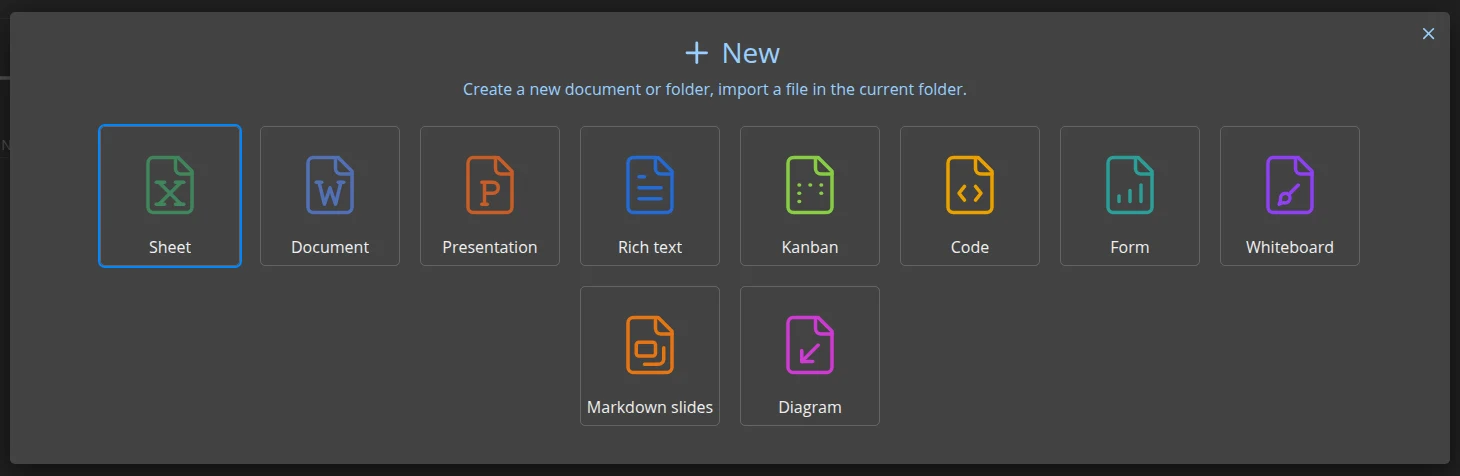
Creating a new document from the CryptDrive: every app CryptPad offers. Screenshot: PrivacyGear, cryptpad.fr (dark theme), September 2026, before version 2026.10.0.
Everything starts in the CryptDrive, your encrypted file space. From there you create documents, organise them in folders and share them with contacts or teams. Several people can edit at once and see each other’s changes live, with a chat panel next to the document.
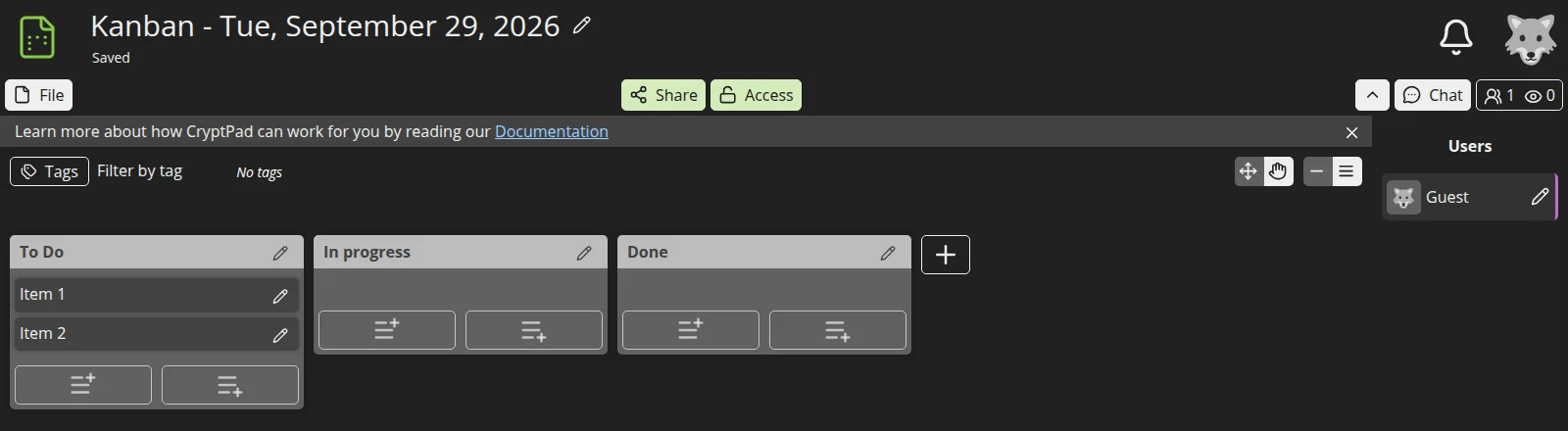
A Kanban board, with Share and Access at the top and everyone currently in the document on the right. Screenshot: PrivacyGear, cryptpad.fr (dark theme), September 2026, before version 2026.10.0.
What works well: rich text documents, Kanban boards, Forms (a private alternative to Google Forms) and the whiteboard are quick and pleasant. Sharing is flexible: view-only or edit links, access lists for specific contacts, documents that expire, and view-once links that destroy themselves.
What’s slower: because all the encryption happens in your browser, large documents and big spreadsheets can load more slowly than in Google Docs. The spreadsheet and presentation apps cover everyday use, not every advanced Excel or PowerPoint feature. There are no apps, and CryptPad documents no offline mode.
Security track record
CryptPad’s code was audited by Uni Systems on behalf of Germany’s federal cyber security agency BSI, within the BSI’s CAOS initiative for code analysis of open-source software, because CryptPad was taking part in the openDesk project. CryptPad says most findings fell outside its threat model, but one was serious: a flaw that let an attacker overload the server (CVE-2025-51846). On 28 January 2026 a distributed denial-of-service attack took cryptpad.fr down for under three hours. The fix for the flaw is in the winter fix release 2026.2.1, and CryptPad published a post-mortem of the outage together with a new security policy (CryptPad’s post).
The same period also brought a fix for a cross-site scripting bug (CVE-2026-26028) that CryptPad’s content security policy already blocked. Reading an honest post-mortem is a good sign; so is the audit. Just keep in mind that “end-to-end encrypted” protects the content, not the availability of the service.
Choosing an instance
The instance you choose is the organisation you trust to serve the correct code and keep the service running:
- cryptpad.fr is run by the CryptPad team itself, hosted in France. Paid plans there fund development and give more storage and priority support. After a support team member left, CryptPad said in September 2026 that it has no French-speaking support staff left and will drop French-language support on cryptpad.fr; it is hiring a support engineer. It’s the default choice for most readers.
- Independent public instances are listed on cryptpad.org/instances. To be listed, they must pass checks for an up-to-date version and recommended settings. They’re run by non-profits, communities and individuals, with their own storage limits and terms. Support comes from them, not from CryptPad.
- Your own instance makes sense for an organisation that wants its own domain, storage location and single sign-on, self-hosted or managed by XWiki.
You can’t move a document from one instance to another by moving the link; you export it and import it on the other instance.
CryptPad vs Proton Docs vs Google Docs
| CryptPad | Proton Docs / Sheets | Google Docs | |
|---|---|---|---|
| Content end-to-end encrypted | Yes | Yes | No |
| Account needs | Username and password | Proton account | Google account |
| Use without an account | Yes, limited | View and edit shared docs (Proton says) | View and edit shared docs |
| Apps | Docs, sheets, slides, Kanban, forms, whiteboard, code | Docs, sheets | Full suite |
| Mobile apps | No, browser only | Proton Drive app (Android, iOS) | Yes |
| Self-hosting | Yes | No | No |
| Password reset | No | Yes; without a recovery phrase, older data may be lost | Yes |
| Best for | Groups and organisations wanting an encrypted suite without Big Tech | People already using Proton | Maximum features and convenience |
See the Proton Drive review for Proton Docs and Sheets.
Caveats
No password reset, really. Losing your password means losing your documents. Store it in a password manager, and export important documents now and then.
Usernames aren’t unique. Two accounts can have the same name, so don’t trust a name alone. To be sure who you’re sharing with, compare their public key through another channel.
Team access is hard to take back. Anyone with edit rights in a team can pass access on, and a former team member technically keeps the keys to what they had access to. Give edit rights carefully; use viewer roles and access lists for sensitive material.
Browser-only. You’re always working in a web app, with the trust in the instance that comes with it. That’s a trade-off compared with local apps such as LibreOffice with files you encrypt yourself.
Pros and cons
Pros
- End-to-end encrypted office suite, including forms, Kanban and whiteboard
- No email address or phone number needed
- Open source, made in the EU, self-hostable
- Flexible sharing: passwords, expiry, view-once links, access lists
- Audited on behalf of Germany’s BSI; open about security incidents
Cons
- No password reset
- Can be slower than Google Docs with large documents
- No mobile or desktop apps; no documented offline mode
- You trust the instance to serve genuine code
- Advanced office features are limited
Getting started
This assumes a fresh start. Already have an account? Start at step 3.
- Choose an instance. For most readers: cryptpad.fr. Prefer a non-profit? Pick one from cryptpad.org/instances.
- Register with a username and a strong password, and save that password in your password manager right away.
- Create a document from the CryptDrive, or import one you already have.
- Sending the link by email or SMS? Add a password first: Access > Add a password. Adding one changes the document’s link and removes its history, so do it before you share. Send the password another way than the link.
- Share it via Share. Sharing with a CryptPad contact (Contacts) keeps the link inside CryptPad; otherwise use Link, choose View or Edit and Copy link.
- Export what matters from time to time as a backup (File > Export).
Conclusion
CryptPad is the most complete end-to-end encrypted office suite we’ve found: documents, spreadsheets, forms, Kanban and whiteboards, without an email address and without Google or Microsoft reading along. For groups, associations and anyone collaborating on sensitive material, it’s a strong recommendation, especially on cryptpad.fr or a well-known public instance.
The trade-offs are real, though. There’s no password reset, it can be slower than Google Docs, and it only runs in the browser, which means trusting the instance you pick. If you already use Proton, Proton Docs will feel easier; if you want Google’s full feature set, CryptPad won’t match it.
Next step
Chosen CryptPad?
- Choosing a password manager — where your CryptPad password belongs
Similar options
- Proton Drive review — encrypted storage with Docs and Sheets, including mobile apps
- Nextcloud review — your own cloud with office apps, if you run the server
Want to go further?
- Tor Browser review — for hiding your IP address from the instance