iStorage datAshur Pro review: encrypted USB with PIN pad
Who is this for? Anyone who needs to carry sensitive files on a USB drive that works without drivers or software — on any computer, any operating system. The PIN pad is on the device itself, not in software.
iStorage datAshur Pro review: encrypted USB with PIN pad
Who is this for? Anyone who needs to carry sensitive files on a USB drive that works without drivers or software — on any computer, any operating system. The PIN pad is on the device itself, not in software.
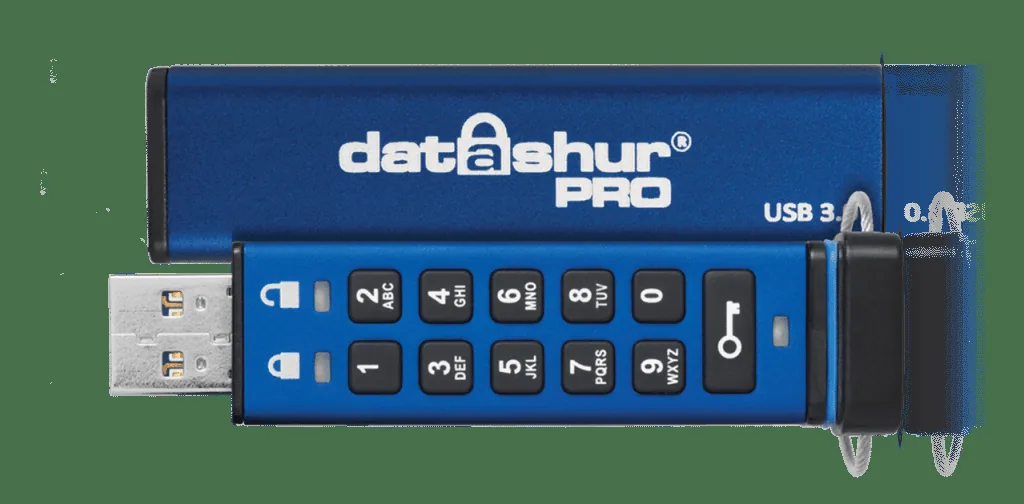
An encrypted USB drive without software is rare. The iStorage datAshur line does it: PIN code on the device itself, hardware encryption, and compatible with any system that recognises a USB drive. Two current models matter: the datAshur PRO² (USB-A, FIPS 140-2 Level 3) and the datAshur PRO+C (USB-C, FIPS 140-3 Level 3, ships with a C-to-A adapter). For a modern laptop or an Android phone, the PRO+C is the more practical choice.
Specifications
| Property | Value |
|---|---|
| Encryption | AES-256-bit XTS hardware encryption |
| PIN pad | Built-in, 11-button |
| Capacity | up to 512 GB (both models) |
| Interface | USB 3.2 Gen 1 — Type-A on the PRO², Type-C on the PRO+C |
| Operating system | OS-independent (no driver, no software) |
| Certifications | FIPS 140-2 Level 3 (PRO²) / FIPS 140-3 Level 3 (PRO+C); Common Criteria EAL5+ secure microprocessor |
| Price | Varies by capacity |
How it works
The datAshur Pro has a built-in keypad. Before use, you enter the PIN on the device itself — not on your computer. Then you plug it in and it appears as a normal USB drive.
After a configured number of incorrect attempts (default: ten), the device wipes itself completely. Brute-force attacks are therefore practically useless.
The encryption key is generated on the device and never leaves it. No software is required on the host computer — no driver either.
Use with GrapheneOS
The PRO+C plugs straight into a Pixel’s USB-C port; the USB-A PRO² needs a USB-C-to-A adapter. Either way: enter the PIN on the device first, then plug it in, and it appears as USB storage in GrapheneOS.
This is useful for transporting files between devices without the contents being readable if the drive is lost or seized.
Certification and model confusion
FIPS 140 is a US security standard for cryptographic modules. Level 3 requires physical tamper resistance and a verifiable response to intrusion attempts. It is not a marketing term — it is a standardised third-party audit, used by government agencies and companies with strict compliance requirements.
FIPS 140-2 vs 140-3: 140-2 is the older revision; NIST has moved new certifications to FIPS 140-3. The USB-A PRO² carries a 140-2 Level 3 certificate; the USB-C PRO+C carries the newer 140-3 Level 3. Both are genuine — but if the certification revision matters to your compliance requirements, the PRO+C is the one on the current standard. Always confirm the exact model, capacity and certificate before buying.
Caveats
Speed: USB 3.2 Gen 1 is fast enough for most use cases, but not the fastest USB drive you can buy. That is a deliberate trade-off for the additional security layers.
Forgotten PIN: If you forget the PIN, the data is gone. There is no recovery option — that is part of the security design.
Price: More expensive than a regular USB drive. That is justified — you are paying for hardware encryption and certifications.
When do you use this?
- Transporting sensitive files between systems
- Storing backup of keys or password manager export
- Taking files to locations where you do not want to bring your laptop
- Professional situations where you need demonstrably secure storage
For home storage of backups, encrypted cloud storage (Proton Drive, Nextcloud) or an encrypted external drive is simpler for most people. The datAshur Pro is for portability and situations where software encryption does not provide sufficient trust.
Pros and cons
Pros
- AES-256 hardware encryption without software or drivers, so it works on any operating system
- PIN is entered on the device itself, not on the computer
- After a configured number of wrong attempts the device wipes itself
- FIPS 140 Level 3 certified (140-2 on the PRO², the newer 140-3 on the PRO+C) plus a Common Criteria EAL5+ secure chip
- The encryption key never leaves the device
Cons
- Forgetting the PIN means permanent data loss
- Read speed 100–120 MB/s, write speed 40–60 MB/s — not the fastest USB drive
- More expensive than a regular USB drive
- You still need to verify the exact model, capacity, and certification before buying
Conclusion
The iStorage datAshur Pro does what it promises: hardware encryption without software, on any system, with a built-in PIN code. The price is high but justified for the specifications and certifications.
If you want to carry sensitive data portably without depending on software on the host system: this is the right choice.
Getting started
1. First use — set a PIN
Hold the unlock button until the LED blinks green (admin mode). Enter your desired PIN (7–15 digits) and confirm. The PIN is now set.
2. Unlocking for daily use
Press the unlock button, enter your PIN, and press unlock. Plug the drive in — it appears as normal USB storage. When disconnected it locks automatically.
3. Use with GrapheneOS via OTG
Unlock the drive first (step 2), then connect via a USB-C OTG adapter. GrapheneOS recognises it directly as USB storage.
4. Forgotten PIN — wipe and restart
If you forget the PIN: after the maximum number of attempts (default 10) the device wipes itself. The data is then irrecoverably lost — that is part of the security design.
Next step
Got the datAshur Pro working?
- VeraCrypt review — encrypted containers as an alternative for portable storage
Similar options
- Proton Drive review — encrypted cloud storage as an alternative to local portable storage
Want to go further?
- Profile: privacy-conscious user — which measures fit your use