AdGuard Home review — DNS ad blocker for your entire network
AdGuard Home blocks ads, trackers and malware domains at DNS level for every device on your network. Runs on your router, NAS or Raspberry Pi.
AdGuard Home review
AdGuard Home is a self-hosted DNS server that blocks ads, trackers and malware domains before they reach your devices. One installation protects everything on your network — smart TVs, gaming consoles, phones, laptops — without configuration per device.
How DNS blocking works
When your browser wants to load ads.google.com, it first asks the DNS server: “What is the IP address of ads.google.com?” AdGuard Home intercepts that question. If the domain is on a blocklist, AdGuard Home responds: “That domain doesn’t exist.” The browser doesn’t load the ad — no connection was ever made.
This works for every device using your AdGuard Home as a DNS server. No browser extension needed, no per-app configuration.
Specifications
| Property | Value |
|---|---|
| Type | Self-hosted DNS sinkhole |
| Blocklists | Multiple — OISD, Steven Black, AdGuard, EasyList, etc. |
| Upstream DNS | Any DNS provider (Quad9, Cloudflare, Mullvad DNS, etc.) |
| DNS-over-HTTPS | Yes |
| DNS-over-TLS | Yes |
| Per-client rules | Yes — different rules per device |
| Statistics | Yes — built-in dashboard |
| Platforms | Linux, macOS, Windows, ARM (Raspberry Pi, GL.iNet) |
| Open-source | Yes (AGPLv3) |
| Price | Free |
GL.iNet integration — built-in
GL.iNet routers (Flint 2, Beryl AX, Slate AX) have AdGuard Home built into the firmware. Nothing to install separately — activate it via the GL.iNet web interface with one click.
After activation, all DNS requests from all connected devices are automatically filtered. See the GL.iNet setup guide for step-by-step activation.
Self-hosting — Raspberry Pi or VPS
On other hardware, install AdGuard Home as follows:
curl -s -S -L https://raw.githubusercontent.com/AdguardTeam/AdGuardHome/master/scripts/install.sh | sh -s -- -vAfter installation, configure your router to use AdGuard Home as the DNS server (192.168.x.x of the device it runs on). All network devices then automatically use AdGuard Home.
Dashboard and statistics
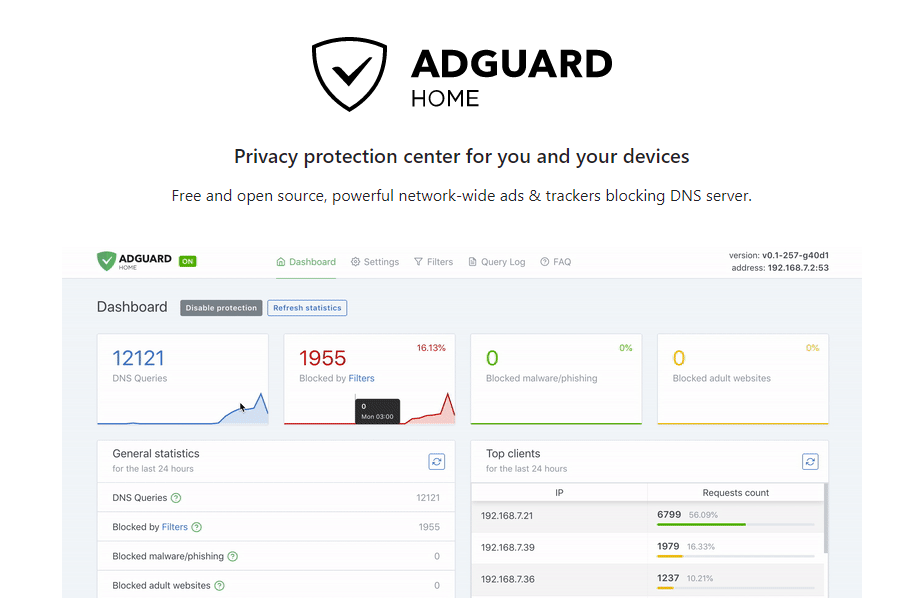
AdGuard Home has a built-in web interface showing:
- How many requests have been blocked (typically 20–40% of all DNS traffic)
- Which domains are blocked most frequently
- Per device: how many requests, how many blocked
- Query log: every DNS request visible in real-time
This also makes visible which devices are unexpectedly sending traffic — a smart TV trying to contact tracker servers is immediately visible.
Upstream DNS configuration
AdGuard Home forwards requests for non-blocked domains to an upstream DNS provider. Choose a privacy-friendly one:
| Provider | DoT/DoH | No logging | DNSSEC |
|---|---|---|---|
| Quad9 (9.9.9.9) | ✅ | ✅ | ✅ |
| Mullvad DNS | ✅ | ✅ | ✅ |
| Cloudflare (1.1.1.1) | ✅ | Limited | ✅ |
| Google (8.8.8.8) | ✅ | ❌ | ✅ |
Never use your internet provider’s DNS for privacy-sensitive use — they log all your requests.
AdGuard Home vs Pi-hole
| AdGuard Home | Pi-hole | |
|---|---|---|
| Installation | Simpler | Slightly more complex |
| Built-in DoH/DoT | ✅ | Via extra configuration |
| Interface | More modern | Older but solid |
| Blocklist management | Simpler | Comparable |
| Reverse DNS | ✅ | ✅ |
| Community | Large | Larger (older project) |
| Open-source | AGPLv3 | EUPL |
For new installations AdGuard Home is the recommended choice — simpler to configure and DoH/DoT built-in.
Caveats
DNS blocking is not watertight: Some ads and trackers use first-party domains (the same domain as the service itself) — those cannot be blocked without breaking the service itself. Combine with a browser extension like uBlock Origin for better coverage.
No HTTPS inspection: AdGuard Home only sees DNS requests, not the contents of HTTPS connections. That is also good — it would undermine encryption.
Availability during outage: If AdGuard Home goes offline, DNS stops working. Set a fallback DNS on your router as backup.
Conclusion
AdGuard Home is the most effective free measure for privacy at network level. One installation on your router or Raspberry Pi protects every device without configuration. Combined with a privacy-friendly upstream DNS provider (Quad9, Mullvad), you block a significant portion of tracking and advertising traffic before it reaches your network.
See also:
- Setting up a GL.iNet travel router — activating AdGuard Home on GL.iNet
- Which network setup fits your threat profile? — DNS blocking in context of your total network security
- Security without buying anything — free steps including DNS adjustment